Examples · network meta-analysis
From extracted arms to a ranked treatment network
This example follows one review from arm-level extraction to a saved network meta-analysis. It reproduces part of the 2018 update of a Cochrane network meta-analysis of anti-VEGF treatment for diabetic macular oedema (CD007419). The example uses three randomised trials and two efficacy outcomes at 12 months.
Use it to see what each step asks of you, what the app checks, and which decisions stay yours. The numbers are real results from this example review. They are not a substitute for the published review. For the method itself, its assumptions and its limits, read Methodology · network meta-analysis.
NOTE · What this example covers
NOTE · Before you start
The path at a glance
| Step | Where | What you decide |
|---|---|---|
| 1 | Extraction | The randomised arms of each trial, their results, and the source passage for every value |
| 2 | Analysis · Network setup | For each outcome: model, effect measure, direction, follow-up window and reference treatment |
| 3 | Analysis · Network setup | Which treatment group each arm belongs to, whether to merge groups, and when to refresh the evidence |
| 4 | Analysis · Network setup | Whether the outcome is ready to run |
| 5 | Analysis · Results | How to read the estimates, the ranking and the diagnostics |
| 6 | CINeMA | The certainty of each network comparison |
Step 1 of 6
Extract each trial as randomised arms
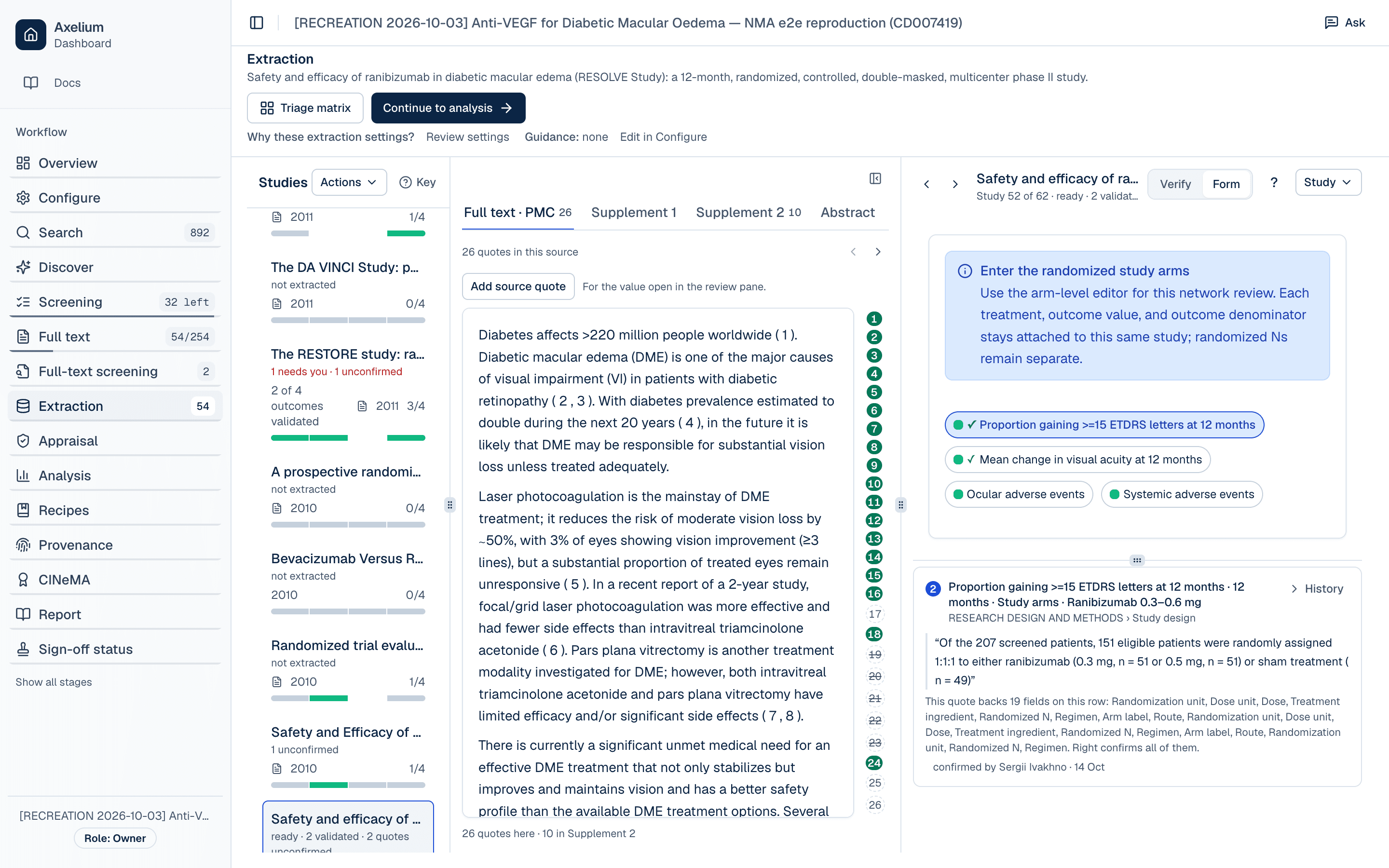
A network meta-analysis compares treatments through the arms of each trial, so each trial is entered as one study with all of its randomised arms. Don't split a three-arm trial into separate two-arm comparisons. The network needs to know that the arms share one randomisation.
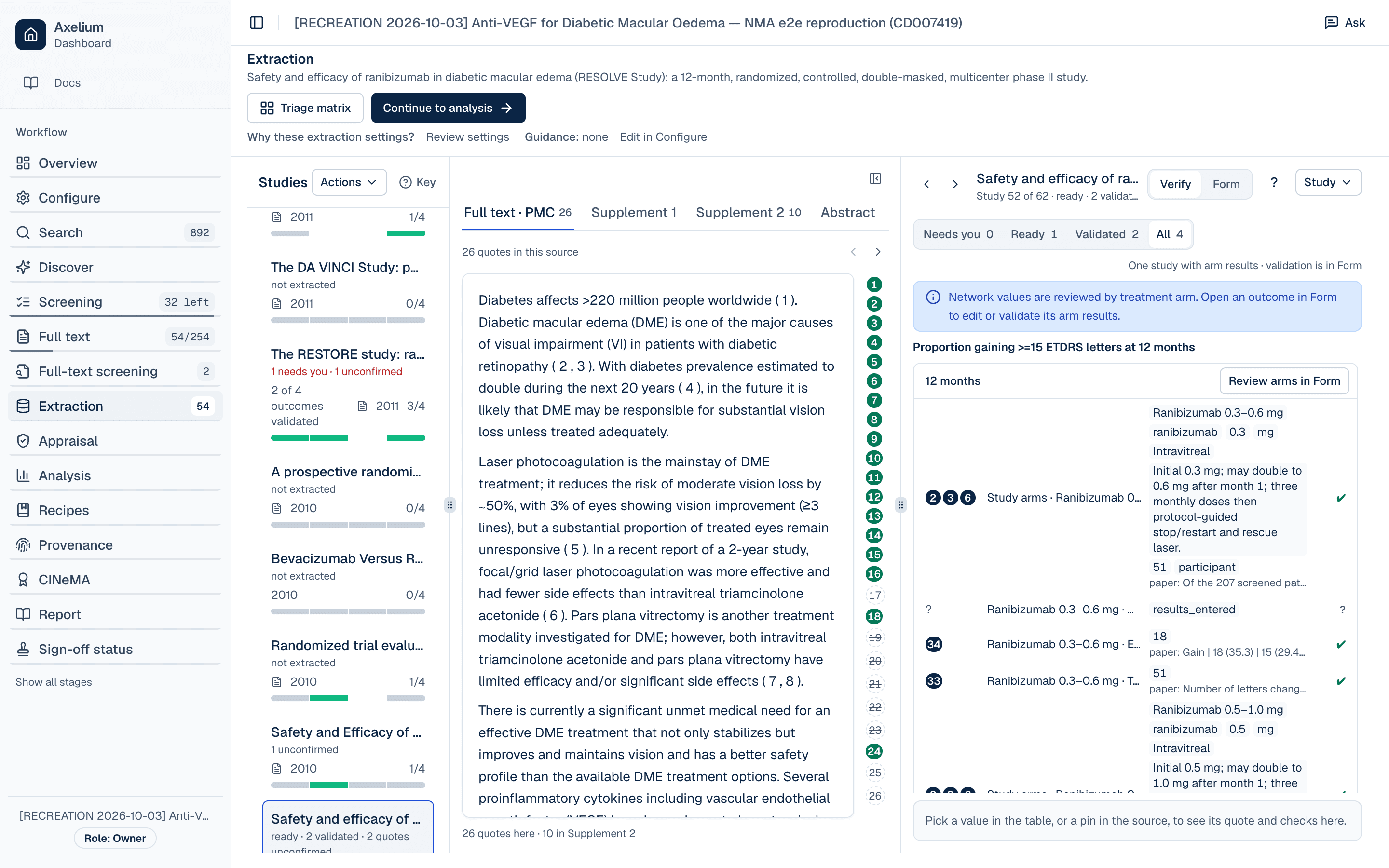
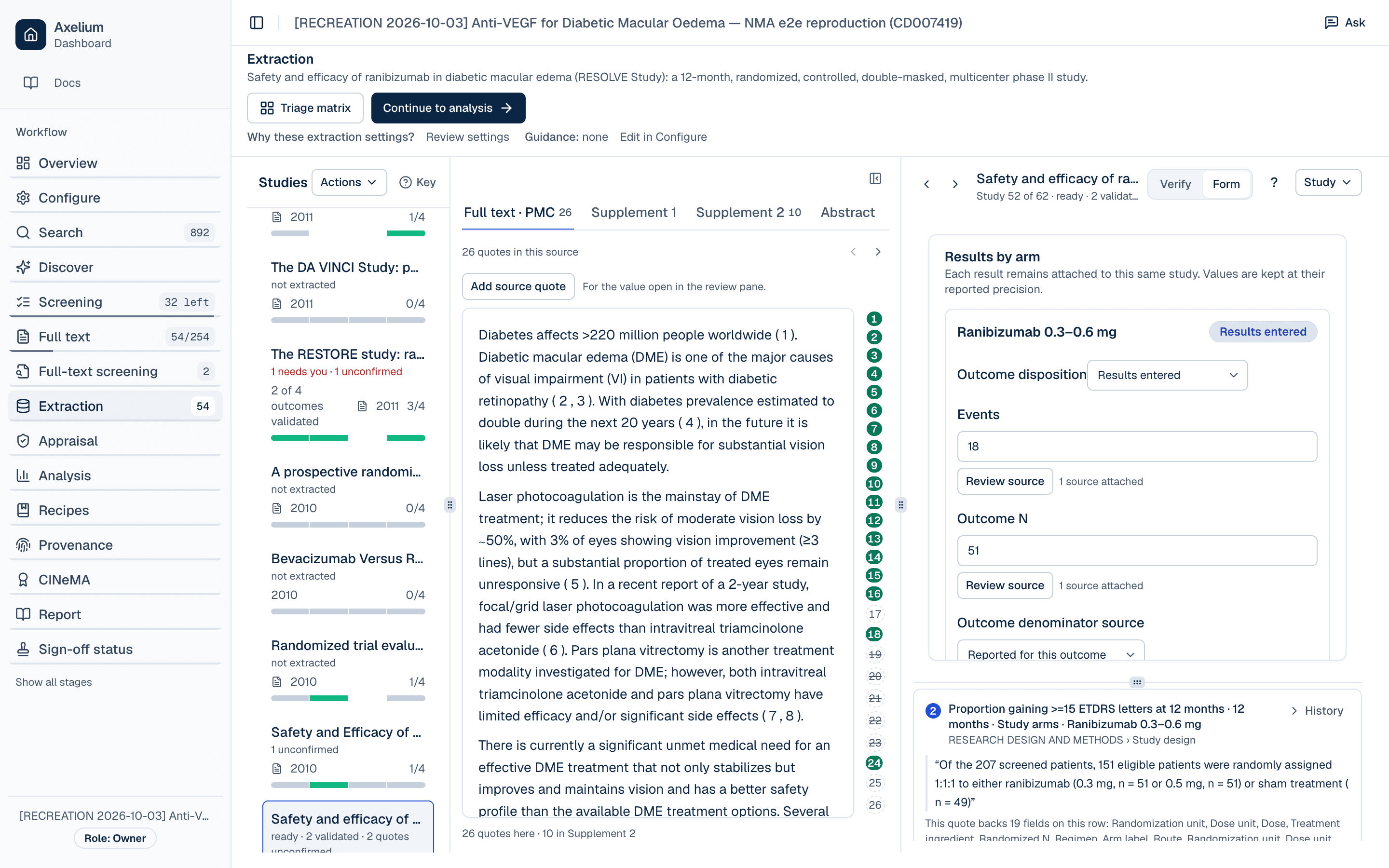
Open Extraction, choose a study, and switch from Verify to Form. The form for a network review has four parts:
- Study arms: one entry per randomised arm, with its label, treatment, dose, route, regimen and randomized N. The randomized N is roster information. It stays separate from the number analysed for each outcome.
- Outcome and population: the analysis set, the timepoint, and how missing data were handled for this outcome.
- Results by arm: for each arm, the result for this outcome. Use events and outcome N for a binary outcome, or mean, SD and outcome N for a continuous one. Each arm also records an Outcome disposition (Results entered, Pooled with other arms, Not reported, or Excluded with reason) and where its denominator came from.
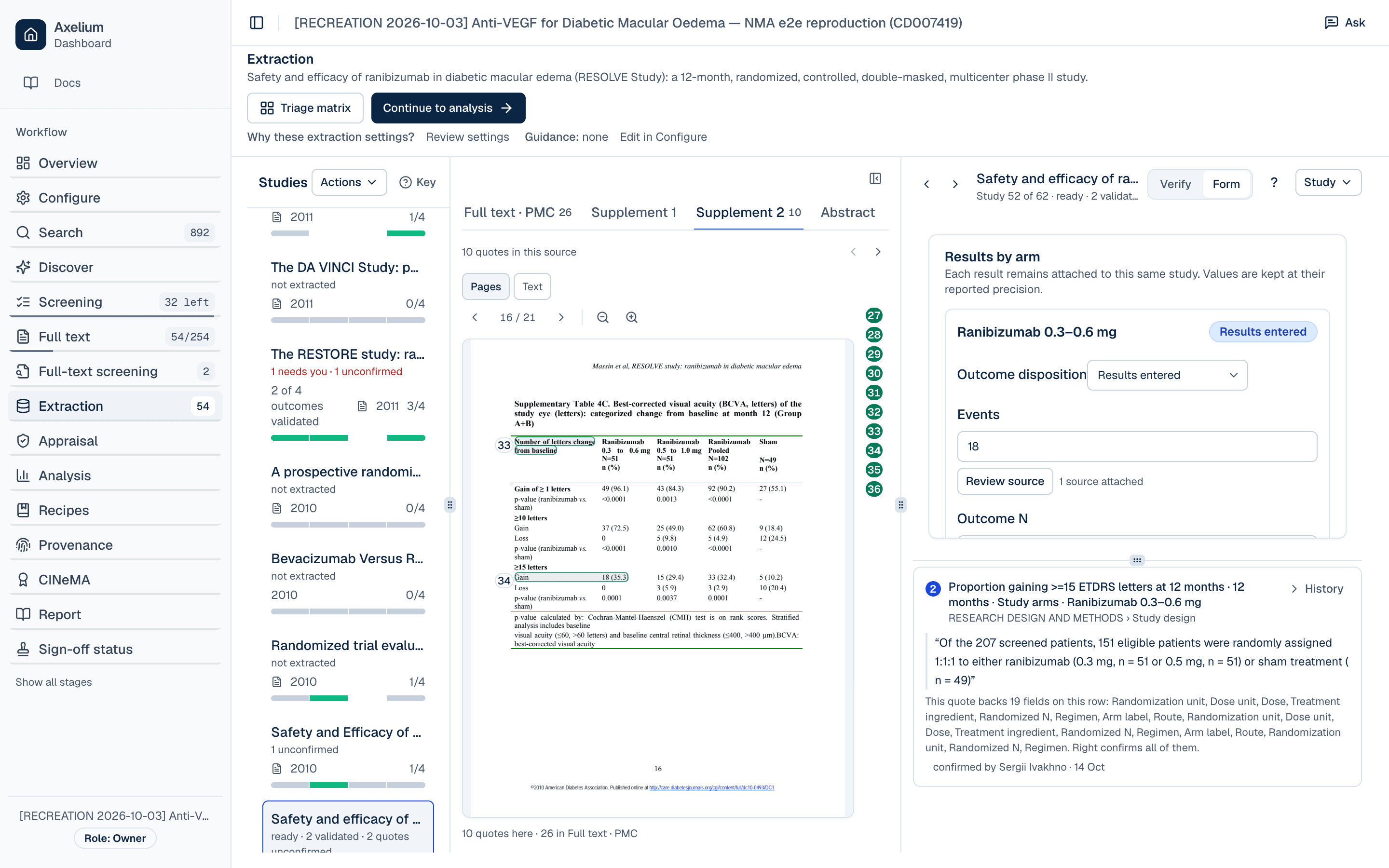
- Source review: every value links to a quote in the paper or supplement. A single quote can back several fields. In RESOLVE, one sentence on randomisation backs 19 fields across the three arms.
The arm data in this example
Mean change in visual acuity at 12 months (ETDRS letters):
| Trial | Arm | Mean | SD | Outcome N |
|---|---|---|---|---|
| Protocol T | Aflibercept 2.0 mg | 13.3 | 11.1 | 208 |
| Protocol T | Bevacizumab 1.25 mg | 9.7 | 10.1 | 206 |
| Protocol T | Ranibizumab 0.3 mg | 11.2 | 9.4 | 206 |
| RESTORE | Ranibizumab 0.5 mg + sham laser | 6.8 | 8.3 | 115 |
| RESTORE | Ranibizumab 0.5 mg + laser | 6.4 | 11.8 | 118 |
| RESTORE | Sham injection + laser | 0.9 | 11.4 | 110 |
| RESOLVE | Ranibizumab 0.3–0.6 mg | 11.8 | 6.6 | 51 |
| RESOLVE | Ranibizumab 0.5–1.0 mg | 8.8 | 11.0 | 51 |
| RESOLVE | Sham | −1.4 | 14.2 | 49 |
TIP · Validate before you analyse
NOTE · Multiple reports of one trial
Step 2 of 6
Choose network settings for each outcome
Open Analysis and the Network setup tab. Start with Prepare treatment-group review. It proposes a treatment group for each arm and doesn't fit a model or change any measurements. You confirm those groups in Step 3.
Step 1: Check the data lists every outcome in a settings table. Each outcome has its own settings, and they apply to every analysis of that outcome:
| Setting | 15-letter gain | Visual acuity change |
|---|---|---|
| Model | Common effect | Common effect |
| Effect measure | Risk ratio | Mean difference |
| Better when | Higher | Higher |
| Time window | 52 ± 8 weeks (44–60) | 52 ± 8 weeks (44–60) |
| Reference | Aflibercept 2.0 mg | Aflibercept 2.0 mg |
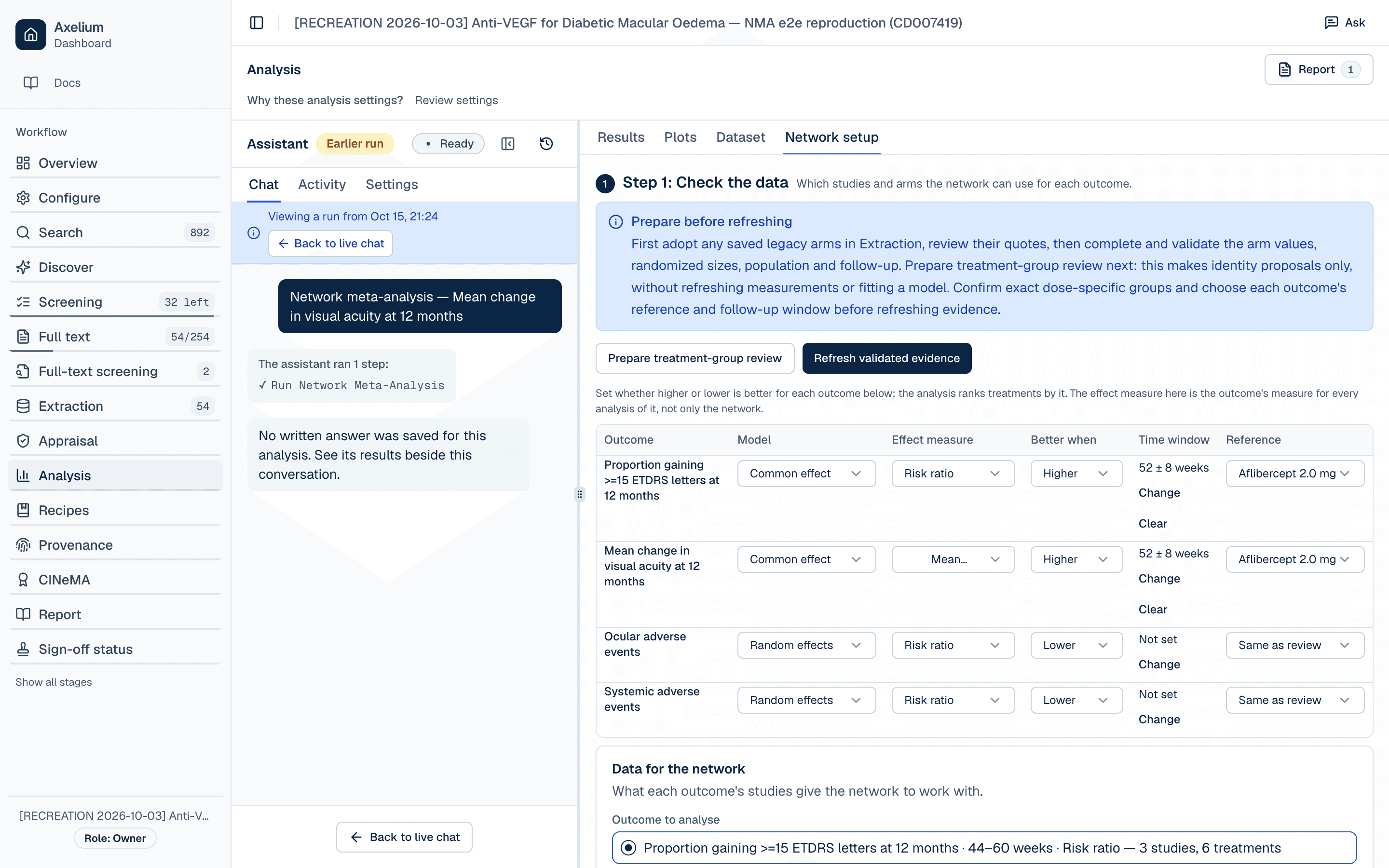
The direction matters: the ranking is ordered by it. The time window decides which reported timepoint each trial contributes. Protocol T reports at one year and RESOLVE and RESTORE at month 12, and all three fall inside 44–60 weeks.
WARN · Why common effect here
Step 3 of 6
Confirm treatment groups
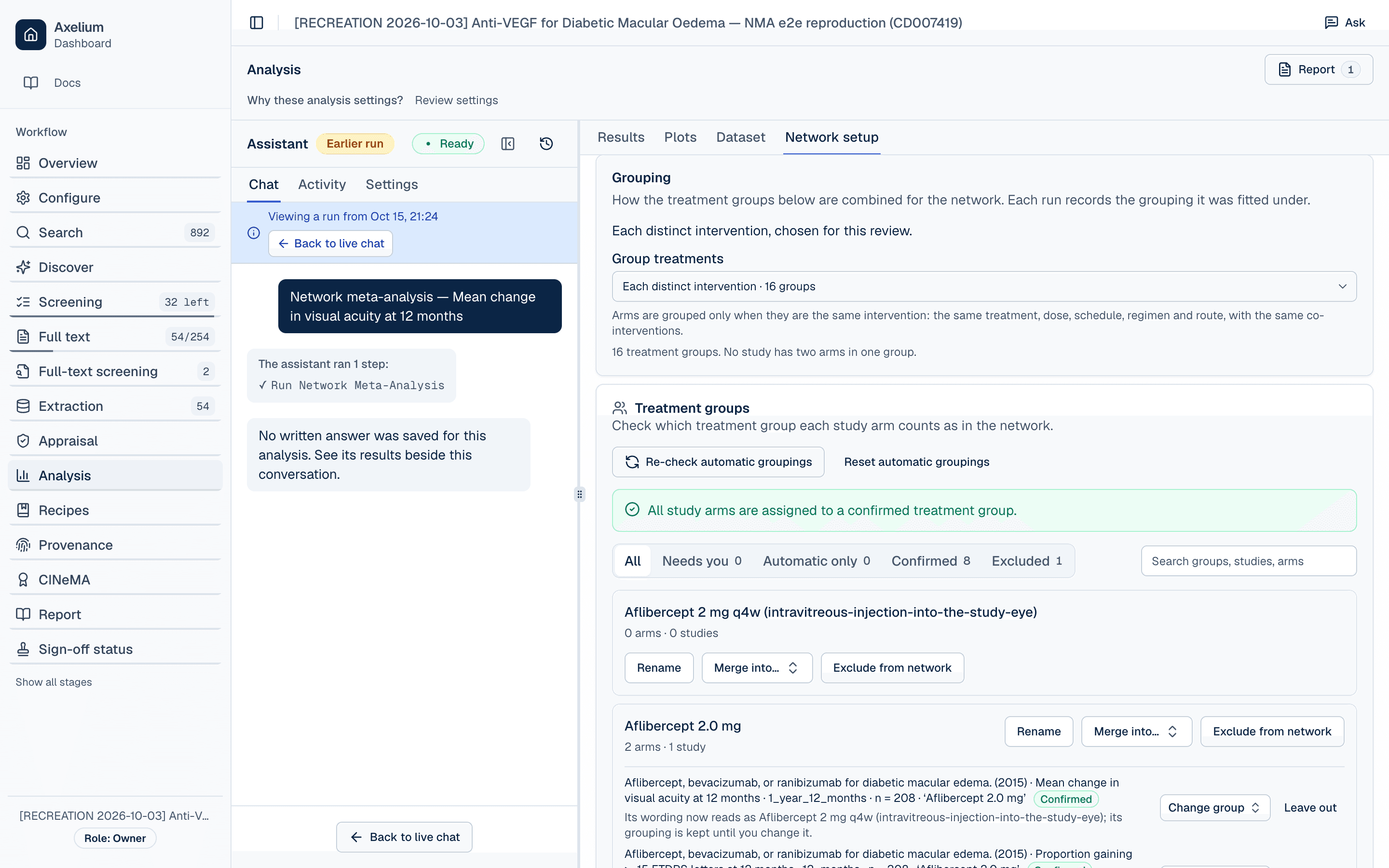
Step 2: Confirm treatment groups decides which network node each arm counts as. The Grouping card sets the starting point:
- Each distinct intervention (used here, 16 groups). Arms are grouped only when they match on treatment, dose, schedule, regimen, route and co-interventions.
- By treatment (6 groups) · By treatment and dose (8) · Biosimilars with their reference product (13) · Ignoring co-interventions (13).
Each run records the grouping it was fitted under.
Below the card, Treatment groups lists every group with its arms. Work through the Needs you filter until it reads 0. Every arm the network uses must be in a confirmed group. Groups can be empty: here 16 groups exist, but only six hold arms for these outcomes, so the network has six treatments. Empty groups play no part in a run.
A reviewer decision: one ranibizumab node
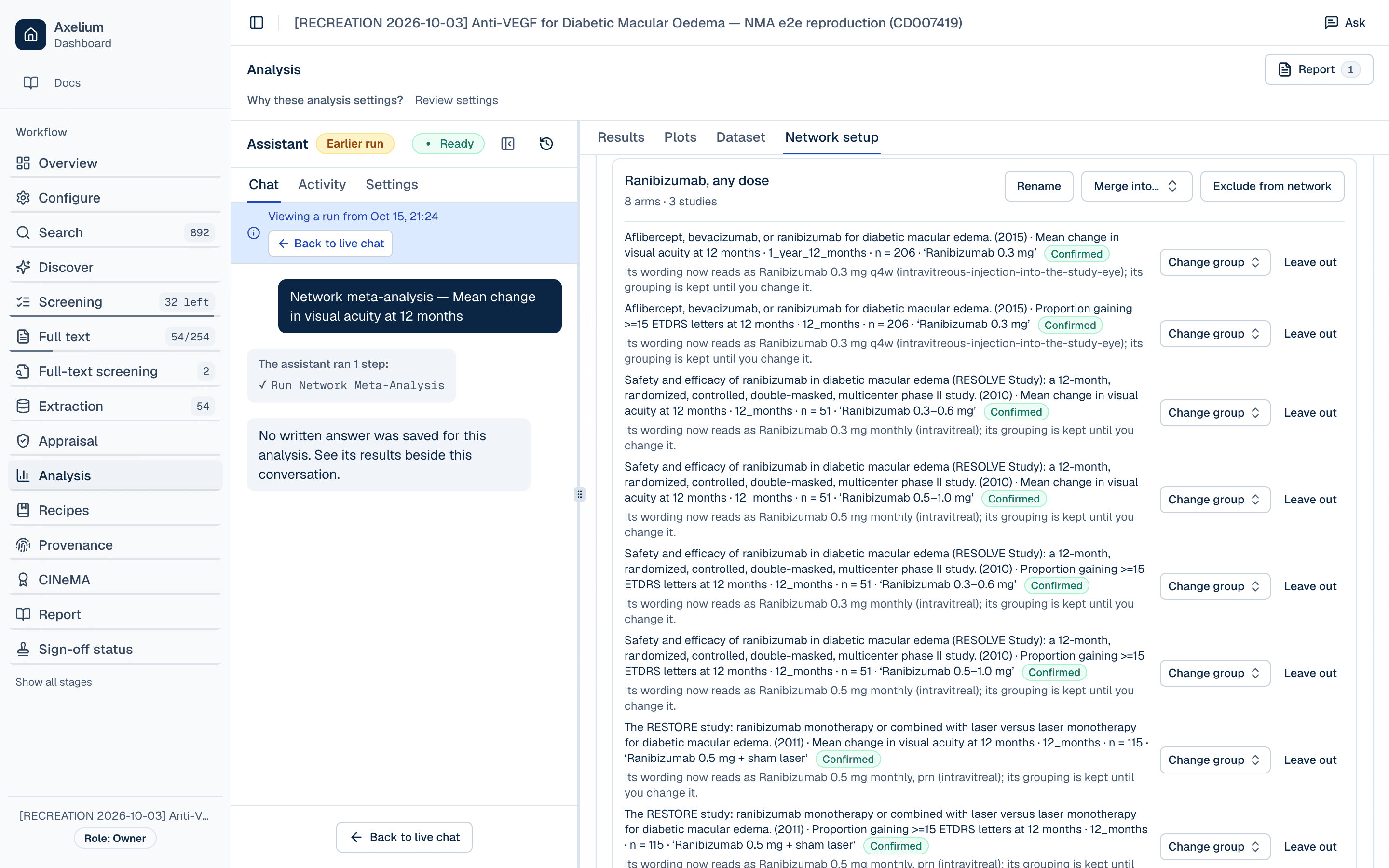
With exact grouping, the three trials used three different ranibizumab regimens: 0.3 mg in Protocol T, 0.5 mg with sham laser in RESTORE, and two dose-escalation arms in RESOLVE. They don't share a node, so the network falls into separate parts. Like the published review, this example compares treatments at drug level, so the reviewer merged them into one group named Ranibizumab, any dose.
- Merge into… shows the consequence before saving. Here the first merge takes the network from three parts to two.
- RESOLVE's two ranibizumab arms then land in the same group. The app asks you to confirm that they are pooled with other arms and to give a reason. Its combined values (n = 102, mean 10.3) match the pooled column RESOLVE reports itself.
- The merged group lists 8 entries from 3 studies: four ranibizumab arms, each with a result for both outcomes. The group name records the assumption.
WARN · Merging is an assumption
RESTORE's Ranibizumab 0.5 mg + laser arm stays a separate node because its laser co-intervention makes it a different intervention under this grouping.
Refresh the evidence, then read the data summary
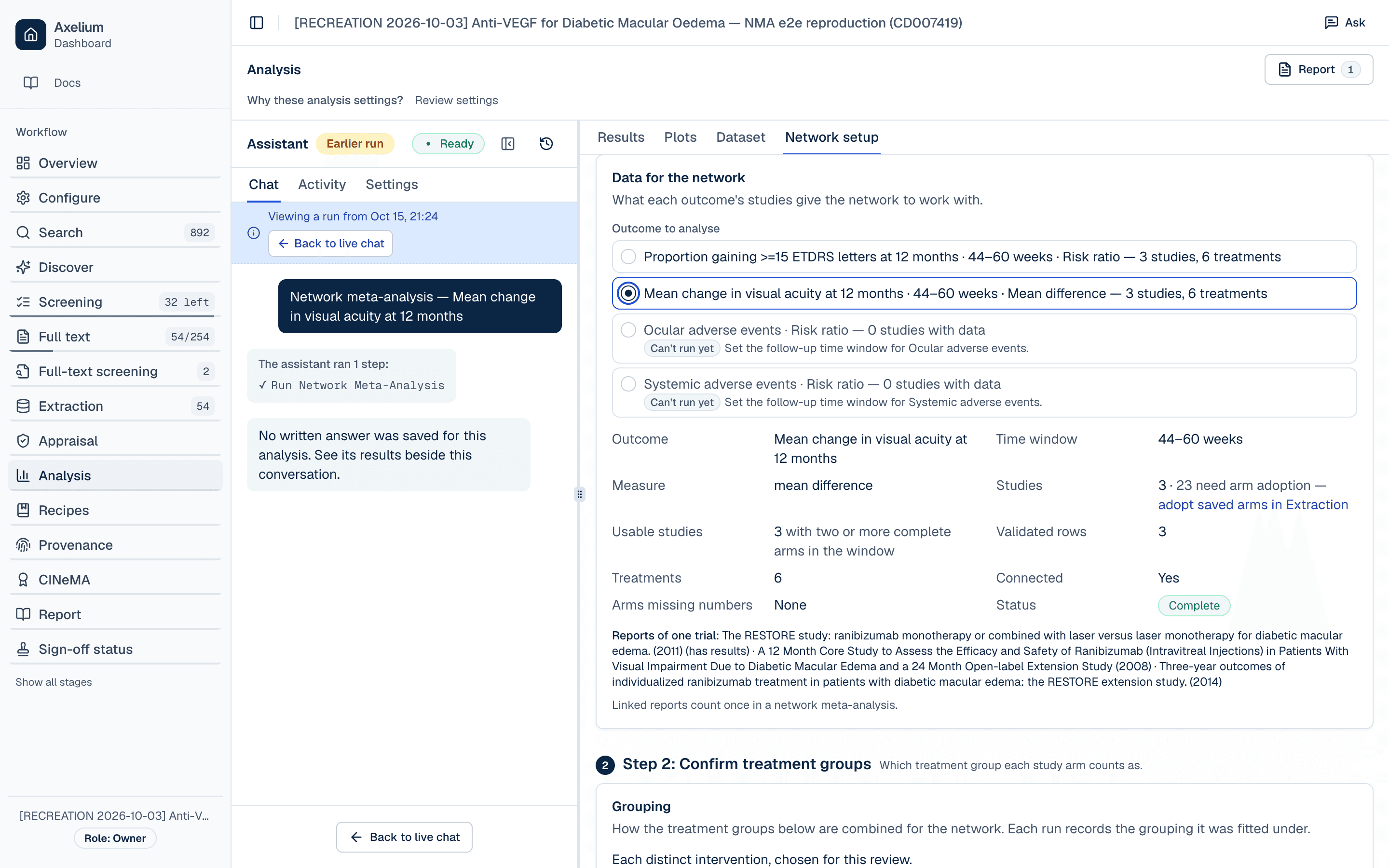
Once the groups are confirmed and every outcome you want to run has its settings, choose Refresh validated evidence in Step 1. Refresh doesn't fit a model. It rebuilds what each outcome gives the network from the validated rows and confirmed groups. Refresh again after any change to groups or validated values. In this example the reviewer refreshed straight after the ranibizumab merge.
Then, under Data for the network, choose the outcome to analyse. The summary shows how many studies, validated rows and treatments it has, whether the network is connected, and whether any arm is missing numbers. Check that these counts match what you expect.
Step 4 of 6
Check the network
Under Step 3: Run the analysis, choose Check network. The check stops the run and tells you what to fix when:
- the review isn't set up for network meta-analysis;
- the outcome has no reference treatment, or the reference isn't in the network;
- the outcome has no direction (higher or lower is better) or no follow-up window;
- any result the outcome draws on isn't validated;
- random effects are chosen but the network can't estimate between-study variance;
- two reports of one trial both contribute results at the same follow-up.
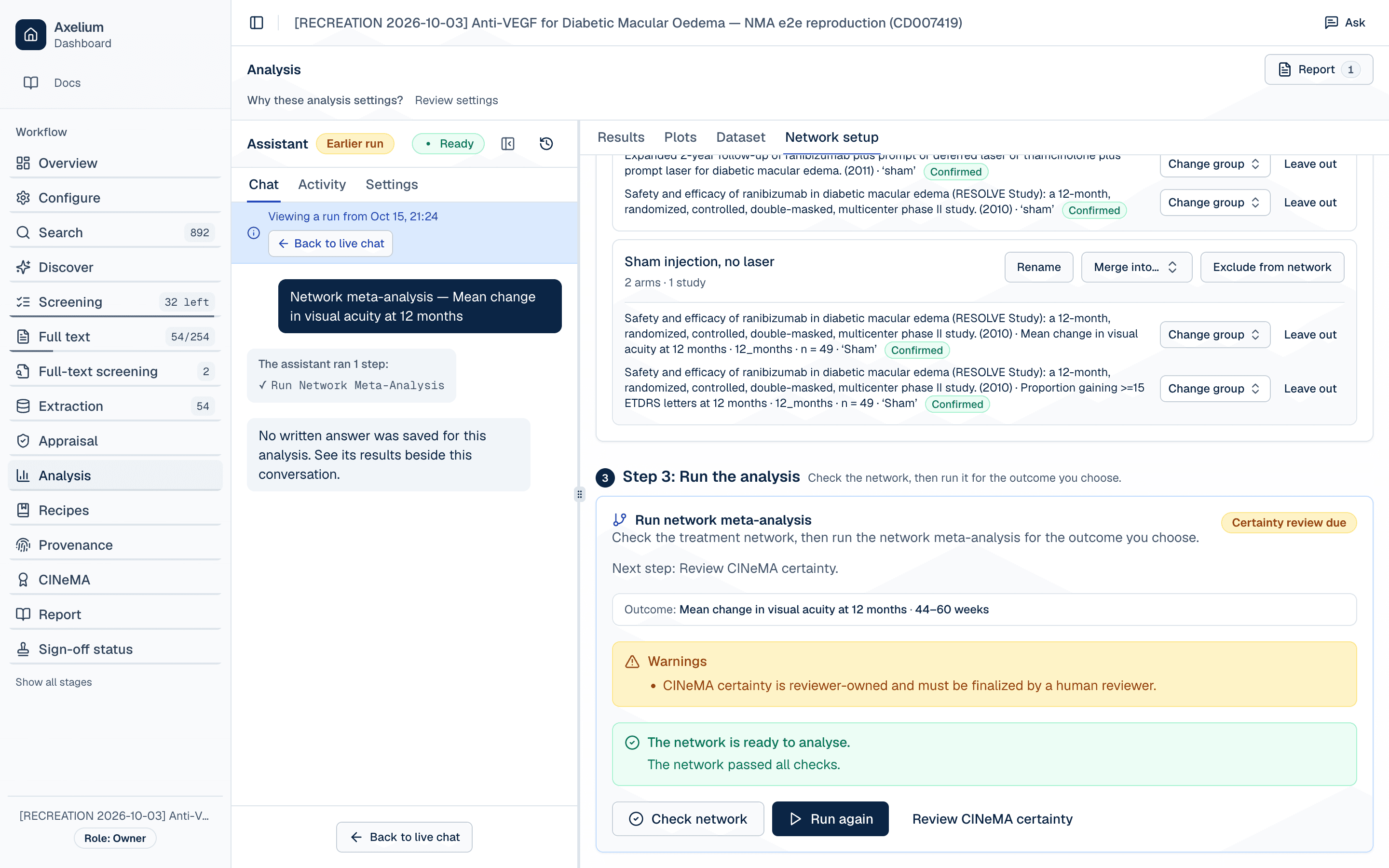
Make sure the outcome named on the card is the one you mean to run before you start the run.
Step 5 of 6
Run and read the results
Choose Run analysis. Once an outcome has a run, the button reads Run again. The visual acuity run here took about 15 seconds. When it finishes, the Results tab opens on the saved run. Runs stay Draft until you choose Lock this outcome, and earlier runs, including failed ones, stay in the run history.
If the run header says Some results were left out, open Network setup and review the treatment groups before relying on the result.
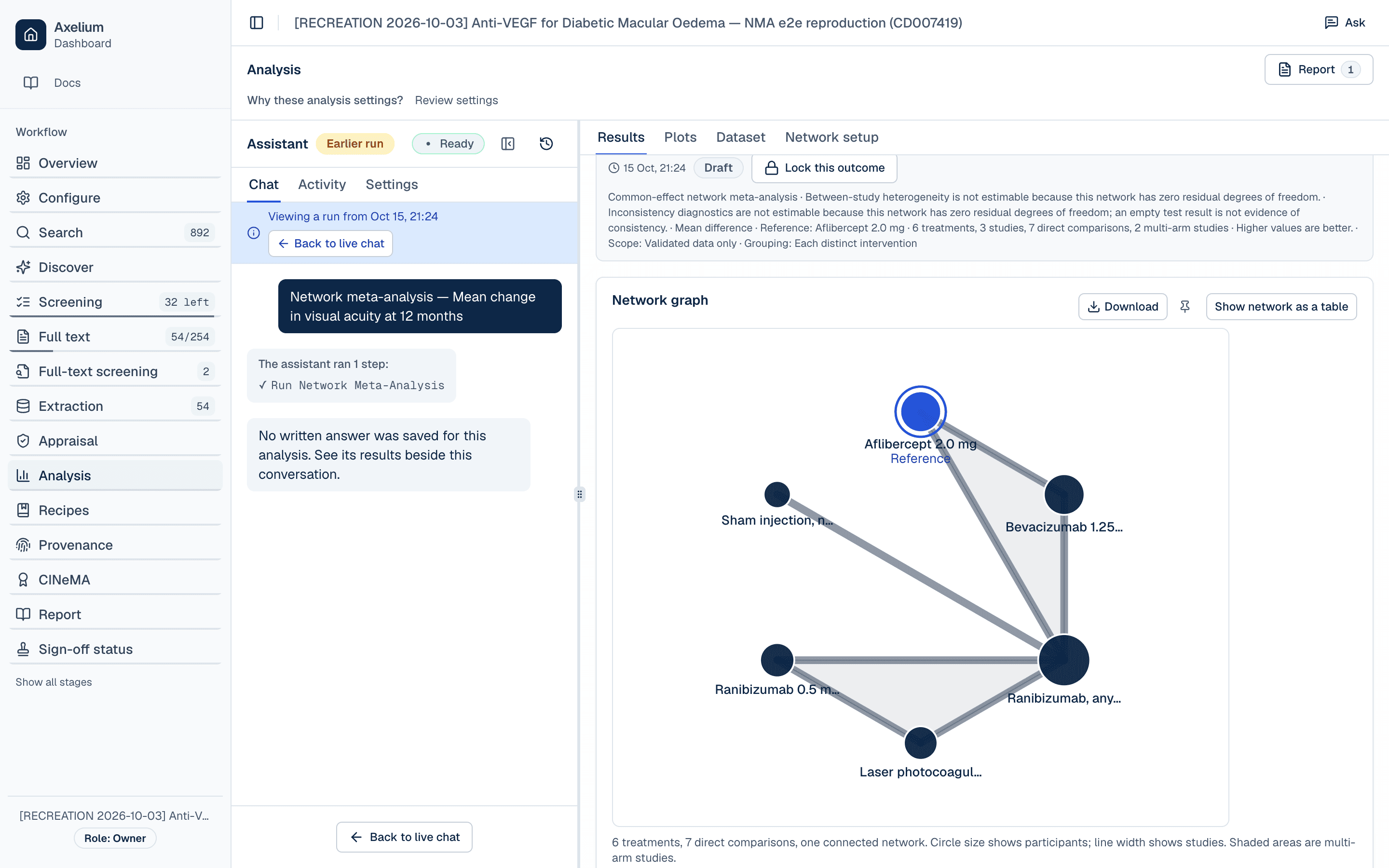
League table
Every treatment against every other. The lower-left half holds network estimates and the upper-right half holds direct estimates. For this outcome higher is better, so a value above 0 favours the row treatment.
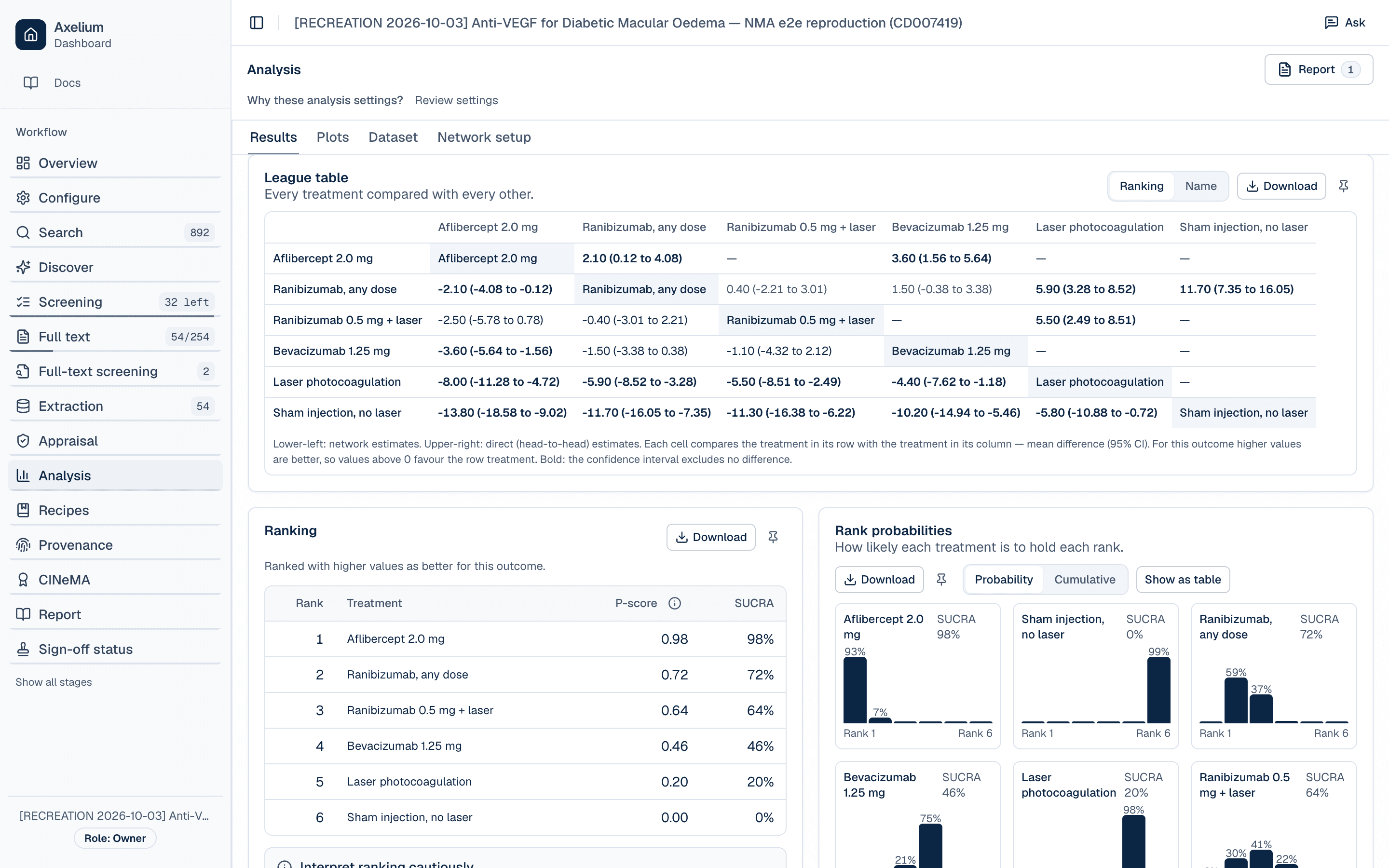
Selected network estimates, mean difference in letters (95% CI):
| Comparison | Mean difference |
|---|---|
| Aflibercept vs ranibizumab, any dose | 2.10 (0.12 to 4.08) |
| Aflibercept vs bevacizumab | 3.60 (1.56 to 5.64) |
| Ranibizumab, any dose vs laser | 5.90 (3.28 to 8.52) |
| Aflibercept vs laser | 8.00 (4.72 to 11.28) |
| Bevacizumab vs laser | 4.40 (1.18 to 7.62) |
| Ranibizumab, any dose vs sham | 11.70 (7.35 to 16.05) |
For the 15-letter outcome (risk ratio), the example's estimates were close to the 2018 update's, with wider intervals. The review reports this outcome as gaining 3 or more lines, which is 15 letters:
| Comparison | This example | 2018 Cochrane update |
|---|---|---|
| Aflibercept vs laser | 3.57 (1.69 to 7.69) | 3.66 (2.79 to 4.79) |
| Bevacizumab vs laser | 2.50 (1.15 to 5.26) | 2.47 (1.81 to 3.37) |
| Ranibizumab, any dose vs laser | 2.76 (1.36 to 5.63) | 2.76 (2.12 to 3.59) |
| Ranibizumab, any dose vs aflibercept | 0.77 (0.59 to 0.99) | 0.75 (0.60 to 0.94) |
A risk ratio above 1 favours the first treatment, because a gain of 15 or more letters is a good outcome.
Ranking
P-score and SUCRA, ordered by the outcome's direction:
| Rank | Treatment | P-score | SUCRA |
|---|---|---|---|
| 1 | Aflibercept 2.0 mg | 0.98 | 98% |
| 2 | Ranibizumab, any dose | 0.72 | 72% |
| 3 | Ranibizumab 0.5 mg + laser | 0.64 | 64% |
| 4 | Bevacizumab 1.25 mg | 0.46 | 46% |
| 5 | Laser photocoagulation | 0.20 | 20% |
| 6 | Sham injection, no laser | 0.00 | 0% |
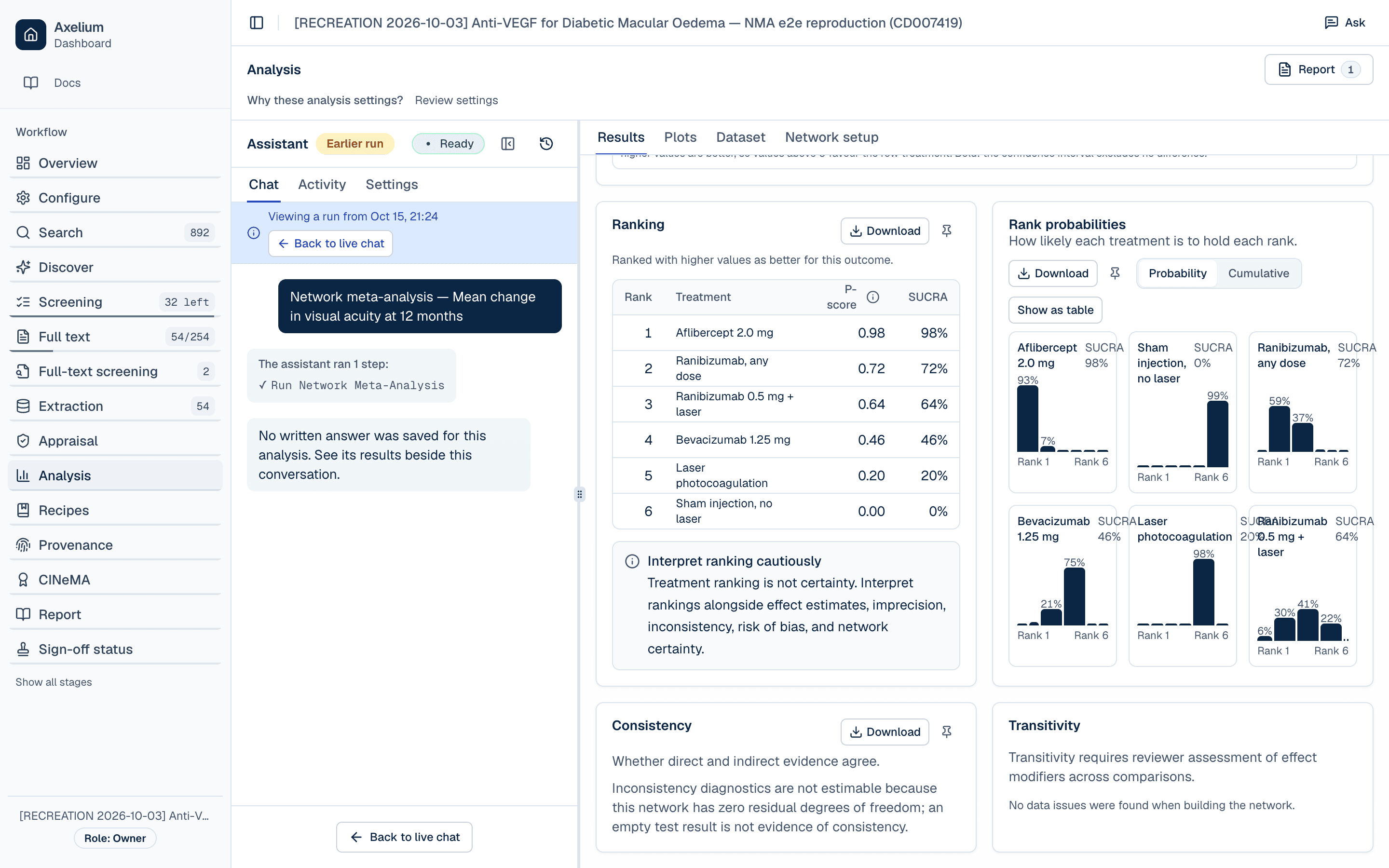
WARN · A ranking is not certainty
Keeping and sharing the result
The network graph, league table, ranking, rank probabilities and consistency panels each have a Download button.
If evidence or settings change after a run, the outcome's status reads Results are out of date until you run it again. When an outcome's analysis is final, choose Lock this outcome. Locking ties the outcome to the method of that completed run, and the run button then reads Locked. If the evidence changes after locking, start a new analysis version to run it again.
Learn moreMethodology · reading network resultsLearn moreMethodology · rankingStep 6 of 6
Rate certainty with CINeMA
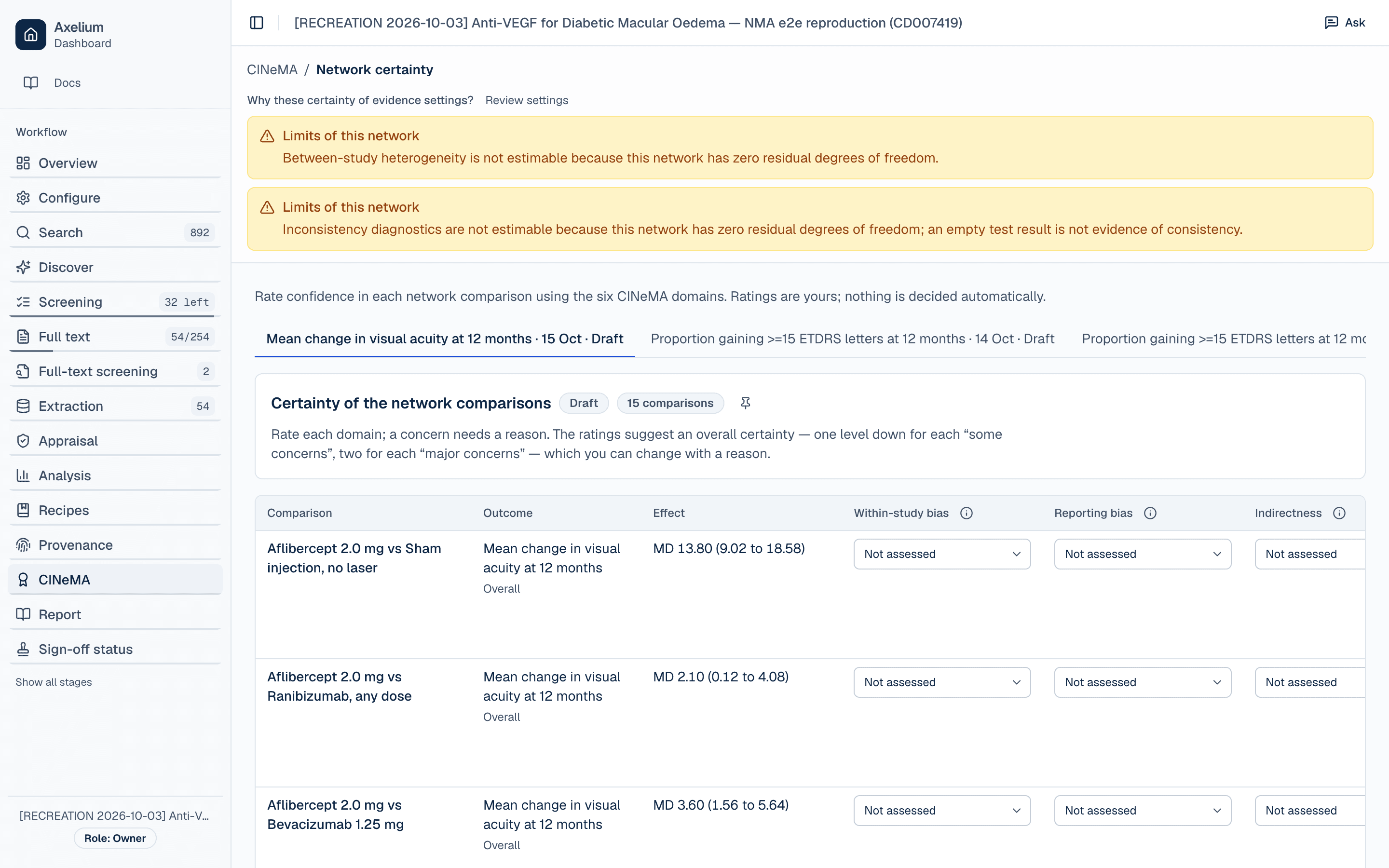
Open CINeMA. Each outcome has a tab, and each network comparison has a row. This example has 15 comparisons per outcome. Rate six domains for each row:
Within-study bias · Reporting bias · Indirectness · Imprecision · Heterogeneity · Incoherence
Every rating starts as Not assessed. Next to the ratings, the app notes what it can see, for example that an interval excludes no effect, or that heterogeneity and incoherence are not estimable in this network. Once you rate the domains, it suggests an overall certainty: one level down for each “some concerns” and two for each “major concerns”. The ratings are yours. You can change the suggestion with a reason, and nothing is decided automatically. With 15 comparisons and six domains, each outcome here needs 90 domain ratings. Save as you go, and finalise when every comparison is rated.
What this example shows, and what it doesn't
It shows
- trials entered once, with all their randomised arms, and every value traceable to a quote;
- a drug-level grouping decision made explicitly and recorded on the group;
- a connected network checked before fitting, and results that state their own limits.
It doesn't
- reproduce the 2018 update. Three of its 24 trials are used, so intervals are wider and heterogeneity and inconsistency can't be assessed;
- include trials that randomise both eyes of one participant and report adjusted analyses, such as DRCR.net Protocol I. Independent arm-level data isn't available for them in this form;
- finalise certainty. The CINeMA ratings are still to be made.