Part 1 · The review, stage by stage
1.7Appraisal
Appraisal judges how far each included study can be trusted. The AI proposes an assessment with the quotes behind each judgement; a person gives their own judgement before it counts for anything.
What it does
The appraisal stage opens the instruments the review's settings name: risk of bias for trials, a qualitative checklist (CASP) for qualitative studies, or both in a mixed-methods review. For each included study and each result, the AI reads the study's text and proposes answers to the instrument's own questions, each with supporting quotes. Where the instrument publishes a scoring algorithm (RoB 2) or an arithmetic rubric (Jadad, Downs & Black), the judgement or score is computed from those answers by the published rules; where it publishes none (RoB 1, ROBINS-I), the overall judgement is the AI's and is marked as such. The AI never validates an assessment: its proposal reads Draft until a person has given their own judgement, and only validated assessments reach certainty ratings, the concordance comparison and the report. A report draft is given those judgements, and the published assessments you imported, one line per assessed study (What the writer draws on). The method, the instruments and their limits are on the risk-of-bias methods page.
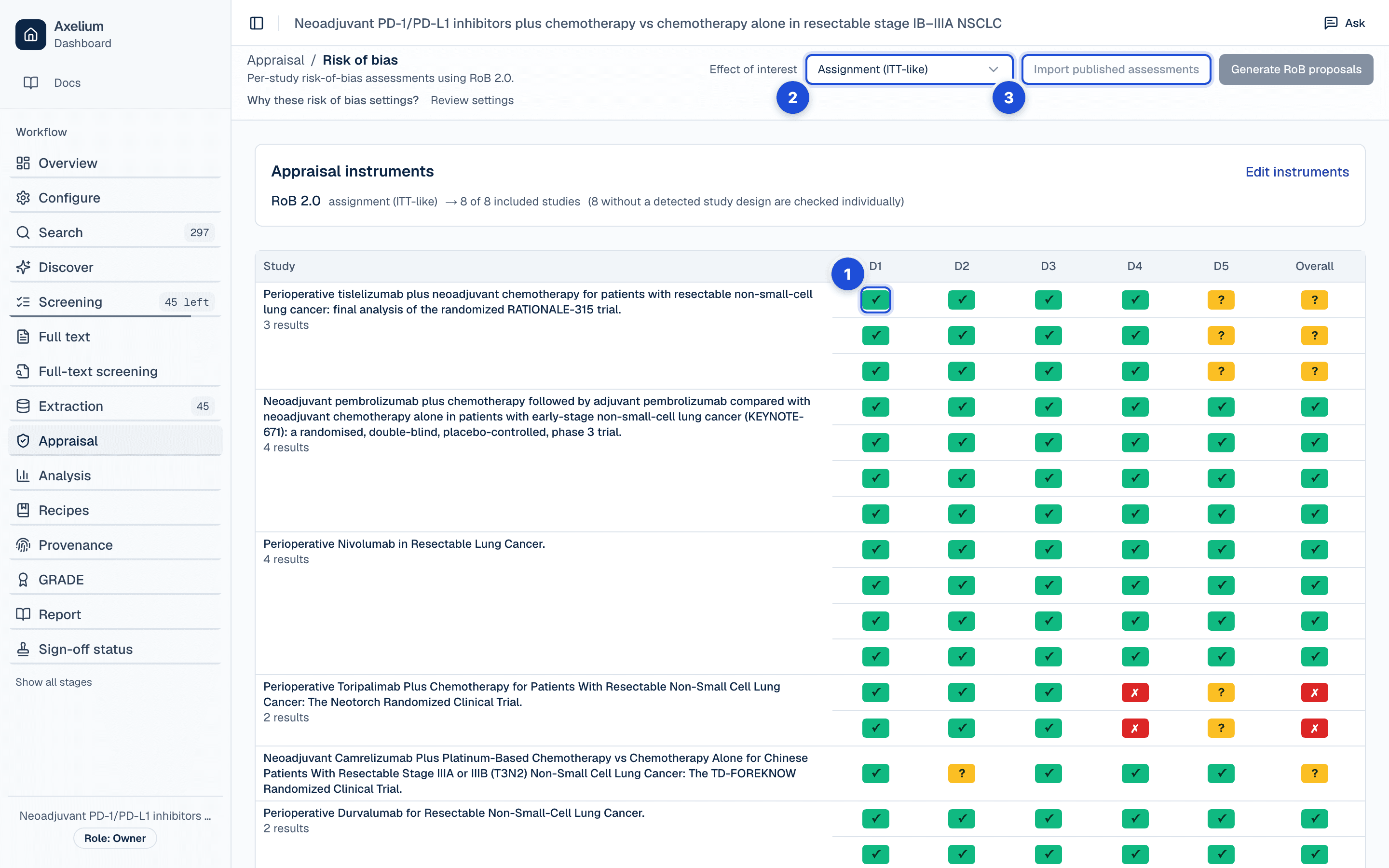
- 1. One row per study and result; open a cell for the signalling questions, the judgement and the quotes behind it.
- 2. For RoB 2, the Domain 2 variant: effect of assignment or of adherence, each with its own assessments.
- 3. Import a published review’s assessments to compare raters.
What you do
Read the matrix and the quotes
The Risk of bias page lists the included studies against the instrument's domains, one row per study and result. Opening a cell shows the domain's signalling questions, the proposed answers, the judgement and the quoted text behind it. Read the quotes, not just the traffic light: each domain judgement links to the quoted text behind it, and a quick scan catches a misread before it shapes your certainty rating. The foot of an assessment's panel says which step finalises it, links the Review queue or Conflicts, names the milestone it counts towards and, once finalised, who finalised it and when.
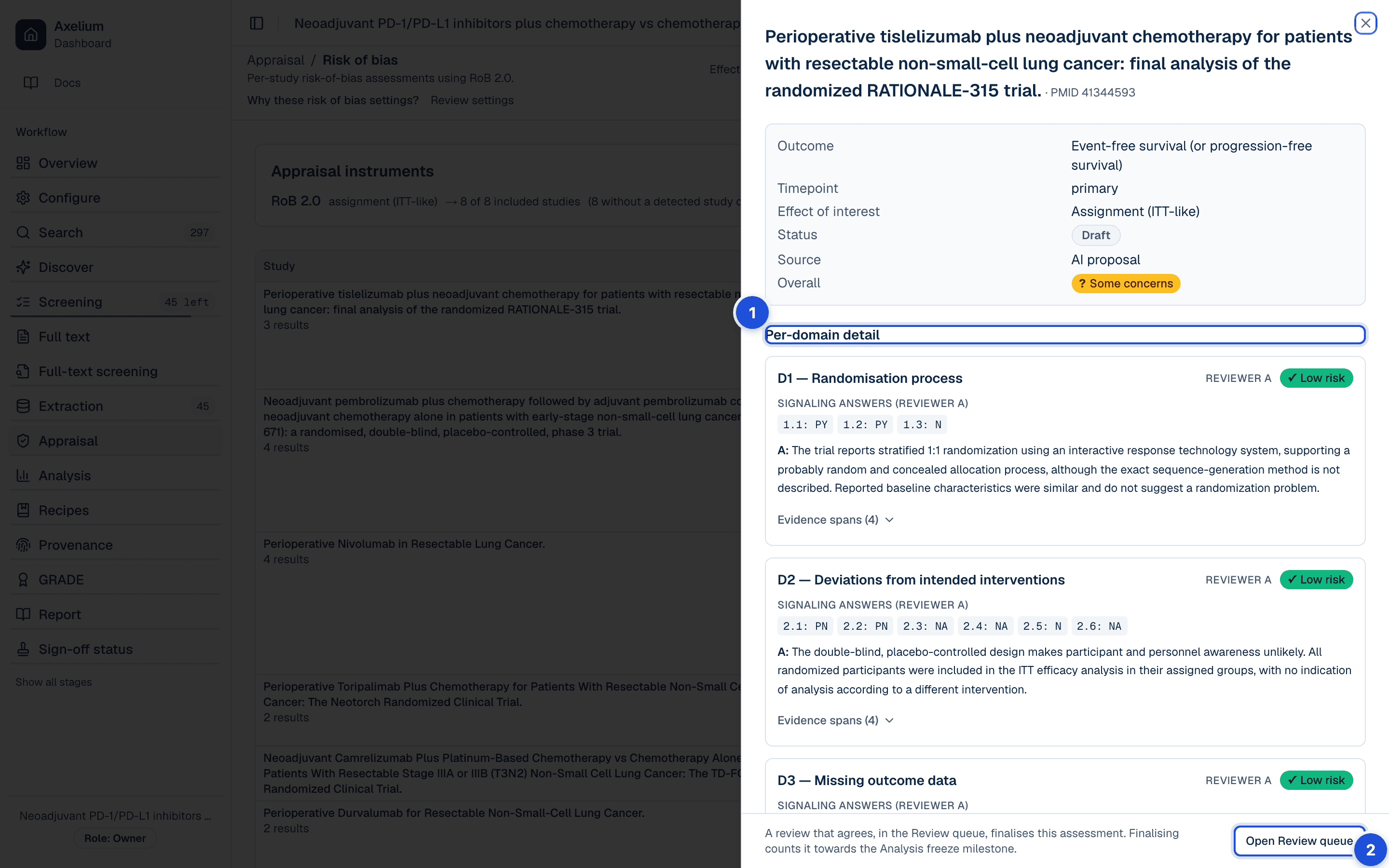
- 1. The assessment: each domain’s answers, judgement and the quoted text behind it.
- 2. The foot says which step finalises it, or who finalised it and when.
For RoB 2, pick the Domain 2 variant deliberately: choose “effect of assignment” (intention-to-treat) or “effect of adherence” (per-protocol) on the page. They answer different questions and can yield different judgements, and each has its own assessments. The instrument's form in the review's settings chooses between the 2019 version of RoB 2 and the 2016 draft: the 2019 version answers missing data, measurement and selection of the reported result for each outcome of a trial separately and reads a protocol or analysis plan when the study's documents hold one. A run of one version replaces that trial's draft proposals; assessments a person has validated are kept.
Give your own judgement in the Review queue
Do not skip the Review queue: unvalidated judgements do not drive certainty conclusions. The queue lists the assessments waiting for you and shows each on a blank form, without the proposal: you answer the instrument's questions yourself and submit. A review that agrees with the proposal finalises it, whether the review has one reviewer or two. One that disagrees sends the assessment to Conflicts: with two reviewers another lead reviewer rules on it, and with one reviewer you rule on it yourself, giving your reason. When the disagreeing reviewer left a comment in the queue, the ruling's reason and the root-cause note start with those words, for you to keep or change. A ruling keeps the AI's judgement, adopts the reviewer's, or sets the assessment aside. There is no Finalise button: an assessment reads Draft while it is the AI's proposal, In conflict while a reviewer disagrees with it, and Finalised once a review agrees with it or a ruling keeps one side. How disagreements are read is on the methods page under AI-proposed, human-validated and imported.
Import published assessments
To compare against a published review's own appraisal, a lead reviewer imports its assessments from a spreadsheet, one row per study, instrument and question or domain, using the per-instrument templates the Import dialog offers. Totals and overall judgements are recomputed from the per-item values by each instrument's published rules rather than trusted from the transcription. Imports are attributed to a reviewer label naming the original review and count as validated; the lead who imports them is recorded as having checked the transcription. Re-importing updates earlier imports in place; a study that already has an assessment with the same instrument keeps it and is listed as not imported, and identifiers that match nothing are reported back. Details: Importing published assessments.
Compare raters
When at least two raters, different instruments or the review's and a published assessment of the same instrument, have rated the same studies, the Concordance tab shows percent exact agreement and Cohen's kappa with its confidence interval for every pair, and a study-by-rater matrix. Only validated assessments take part. The tab downloads the comparison as a spreadsheet (CSV) or a Word document. How to read it, and its caveats: Interpreting concordance.
Qualitative studies: CASP
Qualitative studies are appraised with CASP (Critical Appraisal Skills Programme), the qualitative equivalent of a risk-of-bias assessment; that appraisal feeds the methodological-limitations component of CERQual. The AI drafts a proposed CASP appraisal for each eligible qualitative study with parsed full text, every answer grounded in a verbatim quote from the paper, and a reviewer confirms or edits each one; a reviewer's appraisal is never overwritten. Each appraisal reads Draft (the AI's appraisal, not yet checked by a person), In review or Finalised. Finalising saves any answers you have not saved first, and reopening a finalised appraisal asks why, keeps the reason in its history, and returns it to In review. The method: CERQual and the summary of qualitative findings.
Settings
The review's Appraisal settings say which critical-appraisal instruments apply and to which study designs; a review whose settings name no instrument has no appraisal step until one is chosen in Configure. The instruments are versioned like every setting; see Review settings. Choosing between instruments is a method question: Choosing instruments. Submitting a review in the queue and running assessments need the permission to review; importing published assessments, re-running assessments over reviewed ones and ruling on a disagreement need a lead reviewer. Reviews, imports and rulings are all refused once the analysis is frozen.
What is recorded
| Record | Where you see it | Exported in |
|---|---|---|
| The AI’s proposed assessment: each domain’s answers, judgement and supporting quotes with their page | The Risk of bias matrix and its drawer; the CASP matrix and its drawer | Word report (risk-of-bias section); the CASP appraisal feeds CERQual |
| A reviewer’s own judgements from the Review queue, given without seeing the proposal | The assessment’s panel, once submitted | Approval record (CSV, NDJSON) |
| Validation: who finalised an assessment and when, and the milestone it counts towards | The foot of the assessment’s panel; Sign-off status | Approval record (CSV, NDJSON); the Word report’s Validation and sign-off record |
| A ruling on a disagreement: the AI’s judgement kept, the reviewer’s adopted, or the assessment set aside, with the reason | Conflicts; the assessment’s panel | Approval record (CSV, NDJSON) |
| An imported assessment, the review it came from and the lead who imported it | The assessment’s drawer; the Concordance tab as its own rater | Concordance CSV and Word download |
| Concordance between raters: agreement and kappa per pair, the study-by-rater matrix | The Concordance tab | Concordance CSV and Word download; Word report |
| A CASP appraisal’s finalisation and reopening, with who did it and the reason for reopening | The appraisal’s drawer and its history | Approval record (CSV, NDJSON) |
| What Sign-off status counts: validated by a named person, AI only, or person not recorded | Sign-off status | The Word report’s Validation and sign-off record |
The RevMan export carries the studies and their values but leaves the risk-of-bias judgements empty, for the authors to fill in RevMan.
Limits
When no full text is held
A risk-of-bias proposal is made from the study's full text when the review holds one. When no full text is held it reads the abstract record instead, and the assessment does not say that it did: nothing on the matrix, in the drawer or in the record marks an assessment as made from the abstract alone. Check the document before you accept a proposal, and treat a proposal for a study whose full text is missing as a prompt to find the paper, not as an appraisal of it. CASP drafts are made only for studies with parsed full text.
- For instruments without a published algorithm, the overall judgement in an AI proposal is itself model output, not a computed result.
- The quotes behind a proposal are the sentences the AI cited, with their page; opening one shows the document at that page. They are not matched against the document's text the way extraction quotes are, so a misread can carry a plausible quote: read the quote in the paper.
- Concordance compares raters on a shared scale, so instruments with different scales are read against each other only approximately; the methods page lists the caveats.
- A review that appraises trials only skips studies the design mapping marks as non-randomised; a study whose design is not yet mapped is assessed, and the instrument decides from the text whether it is randomised.