Part 2 · Oversight and governance
2.3Audit trail and history
A review keeps a record of who did what, when, and who confirmed it, from the first search to the last report. This chapter says what that record holds at each stage, where to read it, what the AI’s decisions carry, and how to ask the record a question.
What it does
Axelium is designed so reviewers can trace results back to studies, source documents, extracted values, reviewer decisions, and report evidence. It makes checking easier, not unnecessary. Extracted values, quotations and pinned outputs are traced to the page and passage they came from, and every decision to the person who made it. Each AI decision carries the identifier of the model that made it and of the prompt it ran with. The AI never writes to the record on a person's behalf: its steps are recorded as its own, and a person's step is recorded under their name and role at the time. Traceability includes knowing when it is absent: a quoted excerpt that cannot be found in its document is marked unconfirmed rather than shown as verified.

What you do
Where to read the record
- Sign-off status, after Report in the sidebar: who approved what, what still needs a person, and the review's History of approvals, newest first, with a download of the whole approval record. Described in Approvals, locks and sign-off.
- Versions: each protocol version, the milestones and their sign-offs, the requests still waiting, and the review's activity — a protocol or search strategy unlocked, with the reason given. Described in Review settings.
- Provenance: what each living-review update changed — the cycles, how each outcome's estimate and certainty moved across them, and the updates that flagged a significant change — with Freeze for submission, which keeps a snapshot of the record as it stood. Each update keeps its own results and certainty ratings; an older update's out-of-date notice stays even when a newer analysis exists.
- The item itself: an extracted value's lineage opens the page and passage it came from and its own history; a screening decision shows the AI's verdict and reason beside the person's; a rating shows what the AI derived and what a person changed.
What it answers
On Sign-off and on Provenance, Ask answers from the record of the review: who did the work, when, and who confirmed it.
- How many records were identified, screened, excluded, sought in full text, assessed and included, and why records were excluded at full text.
- Where a person's decision differed from the AI's.
- How active each screener was, and where two people decided the same record.
- Which full-text decisions quote a passage that is in the document.
- Which sign-offs are in place, and which items the AI acted on that a person has not confirmed.
- What was searched, imported, extracted and obtained as a document, and what the model work cost.
- For a qualitative review, each finding's status, who confirmed it, and whether its quote was found in the paper.
- A question in your own words; the answer uses the figures above.
A few starting questions are offered. Any of them can be edited before you send it.
What belongs to “Ask about this data”
One assistant, on every page of the review, answers about the data and the record together and can relate the two by study. See Ask about your data.
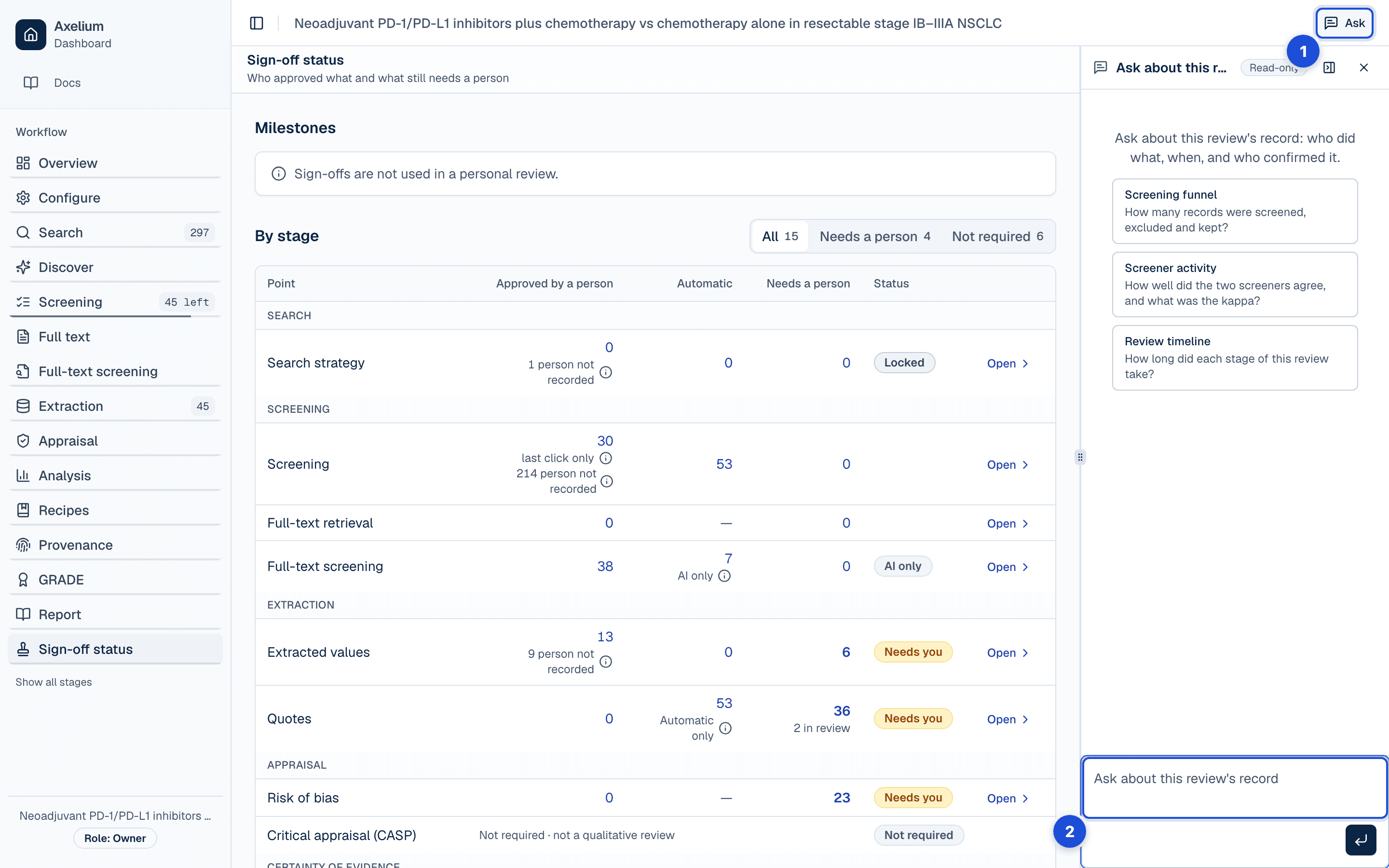
- 1. Ask, in the review’s header, on every page.
- 2. On Sign-off and Provenance the question goes to the record: who did what, when, who confirmed it.
Data as of
Each answer says when its figures were read. A figure carried over from an older answer is marked as such. A number in the written answer that is not one of the figures is marked unverified, so you can see it was not read from the review.
Your verdict
Thumbs up or thumbs down on an answer. A thumbs down can include a short note. The verdict is yours: another person's verdict on the same answer stays theirs.
Settings
The record has no settings: it is kept for every review, personal or team, and nothing turns it off. What a stage records depends on how the review is set — a review with two reviewers keeps two decisions per record; one without a qualitative strand keeps no CERQual ratings — and those settings are the protocol's, described in Review settings. Who may read the record follows the role: anyone who can view the review reads its pages, and anyone who can review downloads its approval record.
What is recorded
By stage
Each chapter of Part 1 ends with its own table. Together they make up the record:
| Stage | What is recorded |
|---|---|
| Question and protocol | Each protocol version, the settings it holds, who saved it and when; the protocol lock and an unlock with its reason. |
| Search and sources | The strategy and its queries, the runs and imports, and the strategy’s lock: who locked it and when. |
| Screening | Each decision on a title and abstract, whose it is, the AI’s verdict and reason beside it, overrides and withdrawals, and rulings on conflicts. |
| Full text | Which document was obtained for each study, how and when, and a study closed on its abstract with its reason and who confirmed it. |
| Full-text screening | Each full-text decision with its exclusion reason, the AI’s criterion verdicts and quotes, and whether a quoted passage is in the document. |
| Extraction and traceability | Each extracted value with the page and passage it came from, its validation, rejection or withdrawal and who made it, and the quote check’s result. |
| Appraisal | Each risk-of-bias assessment, whether the AI proposed it or a person imported it, its review, a conflict and how it was resolved, and the CASP appraisal’s finalising and reopening. |
| Synthesis | Each analysis run and the data it read, pinned outputs traced to their studies and values, and the locks on an outcome’s network method and treatment groups. |
| Certainty | Each GRADE, CERQual and network certainty rating, what the AI derived and what a person changed, and the finalising and reopening of each. |
| Reports and exports | Each saved report, when it was generated and the approvals that stood at the time; the manuscript lock that freezes them. |
| Living reviews | Each update’s own results and certainty ratings, what it changed, and the snapshots frozen for submission. |
| Approvals, locks and sign-off | Every approval event: its stage and item, its meaning, who acted and their role, when, the reason, and the state before and after. |
| What the AI does by itself | Each proposal the AI made, who approved or rejected it and when, and the runs that were held for a person. |
The model and the prompt
Every step the AI takes in the approval record names the model that took it and the run it belonged to, and keeps an identifier of the prompt it ran with. The identifier is a fingerprint, not the prompt's text: it lets two decisions be told apart by the instructions behind them, and it is the same for every decision made with the same instructions. Each automated run also keeps the version of the prompts it ran with, so a result can be matched to them. The screens show none of this; the approval record's download does.
Across the review
| Record | Where you see it | Exported in |
|---|---|---|
| Every approval event — stage, item, meaning, who and their role, when, reason, before and after | Sign-off status › History; the item’s history on its stage page | Sign-off export (CSV and NDJSON); the Word report’s Validation and sign-off record |
| For each AI step: the model, the run and the prompt identifier | — | Sign-off export: Model and Run id columns; the prompt identifier in the NDJSON file |
| Each protocol version and its settings, who saved it and when | Versions | The report’s Methods |
| Milestone requests, approvals, refusals and unlocks, with their reasons | Versions; Sign-off status | Word report’s Validation and sign-off record |
| Each living-review update: its results, its certainty ratings and what changed | Provenance | A frozen snapshot, kept with the review |
| The page and passage behind each extracted value and quotation, and whether the passage was found in the document | Extraction › Verify; the value’s lineage | — |
| The PRISMA counts — identified, duplicates removed, screened, excluded, sought, not retrieved, assessed, excluded after full text, included | Overview; Ask on Sign-off and Provenance | The report’s flow diagram |
| The questions asked of the record and the answers given, with when the figures were read | Ask, on the review’s pages | — |
Limits
The approval record starts when it arrived: steps taken before then appear in the counts but not as steps in History, and the download holds no earlier event. A generated report's sentences are not linked to the evidence behind them. The record keeps neither the prompt's text nor the model's full reply. An answer from Ask is drawn from the figures it names; a number it adds that is not one of them is marked unverified and should be checked against the review.