Part 1 · The review, stage by stage
1.1Question and protocol
The question and the criteria that every later stage respects: the framework, the screening questions, the outcomes, the limits on the search, and the lock that freezes them once the review is under way.
What it does
The Configure page turns a research question into a protocol the rest of the review can run on: a framework that names the question’s elements, one screening question for each element, the outcomes to extract, and the limits the search will apply. From a question in plain words the configuration assistant drafts all of this and proposes it; nothing is saved until you confirm it, and every save is a new version. Reproducing a published review? Attach its PDF and ask the assistant what it used — its outcomes, eligibility criteria, search dates, appraisal checklist or analysis model. It answers with page references and changes nothing until you confirm. The protocol is yours to lock: once locked, its settings stay as signed off, and an amendment reopens it with a recorded reason. The methods your review ran under are part of its record, so a later change to a method never silently changes your review.

Frameworks
A framework turns a broad research idea into criteria that can guide search, screening, extraction and synthesis. Choose the framework that matches the evidence you expect to review; each element becomes one screening question.
| Framework | Elements | Fits |
|---|---|---|
| PICO | Population, Intervention, Comparator, Outcome | Clinical intervention questions and comparative effects. The default. |
| PEO | Population, Exposure, Outcome | Prevalence, risk-factor, observational and experience questions with no comparator arm. |
| PECO | Population, Exposure, Comparator, Outcome | Exposure questions that compare an exposed group with an unexposed or differently exposed one. |
| PICOC | Population, Intervention, Comparator, Outcome, Context | Intervention questions where the setting or context is itself a criterion. |
| PO | Population, Outcome | Descriptive and prevalence questions with no intervention or exposure. |
| SPIDER | Sample, Phenomenon of interest, Design, Evaluation, Research type | Qualitative and mixed-methods reviews; the framework the qualitative starter begins on. |
| SPICE | Setting, Perspective, Intervention, Comparison, Evaluation | Service and practice questions framed from a perspective in a setting. |
| PICo | Population, Phenomenon of interest, Context | Qualitative questions about an experience in a context. |
In a mixed-methods review the trial stream keeps its PICO question and the qualitative stream carries its own PEO or SPIDER question, so each body of evidence is framed in the terms that suit it. The qualitative methods are in Qualitative synthesis.
What you do
The Quickstart’s configure step is the two-minute version; here, each control in the order of the page.
Choose the framework and write the question
Type the question in plain words, or paste it to the configuration assistant, and pick the framework in the Question section. The table above says which framework fits which question. Pick the framework first: changing it later keeps the questions you wrote where the new framework has the same element, and marks screening results produced under the earlier settings as out of date.
The screening questions: inclusion and exclusion criteria
The protocol records your inclusion and exclusion criteria as one yes/no question per element of the framework, under Screening questions in the Question section; a required element is marked as such. The screener answers each question for each record, with the passage it rests on, and the answers decide include, exclude or unsure. The same criteria are asked again at full text, where the full-text settings list them under Criteria that must be met, and warn when a criterion the review states is not used at full text.
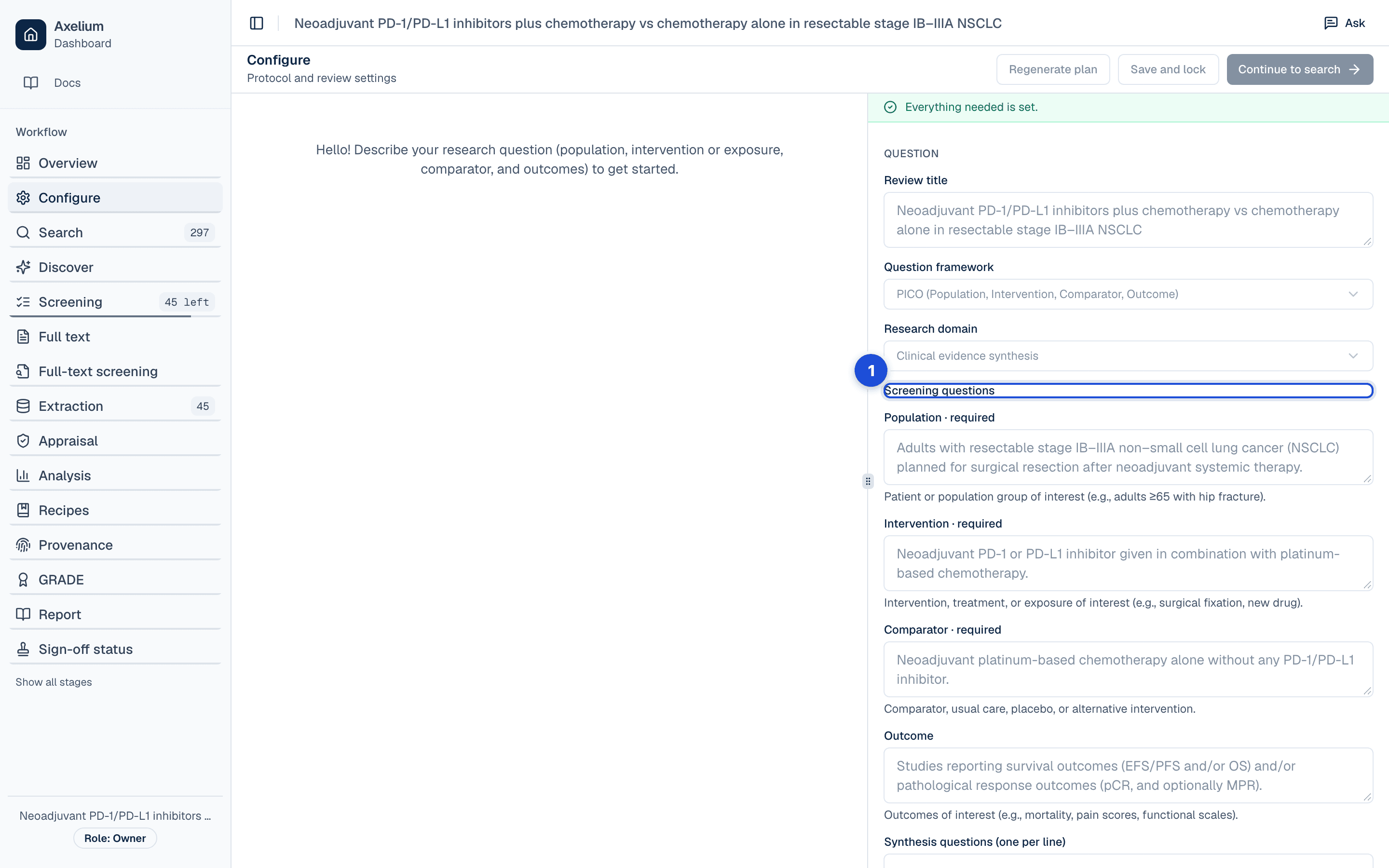
- 1. One yes/no question per element of the framework, in your words; a required element is marked.
| Column | What it holds |
|---|---|
| Criterion | Its name as the framework labels it (Population, Comparator, Design …), or the label you gave a question of your own. |
| Where it comes from | The framework’s own element; a screening question you stored under a key the framework does not read; or a comparison your settings require, whose question is built from the element labels. |
| The question | The yes/no question the screener answers for each record, in your words. Empty: the element’s description is used. |
| Asked at the abstract stage | Every framework element is. A stored question is not, until you use it at full text. |
| Asked at full text | Every framework element is. A stored question or required comparison is asked once you name it under Criteria that must be met. |
| Required at full text | A criterion a study must meet to stay in. One ticked that the review did not require before is new at full text: a study it rules out waits for a person while the rule is new. |
Alternative wordings the screener proposes for your population, intervention or comparator are listed under Suggested by the screener until a reviewer answers them. They help match studies during screening and map study arms during extraction; they are not part of your search strategy. Keeping one leaves the wording in your settings and clears the note; removing one takes it out. Editing the wording yourself answers the suggestion the same way, and results already produced are not changed either way.
Design, language and date limits
The search plan carries the limits the protocol sets on what is searched for: the study designs (randomised, interventional, observational, qualitative), human or animal studies, the languages, and a date range, from a year or from an exact date when you reproduce a search that ran on a particular day. They are part of the search strategy, which is built, refined and locked in Search and sources.
Name the outcomes
Name outcomes precisely — “Overall survival” rather than “OS”. Clear names make extraction, and the choice of analysis, easier. Each outcome opens in its own editor, where its type, its effect measure and its extraction form are set.
Save and lock, and the protocol lock
Save and lock, in the page’s header, checks the protocol before anything is frozen. The dialog lists what is missing or could be better, section by section; a finding with a one-click fix carries a checkbox, one only you can settle carries Open, and one the assistant should be asked carries Ask the assistant. Applying the ticked fixes saves the settings and keeps a locked copy of them as report evidence. Continue to search saves without locking.
The protocol lock itself is the first of a team review’s milestones. A lead reviewer or admin requests it from Configure or from the Sign-off status page; before the request is sent it lists what the milestone checks, with a tick or a warning and its counts, and Protocol lock checks the search strategy. Any other admin of the workspace approves it, or turns it down with a reason; nobody approves their own request. Launching an automated run locks the protocol automatically, with no sign-off, and the record says so. Once the protocol is locked, its settings stay as signed off — the search plan and queries, the screening settings and the outcomes — and nothing changes them: not a page, the configuration assistant, a search preview or a screening suggestion. An outcome’s pooling model and network settings, the treatment grouping and the living-review schedule can still be changed.
Unlock with a reason
To amend a locked protocol, a reviewer who may edit it chooses Unlock on Configure. Unlocking asks why in a dialog; the reason is required and is shown on the review’s Versions page beside the unlock, and the protocol is open to edit again. A search strategy locked on its own is unlocked the same way, with its own reason; a protocol that is milestone-locked must be unlocked first, because its search strategy is frozen inside it. Restart from Search moves a later lock back to the protocol lock and records the restart’s reason as the unlock.
Amendments and versions
Saving settings creates a new version rather than overwriting the last one. Save history, in the Record section, lists every save with what it changed, compared either with the save before it or with the settings now, and you can restore any earlier save — which itself becomes a new version, subject to existing locks. Versions, earlier results and copying are covered in full in Review settings and history.
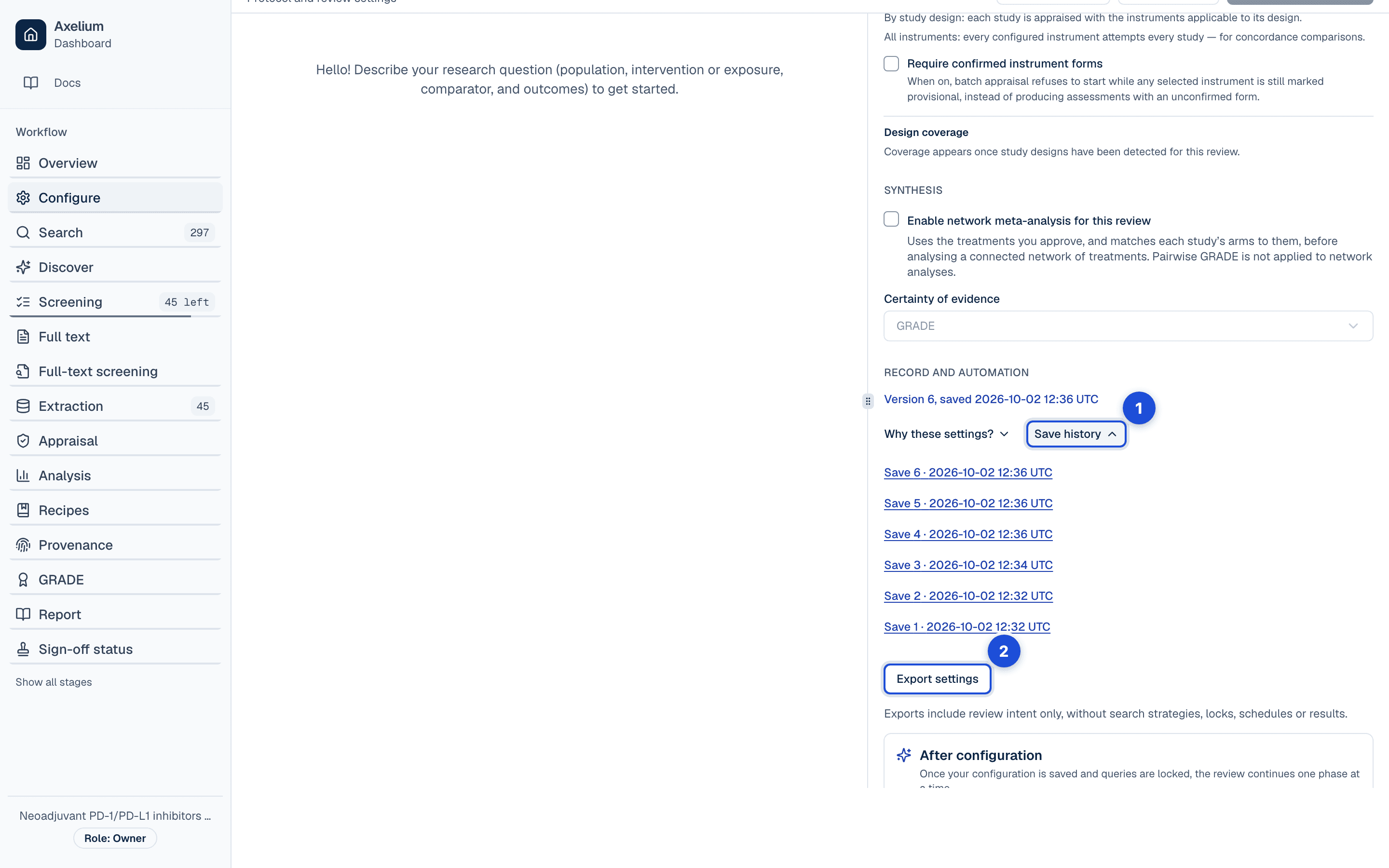
- 1. Every save, with what it changed, compared with the save before it or with the settings now; any earlier save can be restored.
- 2. The settings as a file, to start another review from.
Settings
- Where a review starts. Blank, a template, settings from an earlier review, or an exported settings file. Copied settings do not include the original search strategy, locks, schedules or results; review every question and outcome before starting work.
- Framework and methods. The framework defines the question elements, the screening policy defines who reviews each record, and the appraisal and certainty choices name the methods used to assess evidence; an instrument with several published forms, such as RoB 2 (the 2019 version or the 2016 draft), is chosen by its form. A review that appraises with a combination outside the standard sets is shown as using custom instruments.
- Who may change them. Anyone who may edit the protocol, until it is locked; after that, only once it is unlocked with a reason.
- Results already produced. Changes are compared with the settings recorded for each stage: changing a certainty method alone does not make screening results out of date. Earlier runs remain available after a re-run, and results without recorded settings are shown as unknown rather than assumed current.
What the settings cover, stage by stage: Review settings and history.
What is recorded
| Record | Where you see it | Exported in |
|---|---|---|
| Every version of the settings: who saved it, when, and what it changed | Configure › Record › Save history; the review’s Versions page | Settings file (Export settings) |
| The locked copy of the settings that Save and lock keeps | Evidence board; the report’s Methods | Word report |
| The protocol lock: requested by whom and when, approved or turned down by whom, with the reason; or locked automatically by a run | Configure; Sign-off status; the Versions page | Sign-off CSV/NDJSON; the Word report’s Validation and sign-off record |
| Each unlock of the protocol, by whom, when and why | The Versions page; Sign-off status › History | Sign-off CSV/NDJSON |
| Each lock and unlock of the search strategy, by whom, when and (for an unlock) why | Search; the Versions page; Sign-off status | Sign-off CSV/NDJSON |
| The criteria as the protocol states them: each criterion, its question, and where it is asked and required | Configure › Question; the full-text settings › Criteria that must be met | The Methods material a report writer receives, as each stage ran |
| The screener’s suggested wordings and how each was answered | Configure › Suggested by the screener | — |
| A restart from Search, by whom and why | The Versions page | Sign-off CSV/NDJSON |
Limits
- The frameworks in the review-settings preview are not a promise of end-to-end workflow support: SPIDER, SPICE and PICo frame the question and the screening; their evidence goes to coding and qualitative synthesis rather than to pooling.
- A freshness notice concerns settings, not changes to the study data, and it never deletes or re-runs anything: whether a changed threshold matters is your decision.
- Save and lock checks the protocol and keeps a locked copy for the report; it does not by itself set the protocol lock. In a personal review there are no milestones, so the protocol is locked only when an automated run is launched.
- The configuration assistant proposes and never saves on its own; a document it reads is data, and anything in it that looks like an instruction is quoted back to you to decide.
- Changing the framework or a question re-screens nothing; earlier results are marked out of date.