Part 3 · Administration
3.3Exporting, archiving, deleting
What you can take out of Axelium as a file, how a review’s settings travel to another review, and what deleting a review or closing an organisation reaches.
What it does
Every saved report downloads as Word and Excel; the review downloads as RevMan 5, as RIS or BibTeX of its included studies, as a settings file another review can start from, and as a sign-off record of every approval event. Deleting is different: a deleted review disappears from every page and list but its records stay in storage. Axelium never exports anything by itself and never deletes a review by itself.
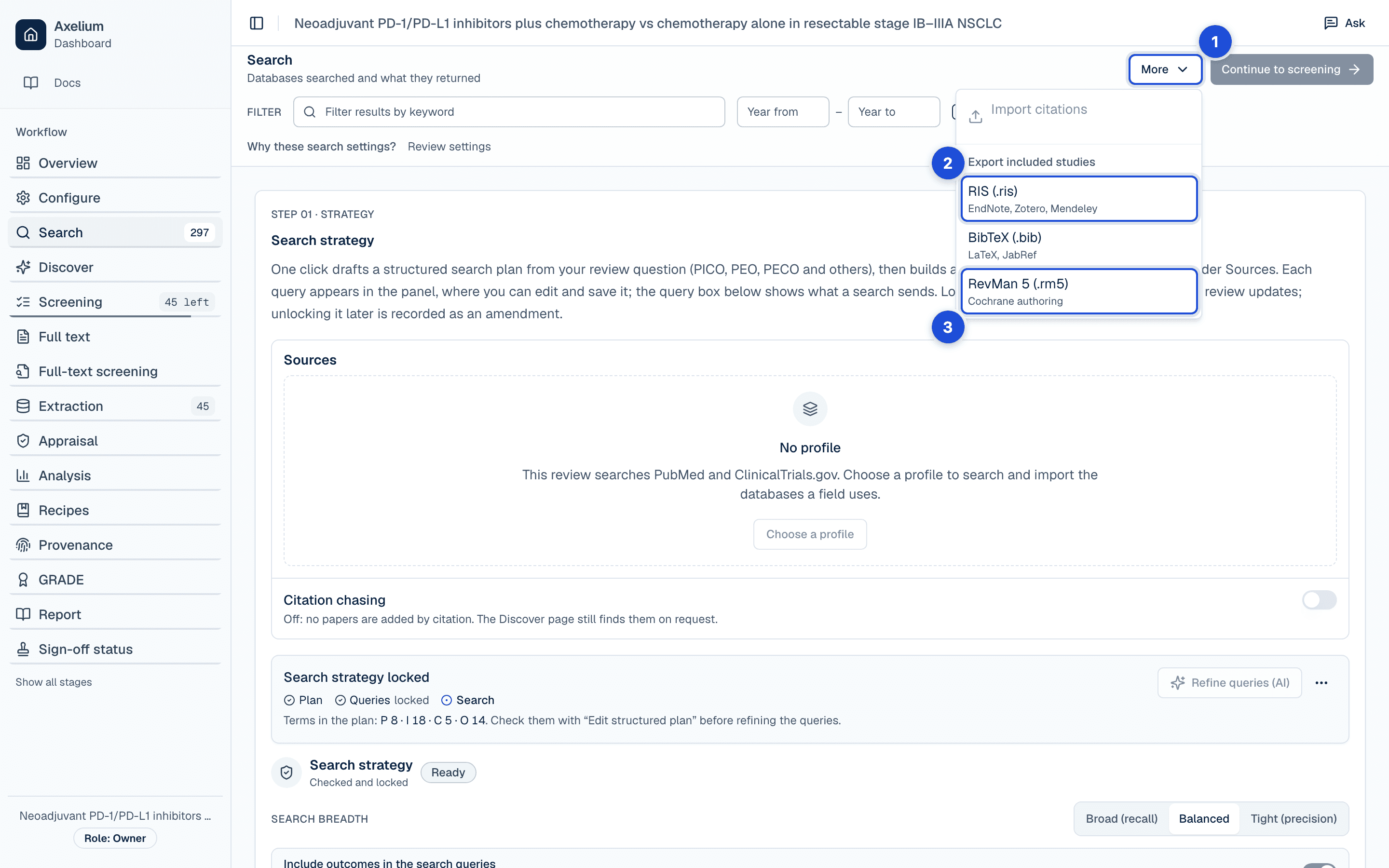
- 1. The Search page’s menu.
- 2. The included studies as RIS or BibTeX.
- 3. The whole review as RevMan 5.
What you do
Take a review out as files
The exports of one review are listed, with what each holds and where it is made, in Reports and exports. In short: Report › Export downloads the open report as Word (.docx) or Excel (.xlsx); More on the Search page, under Export included studies, downloads the included studies as RIS or BibTeX and the review as RevMan 5; the settings page downloads the settings file; and Sign-off status › Export downloads the approval record as CSV or NDJSON. Anyone who can review may export. Exports are made when you ask and download to your browser; none is kept.
Copy a review
A new review can start from a template, from another review, or from a settings file exported from one. What is copied is review intent only: the framework, the criteria, the outcomes and the methodological choices. Search strategies, locks, schedules and results are never copied; a copied review starts its own work. An export refuses rather than quietly leave a setting behind, and tells you which one. The details are under Copying settings between reviews.
Delete a review
Only an owner or an admin of the review’s workspace can delete a review. Deleting hides it: it leaves every list and page at once, and the deletion is written to the audit trail with the review’s title, who deleted it and when. Its records — studies, decisions, extracted values, analyses, reports and approval events — remain in storage.
Settings
Exports follow the review’s settings: where the review requires validated values, the RevMan export holds only validated outcomes, and the settings file carries the review’s methods as named in its settings (What review settings cover).
What is recorded
| Record | Where you see it | Exported in |
|---|---|---|
| The deletion of a review: its title, who deleted it and when | Audit trail | — |
Limits
- Deleting a review hides it; it does not remove its records from storage.
- There is no single download of one review as a package; a review leaves as the separate exports above.
- The citation exports are of the included studies, not of every record searched.