Part 1 · The review, stage by stage
1.4Full text
Every record the abstract screen leaves included or unsure needs its paper before it can be screened at full text or extracted. This stage collects PDFs, supplements and registry records, keeps a record of every attempt, and lists what is still missing.
What it does
Full-text retrieval collects the PDFs, supplements and other source documents that full-text screening, extraction and qualitative coding read. For each report it tries the open sources first: PubMed Central and Europe PMC, an open-access copy, the publisher's page, and for a registry record the registry itself. It accepts text from PubMed Central only when the article's identifiers match the study, so a paper that cites a study is never saved as its full text. Each attempt, its route, its outcome and who or what made it is recorded; a report nothing could fetch stays visible on Missing full texts with what was tried. Documents a person uploads or captures with the browser companion are kept alongside the fetched ones, and a file the study already has is never added twice.

- 1. A file or a whole folder; each file is matched to its study by the PubMed ID in its name or by its title.
- 2. Shows only the rows without a usable paper.
- 3. Downloads the papers of the studies you select; downloads that stop part way are resumed from here.
Lawful access
Axelium fetches only what is free to read. When a paper is free on PubMed Central but its publisher does not allow automatic downloads, or a free copy exists on a website that asks for a person, the report is listed for you to open and add. Papers behind a subscription reach the review in one of two ways: you upload them, or the browser companion captures them from your own browser while you are signed in through your institution.
What you do
Watch the retrieval
Open Full text from the review's sidebar. Retrieval starts by itself after screening; each row shows whether the paper was found, where it came from, and whether its text is ready. Use the Needs upload only filter to find the rows without a usable paper; those studies cannot be extracted until one is added. Retry restarts downloads that stopped part way, and parsed documents become available for source-backed extraction. A study without a DOI is looked up by its PubMed ID, and a DOI found for it is added to the study, unless another study in the review already has that DOI.
Upload papers and supplements
Upload PDFs takes a single file or a whole folder at once; each file is matched to its study by the PubMed ID in its name or by its title. A file a study already has is skipped, so uploading a folder again adds only what is new; your own upload is always kept. Do not skip supplements: many effect sizes, especially subgroup and secondary endpoints, live there. Appendices, spreadsheets and Word documents are parsed like the paper. Once screening is locked, reports can still be uploaded.
Capture with the browser companion
Use the companion when an automatic search could not retrieve a paper, when you are signed in through an institution and can view the article in your browser, or when a supplement sits on a publisher page. Once a review has been through retrieval, the companion's assistant can work through the papers still missing: it saves any paper already in your own reference library first, then opens the journal pages you already have access to, a few at a time and never more than one per journal, and you can stop it at any point. The first run asks your permission for that review; another review asks again. The companion is described in Browser companion.
Close a report whose paper is never found
Missing full texts lists every report still sought, with what was tried for each: the route, the site and the outcome of each attempt. Once nothing more is being fetched, you can close a report as Not retrieved, with a reason. The report leaves full-text screening and extraction and is counted among the reports not retrieved in the PRISMA flow; the written report lists those reports, with the reason and what was tried. Reopen a closed report if the paper turns up: it is sought again. Closing and reopening are not possible once screening is locked; unlock the review on Versions to change a closure.
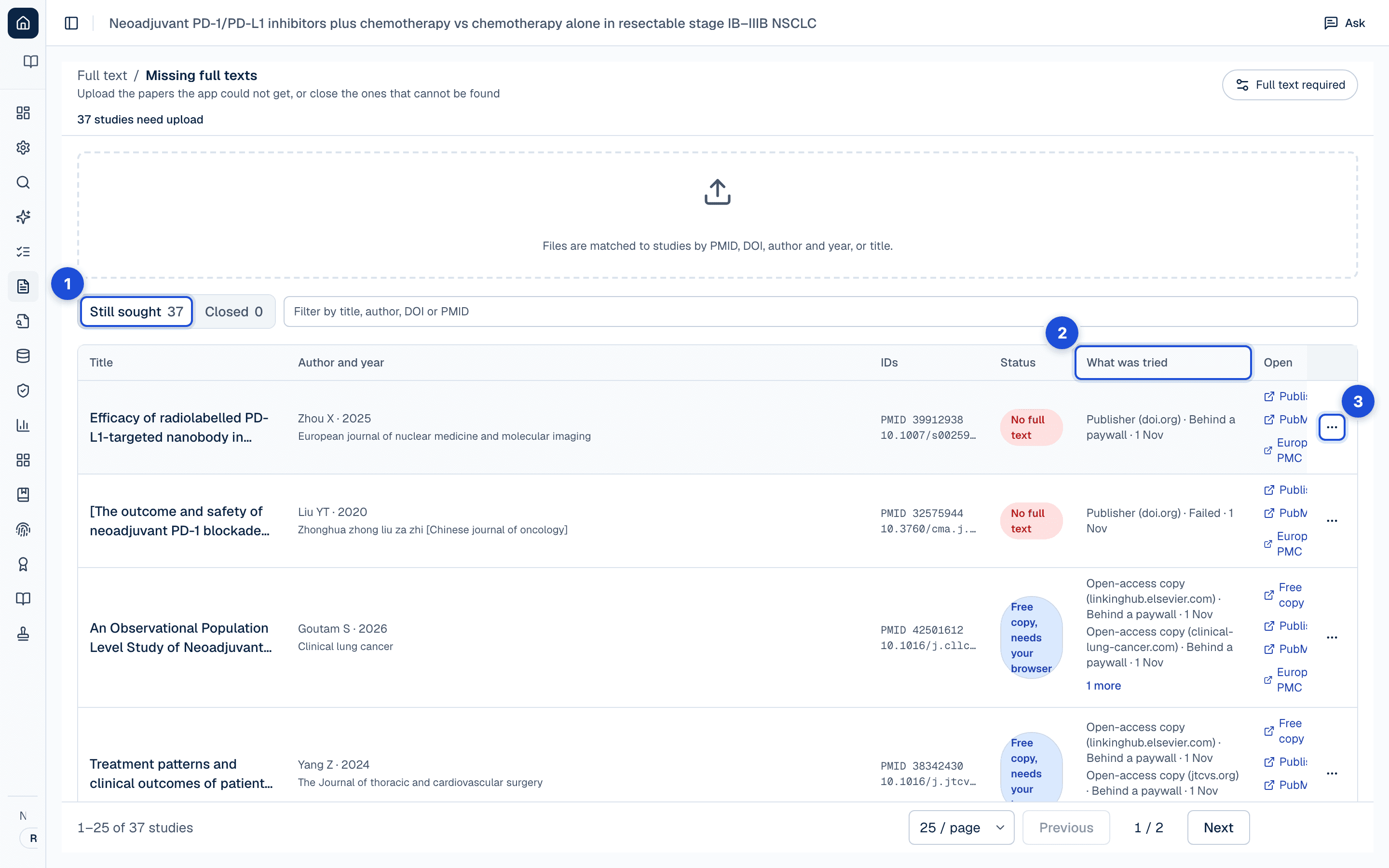
- 1. The reports still sought, and those closed, each counted.
- 2. What was tried for each report, attempt by attempt: the route, the site and the outcome.
- 3. Each report’s menu closes it as not retrieved, with a reason, or reopens it.
Assess a report on its abstract
When the review allows it (the setting is When a paper cannot be found, below), you can instead close a report as assessed on its abstract. The abstract becomes a document of the study that quotes can be anchored in. In a team review someone else on the team confirms the closure; the person who closed it cannot confirm their own. A personal review has no second person, so the one person's word stands. This is separate from dual review at screening: it applies in a team review whether one person or two screen the records. The written report names both people and which studies rest on their abstract, and the PRISMA flow counts those reports among the reports not retrieved and again among those assessed.
See which document is in use
A study can hold several documents: the fetched paper, your uploads, supplements and a registry record. Each shows where it came from and whether it is shown to be the study's own paper (verified by its DOI, PubMed ID or title, not verified, possibly another study's paper, or confirmed by a person). One of them is the paper in use, the one full-text screening, extraction and risk of bias read; how it is chosen, and how a person can choose another, is in Full-text screening.
Settings
Missing full texts has one setting, When a paper cannot be found. By default a paper that cannot be found is reported as not retrieved and is not assessed. A lead reviewer or admin can allow a study to be assessed on its abstract once the paper cannot be found, with a second person confirming it, or plan the review on abstracts. It applies to papers closed from then on; papers already closed keep how they were closed until someone reopens them. The setting is part of the protocol and is read-only once the protocol is locked. See Review settings.
What is recorded
| Record | Where you see it | Exported in |
|---|---|---|
| Every attempt to get a report’s full text: the route tried, the site, the outcome, who or what made it, and when | Missing full texts, under What was tried | The report’s “Reports not retrieved” appendix (what was tried) |
| Each document a study holds: where it came from, its kind, whether its text is ready, and whether it is shown to be the study’s paper | Full text; the study’s Documents tab at full-text screening | — |
| An upload, as an attempt of its own, with who uploaded it and when | Missing full texts, under What was tried; Full text | — |
| A report closed as not retrieved: who, when, and the reason | Missing full texts; the study’s History; Sign-off status | Approval record (CSV or NDJSON); PRISMA flow; the report’s “Reports not retrieved” appendix |
| A report closed as assessed on its abstract, the second person’s confirmation, and a reopening with its reason | Missing full texts; the study’s History; Sign-off status | Approval record (CSV or NDJSON); the report names both people |
| The paper in use for each study, and who chose it when a person did | The study’s Documents tab at full-text screening; the review’s activity | — |
| Reports sought, retrieved and not retrieved, and of those, the reports assessed on their abstract | Sign-off and Provenance (Ask) | PRISMA flow; the report |
Limits
- Retrieval can be blocked by paywalls, publisher gates or poor metadata. Manual upload and the browser companion resolve these cases only when you have lawful access.
- Papers whose text cannot be extracted, such as some scanned PDFs, are marked Full text unavailable at full-text screening even when the file is present; they are not screened there until a readable copy is added.
- Not verified means not yet shown to be the study's paper, not shown to be another's.
- The evidence a report was assessed on (full text, abstract only or registry record) is recorded when the report is closed, and the report names the studies assessed on their abstract; it is not carried onto each extracted value or sentence.
The validation posture behind these statements: Validation and limitations.