Part 2 · Oversight and governance
2.4What the AI does by itself
Axelium runs several steps of a review without waiting for a person. This chapter lists each one, what it decides on its own, what it only proposes, and where a person sees and changes the result.
What it does
The rule is the same at every stage: the AI proposes, a person decides, and whatever the AI did on its own is recorded as its own. What changes from stage to stage is the mechanism. At title and abstract screening in single-reviewer review the AI’s decision stands until a person changes it. At full text a conclusive decision is confirmed automatically only after a second check agrees with the first, and only where the review allows it. Extracted values, risk-of-bias assessments and certainty ratings are drafts until a person validates them. An automated run proposes changes on the Proposals page and applies only narrow, re-checked data fixes by itself. The assistant reads and never writes. Every automatic step leaves a record a person can find, confirm or reverse, and the Sign-off status page counts what the AI decided that no person has yet checked.
The automatic steps
| Step | Runs by itself when | Default | How to turn it off | What a person sees |
|---|---|---|---|---|
| Title and abstract screening | The screening run reads each record against the screening questions and decides include, exclude or unsure. | In single-reviewer review the AI’s decision is the record’s decision; an unsure record waits for a person. In dual review the AI’s decision is one reviewer’s vote and a person always decides. | Choose dual review in the Screening section of Configure. The AI can fill one reviewer’s slot or be left out altogether. | The decision, its confidence and the passages quoted against each question, on the Screening page. A person may change any decision; the change is kept as theirs, with the reason. |
| Full-text screening | The AI reviewer reads the paper, answers each criterion with quoted passages and proposes a decision. A decision the passages settle clearly is confirmed without waiting, once a separate check agrees that those passages answer each deciding criterion’s question. | On for inclusions and for exclusions in single-reviewer review. Never in dual review. | Confirm inclusions automatically and Confirm exclusions automatically, in the full-text screening settings and under Full-text decisions on Configure. | A confirmed decision is marked as automatic; an exclusion carries its reason and can be reversed. A decision the check does not confirm waits for a person, who sees why. |
| Extraction | The extraction run reads the included papers and fills the outcome form, each value with the sentence it came from. | Extracted values wait for validation; by default only validated values are pooled. | Do not run extraction; a value is never validated by the run that extracted it. | The Verify pane, with Validate for one value and Validate all for those nothing flags; a flagged, incomplete or disputed value is taken one at a time. |
| Quote checks | After extraction, each quoted sentence is looked for in the document. | Runs with extraction. | No review setting. | Each quote as found, confirmed, unconfirmed or disputed. A person answers whether a quote is in the paper; a disputed quote keeps its value waiting. |
| Risk of bias and appraisal | The appraisal run proposes one assessment per result, domain by domain, with its reasoning. | Every proposal is a draft. Nothing counts towards a certainty rating until a person validates it. | The instruments are a review setting in the Appraisal section of Configure; a review that appraises nothing proposes nothing. | The matrix and the review queue; a reviewer agrees or disagrees, a lead resolves a disagreement, and a published assessment can be imported instead. |
| The automated review’s proposals | An automated run checks its own results: missing data, stale appraisals, inconsistent units, protocol-level questions. Narrow, well-evidenced data fixes may be applied under a fixed policy, each re-checked; anything protocol-level waits for approval. | Off unless turned on for your workspace, and the review opts in. | Work the review one stage at a time instead of launching an automated run. | The Proposals page: one card per proposed change, with its evidence. Approve asks you to confirm; Turn down asks why. |
| The automatic re-check of extracted data | When an extraction run finishes, a deep audit reads the extracted data next to its source quotes. A finding with clear evidence is repaired, then re-checked in a verification round; a value that passes is marked validated with no person in the path. | On for some workspaces. | No review setting. Values a person has validated or edited are never overwritten. | Findings on the Proposals page, each labelled as machine-suggested with its evidence; what was repaired automatically is listed with the check it passed, and anything the check cannot confirm comes to a person as a proposal. |
| Living-review updates | On the schedule you set, the review’s saved searches run again over the dates since the last update, and new evidence returns through screening, full text, extraction and analysis. | Off until you turn on a living review. | The living-review settings on Configure. | The update search under Recent search activity on the Search page, and the new studies in the review inbox, where a person accepts, rejects or imports them. |
| The assistant | Whenever you ask. It answers from the review’s own data and record, through read-only lookups, and shows the result beside the answer. | Available from Ask in the review’s header. | Nothing to turn off: it changes nothing. | An answer with a card or table you can expand, each figure marked with when it was read. |
What you do
Decide the proposals
Where search drafting is on, the same principle applies at the very start: the run can draft a search strategy for you, but it pauses for your review before any search runs, and locking the strategy is the approval that lets it continue.
For runs that finish with unresolved signals, the deep audit reads the extracted data next to its source quotes and flags issues the standard checks cannot express, such as an outcome typed inconsistently with how the paper reports it. Every finding arrives on the Proposals page with its supporting evidence, labelled as machine-suggested. Narrow, well-evidenced data fixes — reversed study groups, unit conversions, a value corrected against the quotation it came from, a targeted re-read of one study — may be repaired automatically: each repair is re-checked in a verification pass and listed with the check it passed, values a reviewer has validated or edited are never overwritten, and a repair that cannot be confirmed is handed to you instead. Anything protocol-level runs only with your approval; an approved re-run updates the results and is recorded with the run as a protocol deviation. The report does not disclose it: add the disclosure yourself.
Only a reviewer who may adjudicate decides a proposal. Approving accepts the proposal as made; there is no partial approval. A proposal the review has moved past is marked stale, and a later sweep proposes again if the finding still holds.
Ask about your data
Each review has an assistant that answers questions about the review’s own data: which endpoints have extracted values and which are missing, what was extracted for a study and what awaits review, where the review stands, how the question and endpoints are set up, and why a record was included or excluded — the decision, its confidence and the passages quoted against each question. Open it with Ask in the review’s header; it stays open while you move between the pages of a review, and an answer keeps streaming while you do.
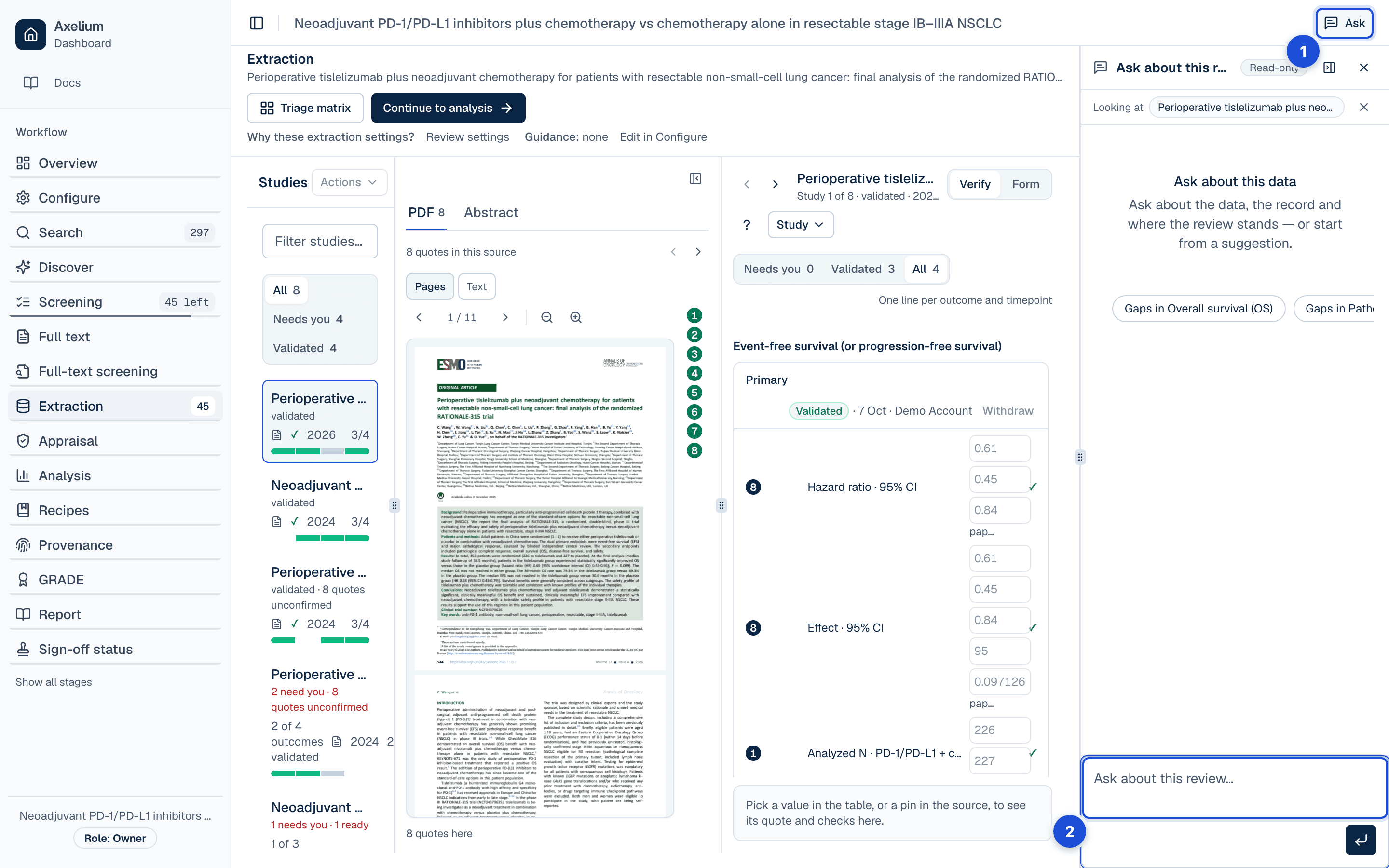
- 1. Ask, in the review’s header.
- 2. On the extraction page it knows which study and endpoint you are looking at.
It is read-only. It never changes the protocol, runs an analysis, or edits a value — the configuration assistant and the Analysis tab keep those jobs. Every answer is built from the result of a lookup over the review’s data, shown next to the answer as a card or table you can expand, so a figure in an answer is one you can see the source of. It can quote saved pooled estimates, confidence intervals, study counts and GRADE ratings, including in a read-only review. Those figures describe the saved analysis and the data it used; extraction-readiness counts describe the data now. On the extraction page it knows which study and endpoint you are looking at, and a row in an expanded table can take you straight to that study or endpoint; on the setup page it can open an endpoint’s definition for you. Its starter suggestions come from the review itself: the endpoints with the biggest gaps, values awaiting review, or a summary of the question.
On Sign-off status and on Provenance, the same Ask button answers from the record of the review: screening counts and the reasons records were excluded at full text, where a person’s decision differed from the AI’s, sign-offs, documents, extraction and the cost of the model work. An answer is a card of figures, each marked with when it was read, and you can say whether it was right. See Audit trail and history.
In the public demo the assistant answers a limited number of questions on each visit, and shows how many are left. A demo conversation is not saved: it stays in your browser tab until you close it. Once the questions are used up, you can request access to use the assistant on your own review.
Cancel a run
While an automated run is in progress, its progress banner on the review’s overview offers Cancel run. Cancelling asks you to confirm first, because it cannot be undone: what the run has already finished stays, and the rest is not done. The run is then shown as cancelled, with the cancellation as its reason. Only a reviewer who may edit the review can cancel. A run cannot be paused: it is running, finished, failed or cancelled, and a run that waits for a decision on the Proposals page continues once the decision is made.
Restart from scratch
Restart from scratch clears every result of a review and runs the automated workflow again from a fresh search. It is offered once a review has run automatically, beside Continue manually on Configure and on a finished run’s progress banner. It needs a review the workflow can run on its own: until then it is shown switched off, and it says what to finish first, such as generating search queries and locking the search strategy. A review worked one stage at a time does not show it. If a review is not ready when you confirm, nothing is deleted.
Settings
- Review mode. Single-reviewer review lets the AI’s title and abstract decisions stand and allows automatic confirmation at full text. Dual review makes every decision a person’s: two reviewers decide independently, the AI may fill one slot, and a person settles each record. Switching the mode later keeps the automatic-confirmation choices, so they apply again if you return to single-reviewer review.
- Automatic confirmation at full text. Both on by default in single-reviewer review. Each change is saved as a version, and generated reports state how many decisions were confirmed automatically. Details: review settings.
- Validated-only pooling. By default an analysis pools validated values only. A review that chooses to pool unvalidated values is told so on Sign-off status, where the validation point is then marked not required.
- The automated review. Off unless turned on for your workspace; a review then opts in when it launches an automated run. The proposals and the deep audit have no setting of their own inside a review.
- Living-review schedule. Set on Configure; weekly unless you choose otherwise. Once the protocol is locked the schedule can still be changed.
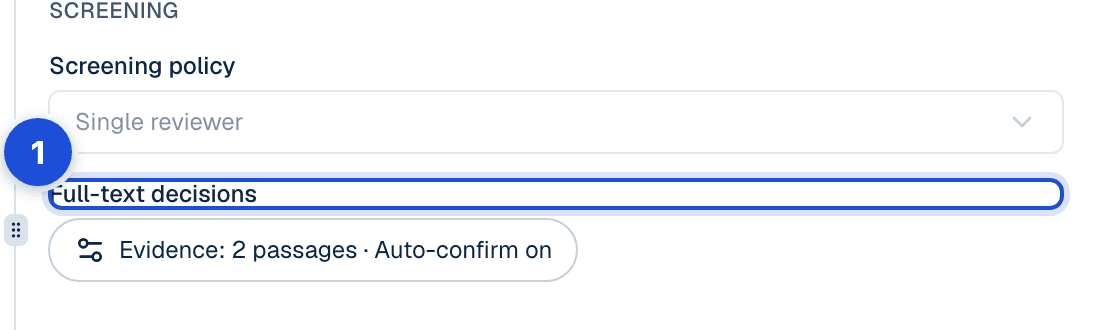
- 1. Confirm inclusions automatically and Confirm exclusions automatically, on by default in single-reviewer review.
Who may change these follows the review’s roles; what changes for results already produced is in review settings.
What is recorded
Every automatic decision is filed as the AI’s or the system’s, never under a person, with the model and the prompt version it was made with. When a person later confirms, changes or withdraws it, that step is recorded as theirs, with their reason where one is asked.
| Record | Where you see it | Exported in |
|---|---|---|
| The AI’s title and abstract decision: include, exclude or unsure, its confidence, the passages quoted against each question, the model and the prompt version | Screening page; Sign-off status › History | Sign-off CSV/NDJSON; PRISMA counts in the report |
| A person’s change to an AI screening decision, with the reason, kept as an override | The record’s history on the Screening page; Sign-off status › History | Sign-off CSV/NDJSON |
| The AI reviewer’s full-text proposal: the decision, the exclusion reason, the answer and quoted passages for each criterion, whether it was confirmed automatically, and whether a person confirmed or overrode it | Full-text screening page; Sign-off status | Sign-off CSV/NDJSON; the report states how many were confirmed automatically |
| Each extracted value with its source sentence; its validation, by a person or automatic, and every later change, withdrawal or rejection | Extraction › Verify, the value’s History | Sign-off CSV/NDJSON; the Word report’s Validation and sign-off record |
| The quote check’s verdict on each quoted sentence, and a person’s answer whether it is in the paper | Extraction › Verify; Sign-off status | Sign-off CSV/NDJSON |
| Each risk-of-bias assessment the AI proposed, who validated it, and how a disagreement was resolved | Risk of bias matrix; Conflicts; Sign-off status | Sign-off CSV/NDJSON; the Word report’s Validation and sign-off record |
| Each proposal of the automated review with its evidence, and its outcome: approved, turned down with the reason, applied by policy, repaired automatically with the check it passed, or stale | Proposals page; Sign-off status | Sign-off CSV/NDJSON; the Word report’s Validation and sign-off record |
| A value the automatic re-check validated, recorded as validated by the system and naming no person | Extraction › Verify, the value’s History; Sign-off status (Automatic) | Sign-off CSV/NDJSON |
| Each living-review update search: the dates it covered, how many studies it found and how many were new, and whether a database could not be fully searched | Search › Recent search activity | — |
| A cancelled run, with the cancellation as its reason | The run’s progress banner on the overview | — |
| The record’s answers on Sign-off status and Provenance: each figure with when it was read, and your verdict on the answer | Sign-off status; Provenance | — |
Limits
- AI screening suggestions can be wrong or incomplete; reviewer decisions should control formal inclusion. In single-reviewer review the AI’s title and abstract decisions stand until a person looks at them, and Sign-off status says so as AI only.
- Automatic confirmation at full text is bounded: it never changes the proposal, never excludes on its own account, and withholds the confirmation when the check cannot be run.
- Extracted values can be affected by table structure, reporting ambiguity, OCR quality, or conflicting sources. A value the automatic re-check validated passed a verification round, not a person; it stands until a person changes it.
- Risk-of-bias and certainty assessments require reviewer validation before publication. Generated reports are drafts and must be checked against the protocol and evidence.
- Automatic repair is deliberately bounded: it never overwrites values a reviewer has validated or edited, every repair is re-checked before it counts and listed on the Proposals page, and anything that cannot be confirmed — or that would change the protocol — comes to a reviewer. It is not a substitute for reviewer judgement about what the review should include.
- An automated re-screen never overturns a person’s decision. The automated workflow does not wait for an open screening conflict, though the assistant will not start a new analysis run until it is resolved.
- The assistant answers only from the review’s own data and record. It will not answer about studies outside the review; a question it cannot answer from a lookup is answered as such.