Part 1 · The review, stage by stage
1.2Search and sources
A search strategy is a plan and the queries built from it. Axelium drafts both, runs them against the sources you choose, de-duplicates what comes back and records every run; you refine, import, lock and, when you must, start over.
What it does
From the review question Axelium drafts a structured search plan — population, exposure or intervention, comparator, outcomes, publication dates, extra terms and exclusions — checks its MeSH headings against the MeSH vocabulary, adds each heading's entry terms as synonyms, and builds one query per source from the plan. It runs the saved queries exactly as the Search page shows them, screens a small sample of each source's results against the question as a smoke test, and saves what it finds as candidate records, pending screening. Records a later search or import finds again are matched to the ones already in the review rather than added twice, and a registry record whose entry lists its results paper is linked to that paper.
It proposes: the plan, the queries, and the findings of a search review. It never decides inclusion — every record enters screening — and it never changes a query you saved except when you ask it to refine or rebuild.
Sources
A review's databases come from a source profile for its field, shown under Sources at the top of the Search page's strategy card. Clinical searches PubMed as its main database, with Cochrane CENTRAL, ClinicalTrials.gov and Europe PMC beside it, and lists Embase as a database you search yourself and import. Physiotherapy and rehabilitation searches PubMed, Cochrane CENTRAL, Europe PMC and ClinicalTrials.gov, and lists PEDro and CINAHL to import. New clinical and blank reviews start on Clinical; a review started earlier keeps its databases until you choose a profile; ecology and evolution reviews, which have no profile yet, search PubMed and ClinicalTrials.gov. Sources says which profile the review uses, Default or Custom, and what has come in from each imported database, with Import beside each; Change opens the profiles, where you can also add or drop a searched database one at a time, with a profile or without one. Configure shows the same sources, read-only.
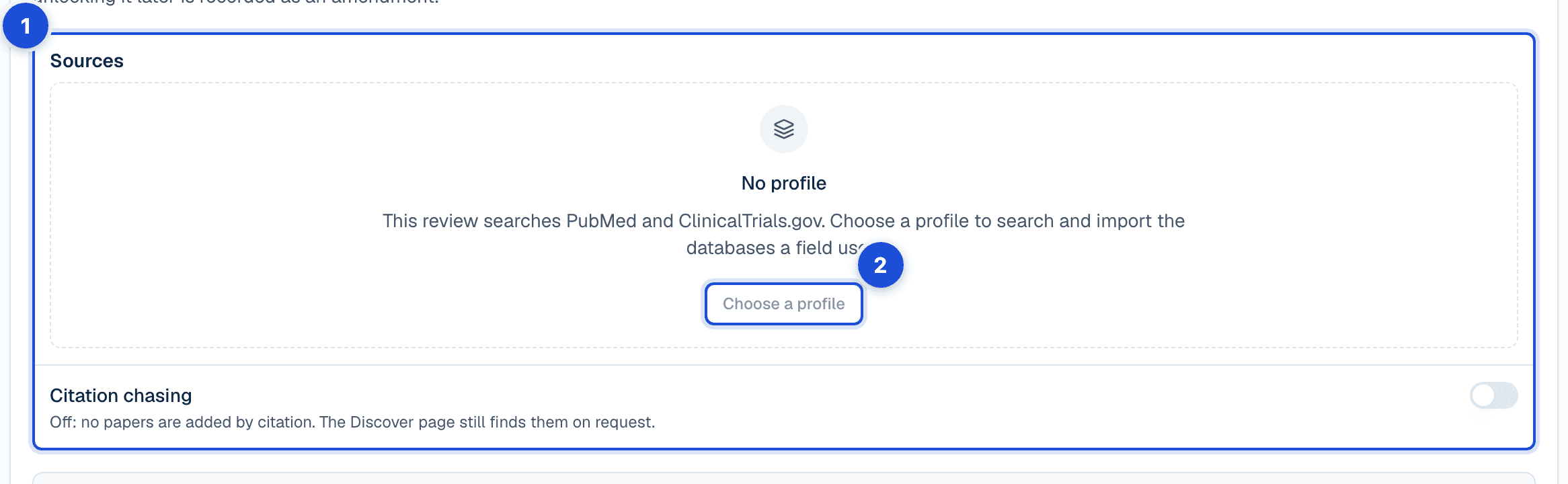
- 1. The databases the review searches, from its source profile, and what has come in from each one you import.
- 2. A source profile sets the databases a field uses; once one is chosen, Change adds or drops a database one at a time.
On a locked search strategy, saving new sources unlocks it first and asks why, recorded as an amendment; on a living review, locked or not, it switches living updates off, and you turn them back on in Configure once you have searched again and locked the strategy. The sources cannot change while a search or an automated run is in progress. A review holds at most 5,000 records from all its searches, next batches, database panels, citation chasing and imports together; deleted records do not count. Each record keeps the search that first found it, and the database it came from.
| Source | What is searched | Limits |
|---|---|---|
| PubMed | Always on. The saved PubMed query, exactly as the Search page shows it, by relevance. | One search adds up to the PubMed record limit: 2,000 unless you choose 1,500 or 3,000. Load next batch adds the next records with the same queries. |
| ClinicalTrials.gov | Always on. The saved registry query; "Only trials that finished recruiting" and "Has results" narrow it. A registry record whose entry lists its results paper is linked to that paper after the search. | 500 records a search. Not searched by date: the end of the date range is applied at screening. Outcomes are never part of the registry query. |
| Europe PMC | Optional. The PubMed query, passed through as it is. | Overlaps PubMed heavily; de-duplication keeps one record. |
| Cochrane CENTRAL (approximation) | Optional. The PubMed query wrapped in the Cochrane highly sensitive strategy for randomised trials. | An approximation of CENTRAL from PubMed: it misses the Embase and hand-searched records CENTRAL holds. |
| OpenAlex | Optional. A relevance-ranked text search built from the plan; the only source where a language filter applies. | Not Boolean: AND, OR and NOT are read as words. Outcomes are never searched. |
| Semantic Scholar | Discover: references, citing papers and recommendations from the studies you pick as seeds. Also searched by a living update where it is among the review’s chosen sources. | Citation chasing, not a keyword search; candidates are screened like any other record. |
| ERIC | Specialty sources panel. Education research records. | Its own query box, separate from the strategy. |
| MAUDE (FDA) | Specialty sources panel. Device adverse-event reports. | Its own query box, separate from the strategy. |
What you do
Build the strategy
On the Search page, Build the search strategy drafts the plan from your saved question and builds the queries. The plan's MeSH headings are checked against the vocabulary before they are used, and the entry terms of each valid heading are added to the query as text synonyms. Each source's query appears in the strategy panel, where the PubMed and ClinicalTrials.gov strings are yours to edit: change a query, choose Save, and that is what the next search runs. Discard puts back the saved queries; until you save, the panel says Unsaved changes, Test queries checks what you typed without saving it, and leaving the page asks first. If the queries changed meanwhile, the save is refused and you are asked to reload.
Four actions work on the plan and the queries differently. Edit structured plan opens the plan as fields; saving keeps the saved queries, marked out of date until you refine them or edit and save them. Refine queries builds the queries again from your existing plan and keeps your edits to it. Rebuild plan and queries from scratch (AI) and Rebuild plan from the question (no AI) both replace the plan; anything you typed in yourself is lost, exclusions most often, so both ask you to confirm first and both are disabled once the strategy is locked.
Exclusions are matched against titles and abstracts, so prefer distinctive phrases. An exclusion that is part of one of your own population or intervention terms would remove every study the search is for, so the search leaves it out and the plan says so: exclude those studies at screening instead. Publication dates, exclusions and extra terms reach the literature searches; “Only trials that finished recruiting” reaches ClinicalTrials.gov; study design, species, trial phase and language (except in OpenAlex) are left to screening, so state them in your eligibility criteria. Outcomes are searched only when “Include outcomes in the search queries” is on and the search mode is not Broad, and never in ClinicalTrials.gov or OpenAlex.
A review with no plan and no saved queries shows a query drawn from the review question as a starting point marked as one that does not run: Run search stays off until you build the strategy or edit and save the query, and saving it unchanged is refused. With a plan but nothing built or saved for either database, the plan's terms do not run on their own either.
Run the search
The search query card shows what a search sends to PubMed and ClinicalTrials.gov and where each query comes from. Before a search runs, the page counts each database's records and says when one has more than a search adds — PubMed has 7,864 records and one search adds the first 2,000, by relevance — so you can run anyway, raise the PubMed record limit and run, or cancel and narrow the query. When one search would leave out more than nine in ten of a database's records, the search is held back until you tick that you understand most records will not be added; the warning offers Refine queries first. When a search would take the review past 5,000 records, the check says how much room is left and the search adds new records up to the limit, PubMed's most relevant first, then ClinicalTrials.gov's, then the other sources', and says how many it left out.
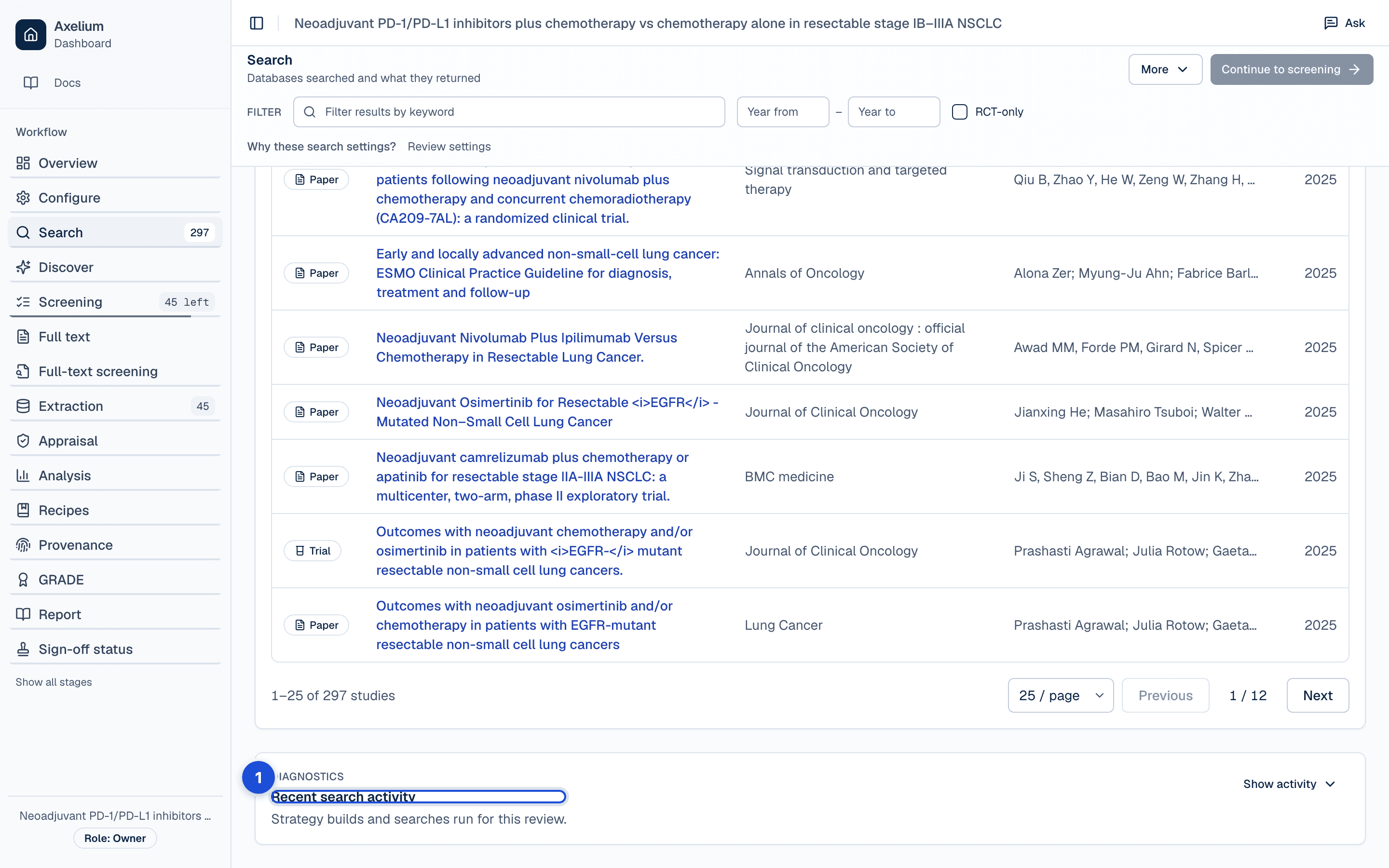
- 1. Every run: what each search sent to each database, how many it added, and whether it is done or incomplete.
Each search records, database by database, what it sent, how many records the database had, how many it added and where the next batch starts; with a source profile, a search fills the review in the profile's order, its main database first. When a search stops at a limit, Load next batch adds the next records with the same queries, after a reload too, and the run history says how much of each database a search added, so a partial set never passes for a complete one. Once the queries have changed since that search, Load next batch is not offered: run the search again. After a search saves its records, each ClinicalTrials.gov record whose entry lists its results paper is linked to it; the card says how many links it added and names the registry numbers it could not link. Link again checks every registry record once more and keeps the links already made.
Refine it
Before the full search runs, a small sample from each source — around fifteen records — is screened against your review question, and the share that matched is shown on the Search page. Treat it as a smoke test: it catches a strategy that is badly off target, but on a sample that size two or three studies move the figure by more than ten points, so act on large differences and the reasons given for the misses, not on small ones.
Refine queries starts from the queries you have, the open findings of a search review, what the last search found and your known papers. Write what should change in the box beside it — a term that drags in off-topic records, a kind of study you are missing, a block to leave alone — and the builder follows the note. When the Configure assistant reviews the search, its findings are listed under the plan: each shows the problem, the part of the search it concerns, the evidence and the suggested fix. Dismiss a finding you disagree with; Undo puts it back, and the page shows who dismissed it and when. After a refine the findings are listed as considered, which means the build saw them, not that it fixed them. Suggestions from Suggest are copied for you to paste in, never applied by themselves.
Pearls are up to five papers you already know belong, given as PubMed ids before the main search: their subject headings and keywords grow the plan's vocabulary, and a pearl a search did not bring in is fetched and added on its own. Discover, after an initial set of included studies exists, uses the studies you pick as seeds and lists their references, the papers that cite them and recommendations; the candidates you add are screened like every other record. Citation chasing is switched on in the search strategy: after each search it adds papers that cite, or are cited by, the review's seed studies (the ones you list under Seed studies, then the studies you include as you screen, up to 20), at most 50 a search, the most linked first. You choose whether a paper must be linked to at least 1, 2 or 3 of them; one finds about six times as many papers as two. Locking the strategy keeps the setting as it is, and it cannot be changed while a search or an automated run is in progress.
Changing the plan, including whether outcomes are part of the search, or switching the review's framework, keeps the saved queries and marks them out of date. A search still runs them, with a warning, and they cannot be locked until you refine them or edit and save them.
Import records
Import a reference-manager export as RIS or BibTeX on the Search page. The import is previewed first: how many references were read, how many are new and how many match a record already in the review, with the warnings the parser raised; then you commit it. Imported records enter screening like searched ones. The Search page also exports every record, or the included ones, as RIS or BibTeX.
When you import a file into a review with a profile, you choose the database it came from, and the import records it; from a database's own Import button under Sources, that database is already chosen. The import also asks for the search behind the records: the date you searched and the platform you searched on, and the strategy on record for that database or the strategy as you ran it there, which becomes a new version of it, part of the review's search strategy and approved when the strategy is locked. The preview names the database, the platform, the date and the strategy. On a locked strategy, recording a new one unlocks it first and asks why, as an amendment.
De-duplication and linking
Every record that arrives — from a search, a next batch, an extra source, Discover or an import — is matched against the records already in the review, and against the others in the same batch, in this order: by PubMed id, then DOI, then trial registration number, then PubMed Central id, then the database's own record number, and only then by normalised title and year together. Title and year never join two records whose PubMed ids, DOIs or trial numbers differ, never join a registry record to a paper, and need a title specific enough to tell records apart (a heading such as “Editorial” is not). A match is not added again; the existing record is noted as found by that database as well, so the review keeps one record and knows every search that returned it, and an identifier the match brings that the record lacks, such as a PubMed id for a paper first found by its DOI, is added to it. A record with no PubMed id, DOI or trial number is still added by its own record number, or by its title and year when it has nothing else. After a search, the PubMed ids and DOIs the new records lack are looked up in OpenAlex and Europe PMC. A record with no record number and no usable title cannot be checked against the review, so it is not added: the Search page says how many, and from which database, under Run search and on the search's entry in Recent search activity. A registry record and its results paper are linked as one study, so screening and extraction treat a trial and its papers together. A record without a title keeps a placeholder made from its identifier, so it can still be screened.
Start the search over
Each search adds its new records to the ones already found. To begin again from nothing, for example once the queries have changed and the earlier results are no longer wanted, choose Start the search over in the Recent search activity card. It hides every record in the review, imported ones included, and sets its searches aside, so the next search starts from nothing. A record the next search finds again comes back as a new record, to be screened again. The review keeps its settings, its plan and queries, its strategy builds, its team, its sign-offs and its history. Screening decisions, full texts and extracted data on the hidden records are kept, but they no longer count anywhere: not in Found studies, screening, the counts on the sidebar and the Overview, PRISMA or the report.
Before anything changes, you are asked to confirm and told what will disappear: how many records, how many are already screened, how many have a full text and how many have extracted data. Once done, the message offers Undo for 10 seconds, and there is no other way back. Undo is refused once a search has run since, or when some of the hidden records are in the review again. The control needs the same role as changing the search, and is refused while the protocol or the strategy is locked, while a search or an automated run is in progress, and while a screening, extraction or risk of bias batch is running. On a living review it also switches updates off, so an update cannot bring the hidden records back; switch them on again once you have searched and locked the queries. Restart from scratch, offered once a review has run automatically, is the permanent version: it deletes the results of every stage and runs the automated workflow again, and cannot be undone.
Lock the strategy
Locking freezes the queries exactly as saved. Each save of the queries keeps each database's query as a version, and saving the same query again adds none; locking records the versions it locks. When the person who locks the strategy also wrote some of its queries, the lock reads Author only on the Search page and on Sign-off status, with who locked it and when. Out-of-date queries cannot be locked, and neither can a draft nobody built. Automated runs refuse to start while the strategy is unlocked, and a living review cannot be switched on until it is locked, so every unattended cycle searches the same question. Unlocking asks for a reason, and the lock, the unlock, its reason, who acted and when are written to the review's record and shown on the Sign-off status page as the approval of the search strategy — by a person, or by the AI when a supervised run locked it on the consent you gave at launch. The two actions that replace the plan are disabled while locked. Once the review's protocol is locked the strategy is frozen with it, and locking or unlocking it waits for the protocol to be unlocked first.
Settings
The search settings are part of the review's settings (what they cover; the chapter is Review settings and history) and can be changed by an Admin or a Lead Reviewer. A change marks the saved queries out of date rather than rewriting them; records already found stay as they are.
- Search mode — Broad, Balanced or Strict; Balanced by default. It sets how many records the builder aims for and whether outcomes are searched at all (Broad leaves them out).
- Extra sources — Europe PMC, Cochrane CENTRAL (approximation), OpenAlex; none by default. ERIC and MAUDE have their own panel.
- PubMed record limit — 1,500, 2,000 or 3,000 records a search; 2,000 by default. It sits beside Free full text only in the run card and is kept with the review; a larger limit takes longer.
- Free full text only — limits PubMed to records with free full text; the run card shows the final query sent when it changes one.
- Plan filters — the publication date range (whole years, or exact dates when reproducing a search run on a given day), “Include outcomes in the search queries” (on by default), “Only trials that finished recruiting” and “Has results” for ClinicalTrials.gov (both on by default), extra terms and exclusions. The plan shows where each filter applies.
- Pearls — up to five PubMed ids of papers you know belong.
The review's settings history keeps each version (versions).
What is recorded
| Record | Where you see it | Exported in |
|---|---|---|
| Each strategy build and each save of edited queries: the plan it was built from, who saved it and when, and whether a person, the AI or the fallback wrote the queries | Search › Search strategy; Recent search activity | Settings JSON; the settings history |
| The lock, the unlock and its reason, who acted and when, and whether a person or the AI locked it | Search › lock control; Sign-off status | Sign-off CSV/NDJSON; the Word report’s approvals appendix |
| Each search run: its date, the query sent to each database, what it added of what each database has, and whether it is done, incomplete or failed | Search › Recent search activity; Found studies | — |
| The relevance sample of each run: the share of the sample that matched the question and the reasons for the misses | Search page, beside the run | — |
| The findings of a search review, which were dismissed, by whom and when, and which a refine considered | Search page, under the plan | — |
| Each import: the file, how many references were read, new, duplicates and committed, who imported them and when | Search › Import | — |
| For each record, the search that first found it and every later search that found it again; a duplicate is noted on the existing record, never added | The record; Found studies | — |
| Registry records linked to their results papers: how many links, when, and which registry numbers could not be linked | Search › search query card | — |
How the counts are defined for PRISMA and the report is in Reports and exports; the review's full history is in Audit trail and history.
Limits
Search coverage depends on source availability, indexing lag, query quality and access rights. Extra sources and citation chasing improve recall but do not guarantee completeness. There is no Embase, CINAHL, Web of Science or PsycINFO connector; each source's own limits are in the table under Sources.
Each record keeps the source that found it, and the PRISMA flow counts the review’s records by each database that found them; what each search fetched from each source is not kept, and the run history says what each search added from each database. A strategy that retrieves some irrelevant records is normal and usually preferable to one that misses eligible studies: screening is where the filtering happens.
Why the method is sound, and the worked example: From search to forest plot and Validation and limitations.