Part 1 · The review, stage by stage
1.6Extraction and traceability
Extraction turns each included study into values a synthesis can use, and keeps every value tied to the sentence, page and passage it was read from. A person validates before anything is pooled.
What it does
Quantitative reviews extract structured values such as events, totals, means, standard deviations, time-to-event estimates or prevalence data for each outcome and timepoint the review defines. The AI reads each study's documents, proposes the values with the quoted sentence each one rests on, and runs automatic checks on what it found: whether the quote is in the paper, whether the measure in the sentence matches the one the outcome is set up for, whether the effect looks plausible, whether the arms may be swapped, whether a registry record disagrees. It never validates a value: by default only values a named person has validated go into the analysis, and a value a check questions waits until a person answers. Every value keeps its citation and its history, so a reviewer can open the document at the spot a number came from and see who changed or validated it, and why. A review that codes its evidence instead of extracting numbers opens this stage on a card with its coded passages, included studies and draft themes.

- 1. The filter: Needs you, Ready, Validated or All, with how many lines each holds.
- 2. One line per outcome and timepoint, with its state and what blocks it.
- 3. The quoted sentence, pinned where it was found in the paper.
What is traced, and what is not
Extracted values, quotations and pinned outputs are traced to the page and passage they came from, and every decision to the person who made it. Traceability includes knowing when it is absent: each quoted excerpt is checked against the document it is attributed to, and one that cannot be found there is marked as unconfirmed rather than shown as a verified quotation, so a value you have not checked yourself is never mistaken for one that has been. The sentences of a generated report are not linked to the evidence behind them: a report cites studies and carries the tables, but no sentence of its text points back to the values or statements it rests on.
What you do
Extract the ready studies
Extract all ready studies, then work through what needs you. A value with no open check and a quote found in the paper rarely needs changing; spend your time on the Needs you lines. Choose effect measures before extraction when possible: an endpoint is an outcome you plan to analyse, and its measure (risk ratio, odds ratio, hazard ratio, mean difference, standardised mean difference, prevalence, response ratio or correlation) says how it is represented across studies. The effect-measures guide explains the choice.
Use extraction guidance, not manual edits, for systematic errors. If the extractor keeps pulling from the wrong table, give guidance such as “use Table 2, not Table S3” in the Extraction guidance box in Configure, or with Re-extract with a note on a questioned line, and let it extract again.
The Verify table and the Form
Extraction shows the study list, the study's sources with each quote pinned where it was found, and a Verify table: one line per outcome and timepoint, each marked Needs you, Ready, Validated or Empty. A line's card shows its state, with who validated it and when, Validate or Withdraw at its foot, then what blocks the value first: the checks on it with their answers, then the quoted sentence, the answers given before and the value's history. When the automatic check has already found the quote in the paper, the question about it steps back behind the checks. Form shows the full form, with the same pins beside each field. Press ? for the keys that move between studies, outcomes and lines.
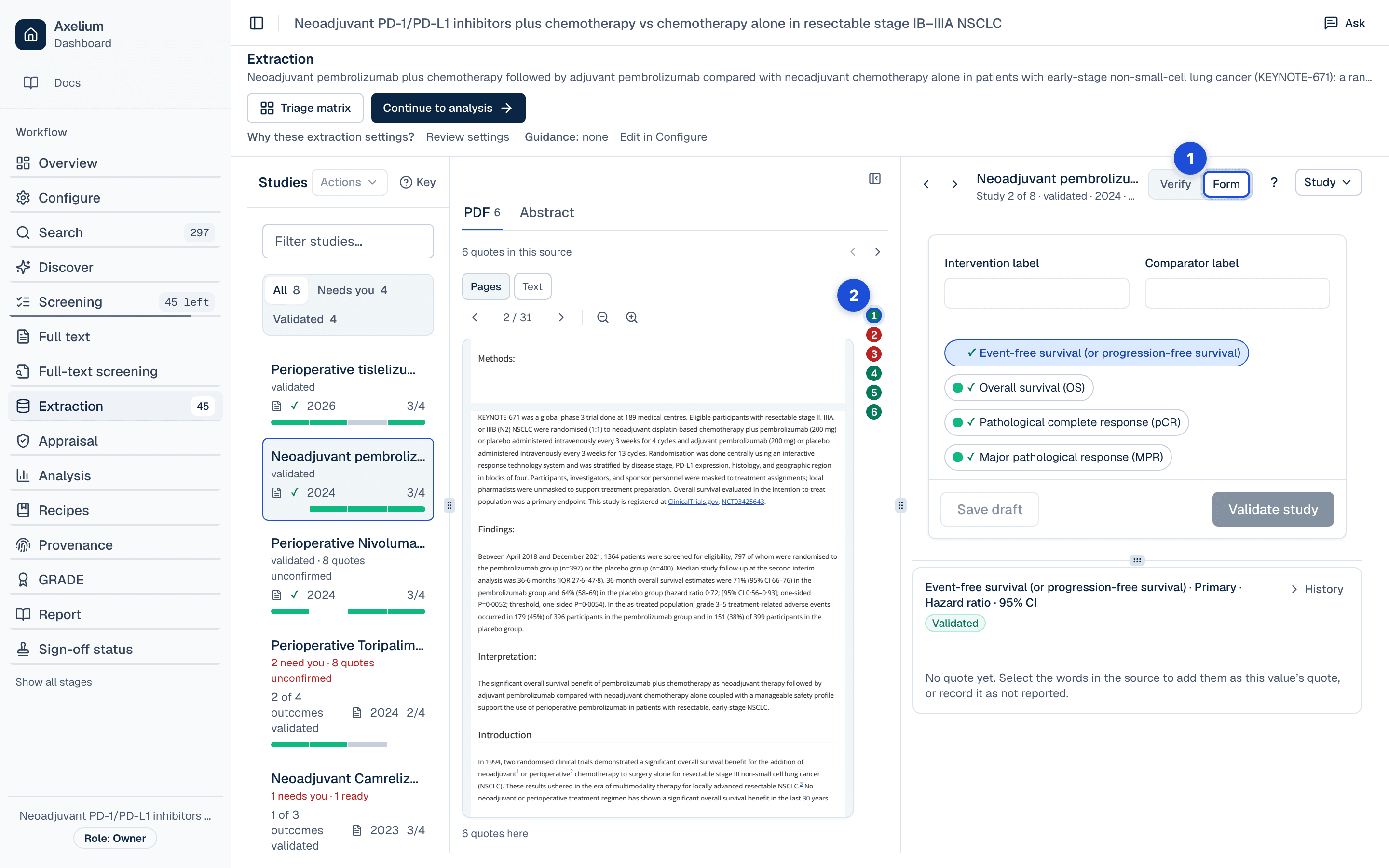
- 1. Form shows the full form, with the same pins beside each field.
- 2. Each field’s quote, pinned in the source.
The Verify table files every extracted value under one of three words. Needs you: something speaks against it, a check, a failed automatic check, a disputed quote, an implausible effect, a missing field, a suspected swap of the arms or a registry record that disagrees, and a person decides, one value at a time. Unconfirmed: nothing speaks against it, but its evidence is not confirmed: the quote has not yet been checked against the paper, was found only as a close match or not at all, the document holds no text to check against, no quote supports the value, or the automatic checks left no record. Ready: its quotes were found in the paper and the automatic checks passed. The word says how the evidence was checked, not that the value is right.
Answer the checks
A check that questions a value offers what settles it: confirm the value as it is, record the measure the paper reports, set the interval's level, clear the value, or re-extract the outcome with a note saying what to do differently. A value quoted from the paper with nothing stored for it offers Use the quoted value, which fills the empty fields with the numbers the sentence gives and is saved with the study like any edit; any other check is settled by editing or re-extracting the value. A confirmation is kept with who gave it and when, and the check opens again if the value changes. Reopening an answered check asks why. Review arm swap warnings first: a swapped arm inverts the effect.
Each confidence interval is read at the level the paper reports, 90%, 95%, 97.5% or 99%, and at 95% only when the paper names none. Standard errors and standard deviations calculated from an interval use the multiplier for its level, on the log scale for ratio measures, and a value whose quote names a different level from the one recorded is questioned.
Confirm the quotes
Every extracted value keeps its citation: the quoted sentence, the page when the document has pages, and, for stored PDFs where the sentence has been located, an evidence excerpt, a picture of the source page cropped around the value with the cited text tinted. Opening a citation shows the document at that spot; a reviewer can redraw the location by hand, and the hand-drawn one always wins. Right and Wrong record whether a quote is in the paper: Wrong asks why before it marks the quote as not in the paper, and so does withdrawing an answer about a quote; the reason is kept in the value's history. One answer covers every field the sentence is quoted for, and the quote marks move as soon as you answer. A reviewer's answer belongs to that sentence: a new extraction that cites another sentence asks again. Selecting words in a source's text (for a PDF, its Text view) while a value is open makes them that value's quote, marked Confirmed by a reviewer, and the value's history records it under your name.
Validate one value, a study or a selection
The form's Validate validates the value in hand, at once. Validating a whole study, or every study, takes only complete values that no check questions, and lists them, with what it leaves out and why, before anything changes. A value a check questions is taken once the check is answered or the value corrected; a value whose quote a reviewer could not find in the paper waits until the quote is settled, marked Right, replaced or re-extracted; a value whose effect looks implausible waits until its values are corrected, or is validated from the form if they are right; and a value still missing fields is validated by hand, one line at a time. In the Verify table, Validate row follows the same rule, and so does validating a selection: tick the values you want, or tick “not yet validated” to take every one shown, and a bar at the foot of the table says how many can be validated and which are held back and why, then validates them after a confirmation that names the number. Bulk validation takes Ready values only; the confirmation offers the Unconfirmed ones as a choice.
A value that holds only the paper's own estimate with its confidence interval counts as complete when nothing questions it, and that estimate can be edited in the form like any other value. In a network meta-analysis a value holds one set of numbers per treatment group, and it counts as complete when at least two groups each have what the outcome needs. Withdrawing a validation, one value, an outcome or a whole study, asks why, and the reason is kept in each value's history. Saving a study changes only the values you edited; the others keep their validation. In a review extracted by two reviewers, the second reviewer enters values on a blank form without seeing the AI's; agreement validates the value and a disagreement goes to Conflicts.
The review queue
When a study's extraction stops for a person, the review queue lists the outcomes the checks questioned and asks for one of three decisions per outcome. Keep leaves the value as it was. Reject excludes the value from the analysis and asks for a reason for each outcome rejected. Re-extract sends the outcome back to the extractor with your note on what to do differently; it is the one decision that extracts again, and it needs a note to go on. A decision that cannot be recorded, for example because extraction was locked meanwhile, is named with the reason, and the others are still recorded.
A value excluded from the analysis stays excluded when it is edited or extracted again. To bring it back, select Undo rejection beside the outcome's Rejected badge in Form; it asks why, then the values return to Needs you, unvalidated, ready to check and validate again. This works the same way in a network meta-analysis, unless a saved network analysis holds the outcome: then the undo is refused, with a message saying so.
Settings
The review's Extraction settings say which outcomes are collected and how a study's arms are matched to the review's; the Outcomes settings name each endpoint and its effect measure; and the Extraction guidance box carries the instructions every extraction run follows. By default the synthesis takes only validated values; the review's synthesis defaults can change that. Whether a second reviewer extracts each value on a blank form is the review's review mode, one reviewer or dual review. Who may change these, and what a change means for values already extracted, is described in Review settings and Earlier results. Validating, withdrawing, rejecting and answering checks need the permission to review; ruling on a disagreement between two reviewers needs a lead reviewer.
What is recorded
Each value keeps a history; the table below lists what it holds. Each step leads with what was done (Validated, Withdrawn, Proposed) and who did it, with their role in the review and the reason they gave. The AI's extraction reads as an AI proposal, and an automatic step is shown as such, with why it happened, never as a person's act. The newest four steps show first; the earlier ones are a click away.
| Record | Where you see it | Exported in |
|---|---|---|
| Each extracted value with its quoted sentence, page and, where located, its passage and evidence excerpt | Verify card and Form; the source pane with its pins | RevMan export (the values; rejected ones never, unvalidated ones only when the review pools them) |
| The AI’s extraction, read as a proposal, with the checks it ran and what they said | The value’s history; the Verify card | Approval record (CSV, NDJSON) |
| Who validated a value, when, in which role; withdrawals with their reason | The value’s history; Sign-off status | Approval record (CSV, NDJSON); the Word report’s Validation and sign-off record |
| Each edit to a value, with the numbers before and after and who made it | The value’s history | Approval record (CSV, NDJSON) |
| A rejection, with its reason, and an undone rejection with its reason | The value’s history; the Rejected badge in Form | Approval record (CSV, NDJSON) |
| Each quote’s verdict, in the paper or not in the paper, who gave it and why | The value’s history; the quote marks in the source pane | Approval record (CSV, NDJSON) |
| Each check’s answer, with who gave it and when, and a reopened check’s reason | The Verify card, under the check | Approval record (CSV, NDJSON) |
| A second reviewer’s values and the ruling on a disagreement | The value’s history; Conflicts | Approval record (CSV, NDJSON) |
| Review queue decisions: Reject with its reason, Re-extract with what changed | The value’s history, under the reviewer who decided | Approval record (CSV, NDJSON) |
Validated values
On a review's Overview, Review health shows extraction as Validated: the share of extracted values that a named person has validated, out of every value that has not been rejected. Only a value whose validator is on record counts. Values marked validated with no record of who validated them are left out of the share and counted beside it as person not recorded; validate one again to put your name on it. The share reads 100% only when every value that has not been rejected was validated by a named person.
Elsewhere, counts that no person checked say so too — AI only, Automatic only, person not recorded — and the Sign-off status page lists them stage by stage.
Limits
Complex tables, unusual outcome definitions, supplement-only data, multi-publication study bundles, and inconsistent registry versus publication values all require reviewer attention. Use source links, the three words of the Verify table and the review queue to verify important values before pooling.
A study may report an effect measure that differs from the one you configured for an outcome, a hazard ratio where the outcome is set up as a risk ratio, or the reverse. Either way the reported estimate is kept and the disagreement is raised for review, but the outcome is still pooled on the measure you configured. Confirm the measure before relying on such a pooled result. The measure is read from the words of the quoted sentence, so a quote that names none, or names two, is not raised.
Extraction also raises a quote whose wording suggests a subgroup, another study or a pooled result, and notes one found in the Introduction, Discussion or reference list. These checks read the sentence, so they can miss a subgroup it does not name and can raise a sentence that is the trial's own result. An open check keeps the value out of every bulk validation (Validate study, Validate all studies, the triage matrix's Validate, Import data) and Validate row until a reviewer answers it; neither a check nor a note changes the value.
A quote's check is a text match against the stored document, so a value can be Ready with a wrong number quoted correctly, and Unconfirmed because a table was never parsed. An outcome the extraction could not finish is listed as such, apart from one the paper does not report.
Quote highlighting and evidence excerpts depend on the PDF carrying a text layer. Scanned PDFs are shown page by page with nothing highlighted, and an excerpt is only produced once the quoted sentence has been located, by the viewer or by a reviewer. An excerpt is a picture of the stored page around the citation; it shows where a value was read from, not that the value was read correctly. Documents held only as text (registry records, full text fetched from an open-access archive) have none, and so does a document whose publisher terms do not allow a stored copy: its source view is the parsed text.