Part 2 · Oversight and governance
2.2Approvals, locks and sign-off
Every decision the AI makes in a review is either confirmed by a person or recorded as automatic. This chapter lists the points where a person approves, the milestones that lock a review, the page that shows what still needs a person, and what each approval records.
What it does
A review has sixteen approval points: things a person confirms, validates, finalises or approves, from the search strategy through screening, extraction, appraisal and certainty to proposals and publication. At each one the AI may propose — a screening verdict, an extracted value, a draft rating — and the proposal stands as automatic until a person confirms it, changes it or rejects it. Nothing is silently promoted: a count that no person checked says so, and a stage whose decisions are all the AI's is shown as AI only. Milestones lock a review in five steps, each requested by one person and approved by another. The Sign-off status page gathers all of this for the whole review, and the review's approval record can be downloaded as a file or read at the end of every Word report. The AI never approves anything, never locks a milestone a person asked for, and never overturns a person's decision.
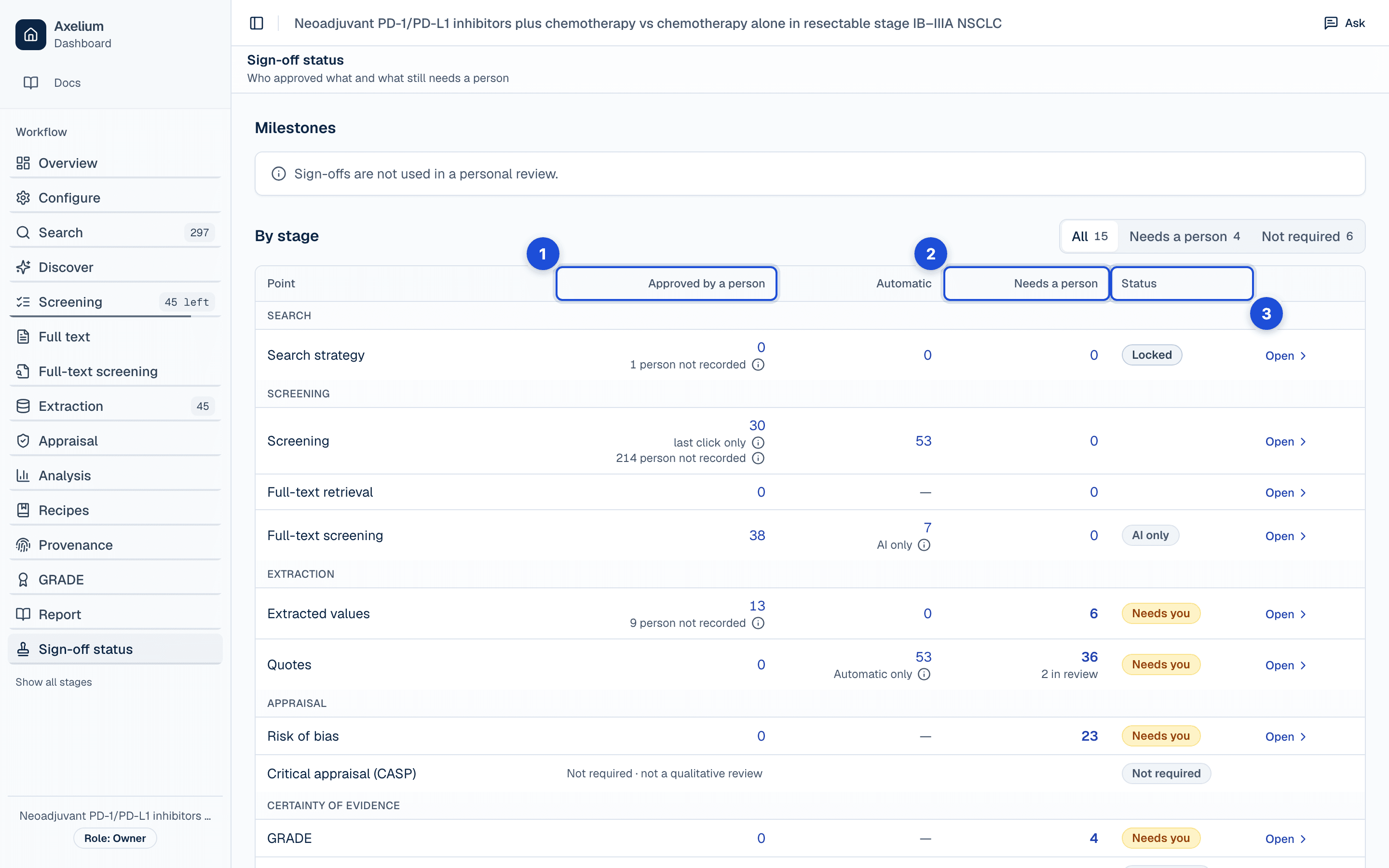
- 1. Confirmed, validated, finalised or approved by someone the review names.
- 2. Waiting for a person’s decision; every count opens its stage.
- 3. A stage no person checked says so: AI only, Automatic only or person not recorded.
The approval points
Each point is approved on its own stage page by anyone whose role allows it; a point without a lock in the last column is never frozen by a milestone. Roles are described in Roles and permissions.
| Point | Stage | Who may approve | Locked by |
|---|---|---|---|
| Sign-offs | Versions | Admin | — |
| Search strategy | Search | Admin, Lead Reviewer | Protocol lock |
| Screening | Screening | Admin, Lead Reviewer, Reviewer | Screening lock |
| Full-text retrieval | Full text / Missing full texts | Admin, Lead Reviewer, Reviewer | Screening lock |
| Full-text screening | Full-text screening | Admin, Lead Reviewer, Reviewer | Screening lock |
| Extracted values | Extraction | Admin, Lead Reviewer, Reviewer | Extraction lock |
| Quotes | Extraction | Admin, Lead Reviewer, Reviewer | Extraction lock |
| Risk of bias | Risk of bias | Admin, Lead Reviewer, Reviewer | Analysis freeze |
| GRADE | GRADE | Admin, Lead Reviewer, Reviewer | Analysis freeze |
| Summarised without pooling | Analysis | Admin, Lead Reviewer, Reviewer | Analysis freeze |
| CERQual | CERQual | Admin, Lead Reviewer, Reviewer | Analysis freeze |
| Critical appraisal (CASP) | Critical appraisal (CASP) | Admin, Lead Reviewer, Reviewer | Analysis freeze |
| Treatment groups | Analysis | Admin, Lead Reviewer | — |
| Network certainty | Network certainty | Admin, Lead Reviewer, Reviewer | Analysis freeze |
| Network method | Analysis | Admin, Lead Reviewer | — |
| Proposals | Proposals | Admin, Lead Reviewer | — |
| Publication | Versions | Owner (organisation), Admin (organisation), Curator (organisation) | — |
What you do
The five milestones
Milestones let a team request and approve sign-off before moving to the next phase. A lead reviewer or admin asks for a sign-off from the Configure page or the Sign-off status page; any other admin of the workspace approves it, or turns it down with a reason, from Configure or the review's Versions page, where the request's notification leads. A personal review has no milestones.
- Protocol lock checks the search strategy and freezes the review’s settings as signed off — the search plan and queries, the screening settings and the outcomes. An outcome’s pooling model and network settings, the treatment grouping and the living-review schedule can still be changed.
- Screening lock checks screening and full-text screening and freezes the set of records: none can be added from any source, and neither manual nor AI screening changes a decision.
- Extraction lock checks extracted values and quotes and freezes the extracted data the analysis rests on.
- Analysis freeze checks risk of bias, critical appraisal and the certainty ratings and freezes the appraisals and ratings that the report describes.
- Manuscript lock checks nothing and freezes the saved reports: they can no longer be changed.
Before you send a request, it lists what the chosen milestone checks, each with a tick or a warning and its counts. Anything still waiting for a person links to its page and holds the request until it is done. Where nothing is approved yet and everything is still in review, the row shows a neutral mark instead of a tick, and does not hold the request. Values marked validated with nobody recorded are named but do not hold it. Approving a sign-off asks you to confirm first. Turning one down, withdrawing your own request and unlocking the protocol ask why in a dialog, and the reason is shown on the review's Versions page.
Once the protocol is locked, its settings stay as signed off and nothing changes them: not a page, the configuration assistant, a search preview or a screening suggestion, even when the search strategy was never locked itself. A later milestone locks the ones before it. Some locks are set without a sign-off — when an automated run starts, when the search strategy gate lets a run proceed, or when a review is restarted from its search — and the Sign-off status page shows those as automatic, never as approved by a person. Restarting from the search moves the lock back to the protocol lock and records who did it and why.
Sign-off status
The Sign-off status page, after Report in a review's sidebar, shows who approved what and what still needs a person. It lists, stage by stage, everything a person approves — screening decisions, extracted values and quotes, risk-of-bias and certainty ratings, proposals and the review's publication — with three counts for each:
- Approved by a person: confirmed, validated, finalised or approved by someone the review names.
- Automatic: decided by the AI or by the review's own rules, and recorded as such.
- Needs a person: waiting for a person's decision, such as an unsure record, a draft rating or a proposal waiting for approval. Each row, and every count in it, opens its stage.
Counts that look finished but that no person checked say so: AI only, when the AI's decisions stand unchecked; Automatic only, when a fixed rule decided them and no person has checked them — quotes the quote check found in the paper, or treatment groups matched by their names; and person not recorded, when something is marked approved but nothing records who approved it. A stage whose only unchecked decisions are of one of these kinds shows it as its status. Anything your review does not need is marked Not required, with the reason — CERQual in a review that is not qualitative, for example — rather than shown as zero. Under the search strategy's Locked, the page says who locked it and when.
A team review also shows its milestones, from protocol lock to manuscript lock: which are locked and who approved them, which wait for approval, and which are still open. A lead reviewer or admin can request a sign-off from the page.
The page ends with the review's History, the latest first, each step with who did it, what it was about, when, and the reason they gave. History records screening decisions, on titles and abstracts and at full text, with their overrides and withdrawals; extracted values and their quotes, with validations, withdrawals, rejections and undoing them, and answers about quotes; finalising and reopening GRADE and CERQual ratings, CASP appraisals and summaries of outcomes that could not be pooled; rulings on screening and extraction conflicts; and automatic locks. A dual-review vote appears once both reviewers have decided; until then each reviewer sees only their own, so two reviewers' History can differ for a while. Choose Last 30 days, Last 90 days or All time; a line above the list counts the approvals, withdrawals and unlocks in that period, beside a small chart of the last 30 days, and Load older shows more. Export, in the page's header (in More actions on a phone), downloads the review's approval record, the steps History lists, as a spreadsheet (CSV) or as one record per line (NDJSON). Anyone who can review may export.
Every Word report ends with a Validation and sign-off record: the milestones and each approval point under its stage, in the page's words, as they stood when the report was generated. A report you download names people as the page does. The report itself is described in Reports and exports.
Conflicts and dual review
Disagreements go to the conflicts queue, where reviewers compare decisions, record the reason for the final call and leave comments or mentions. This holds in single-reviewer screening too: each person's decision on a record is kept as theirs, so when two people decide the same record differently it goes to the conflicts queue; the analysis assistant will not start a new analysis run until the conflict is resolved, though the automated workflow does not wait for it. An automated re-screen never overturns a person's decision; where it disagrees, it leaves the person's decision in place. Nobody approves their own request: a sign-off is approved by an admin other than the person who asked for it, and a study closed on its abstract alone is confirmed by someone other than the person who closed it.
When the two decisions of a dual review disagree, the study goes to the conflicts queue, labelled with its phase. Conflicts are adjudicated per phase: a ruling on a study's abstract conflict never closes its full-text conflict, and the other way round. Once full text has decided a study, that decision stands. When the lead reviewer rules to exclude at full text, they choose the reason for the exclusion from the same list reviewers use at full text. The conflict shows the AI reviewer's assessment of each criterion, with the reason it gave, and each reviewer's own exclusion reason. Screening itself is described in Screening and Full-text screening.
In two-reviewer extraction, the second reviewer fills in the same fields the extraction form shows for each outcome without seeing the first reviewer's values. The two extractions are compared number by number on exactly those fields: the same number written differently (0.72 and 0.720) counts as a match, a value one reviewer filled in and the other left blank counts as a difference, and values the form never asked for are not compared. When the numbers differ, the lead reviewer sees them side by side and chooses, for each one, whose number to keep; everything else in the first extraction is kept as it was.
When a reviewer disagrees with a risk-of-bias assessment, the lead reviewer compares the two domain by domain and resolves it one of four ways: keep the AI assessment, keep the reviewer's assessment, set it aside so it is left out of certainty ratings, or decide later. A set-aside assessment can't be reviewed or re-run afterwards.
A ruling is a set of choices shown together on the conflict's card, and Resolve asks before it records anything. Keeping the AI's assessment, including or excluding a study, and including a set of values ask you to confirm. Keeping the reviewer's assessment instead, setting an assessment aside, sending a study back as Unsure and excluding extracted values ask why, and the reason is kept in the record. Decide later, and Unsure on extracted values, decide nothing: the conflict stays open for another ruling. Unlocking the protocol asks why in the same way, and the reason is shown on the Versions page.
Settings
Milestones are a workspace's: a team review offers them to every lead reviewer and admin without a setting to turn on. The review mode — one reviewer, AI and a person, or two people — decides how many decisions a record needs and so what counts as approved at screening; it is set in Configure, with the screening policy. Who may approve each point follows the role, not a setting. Settings and their history are described in Review settings.
What is recorded
Every approval, confirmation, override, rejection, withdrawal, lock and unlock is one event of the review's approval record, written in the same step as the change it describes. An event can never be edited or removed; an item that is later deleted keeps its name in the record. A person's withdrawal, rejection, override or unlock always carries a reason.
| Record | Where you see it | Exported in |
|---|---|---|
| Each approval event: its stage and item, what it meant (proposed, confirmed, overridden, approved, rejected, withdrawn, locked, unlocked), who did it and their role at the time, and when | Sign-off status › History; the item’s own history on its stage page | Sign-off export (CSV and NDJSON); the Word report’s Validation and sign-off record |
| The PRISMA flow as it stood at each sign-off, with the records in each box (Sign-off status links to the PRISMA flow page) | PRISMA flow › As of | The PRISMA flow’s files |
| Whether a person, the AI or the review’s own rules acted; for the AI, the model and the run it belonged to | Sign-off status (the Automatic and AI only counts); History | Sign-off export: Actor kind, Model and Run id columns |
| The reason given for a rejection, withdrawal, override or unlock | History; the Versions page for milestones and the protocol unlock | Sign-off export: Reason column |
| What changed: the item’s state before and after the event | History (the step’s wording) | Sign-off export: Before and After columns |
| Each milestone: who requested it, who approved or turned it down, when, and the reason for a refusal or an unlock | Versions; Sign-off status (the milestone ladder); Overview | Word report’s Validation and sign-off record |
| A lock set without a sign-off (the launch of an automated run, the strategy gate, a restart) and an unlock made by restarting from the search, with its reason | Sign-off status (Automatic); History | Sign-off export |
| The search strategy’s lock: who locked it and when | Sign-off status, under the strategy’s Locked; Search | Sign-off export |
| The counts per approval point — approved by a person, automatic, needs a person — and each Not required reason | Sign-off status; the Overview’s approvals card | Word report’s Validation and sign-off record, as they stood when it was generated |
| A ruling on a conflict, with the choice made and the reason where one was asked | Conflicts; History | Sign-off export |
The export's spreadsheet has one row per event with the columns When, Stage, Item, Action, Meaning, Actor kind, Actor name, Role, Reason, Before, After, Run id and Model, newest first, in words rather than codes. The one-record-per-line file holds the same events, with the prompt identifier; it never holds anyone's address or browser. Both keep the screening blind for the person downloading: a vote the other reviewer has not yet matched is left out. What the record holds across the whole review, and how to ask about it, is in Audit trail and history.
Limits
No approval covers the sentences of a generated report: it records the approvals that stood when it was written, not its own wording. An approval point's History starts when the record arrived; decisions made before then appear in their counts but not as steps. Analysis settings — an outcome's pooling model, network method and treatment groups — are locked by their own approval points, not by a milestone.
What the AI decides without a person, and how to review it, is in What the AI does by itself; the validation posture behind these limits is on Validation and limitations.