Part 1 · The review, stage by stage
1.5Full-text screening
Full-text screening checks eligibility against the paper itself before anything is extracted. The AI reviewer reads each paper against every criterion and quotes what it relied on; a person confirms, overrides or settles what it left open.
What it does
Every study the title and abstract screen left included or unsure, and whose full text could be read, is assessed by the AI reviewer once its paper arrives. It reads the paper section by section against each eligibility criterion of the review's question framework (PICO, PEO, or the qualitative frameworks), plus two publication checks: whether the study collected its own data rather than reviewing or re-analysing others', and whether it reports results. For each criterion it quotes the passages it relies on, and every quote is located in the paper; a quote that cannot be found does not count. It proposes Preliminary include when every criterion and check is met, Preliminary exclude with a suggested reason when one is not, and Needs review when the evidence does not settle the decision either way. In single review a proposal the evidence settles clearly is confirmed automatically by default; everything else waits for a person. In dual review nothing is confirmed automatically. The AI reviewer never excludes a study for lack of evidence, never excludes one whose full text is missing, and never re-screens a study a person has decided.
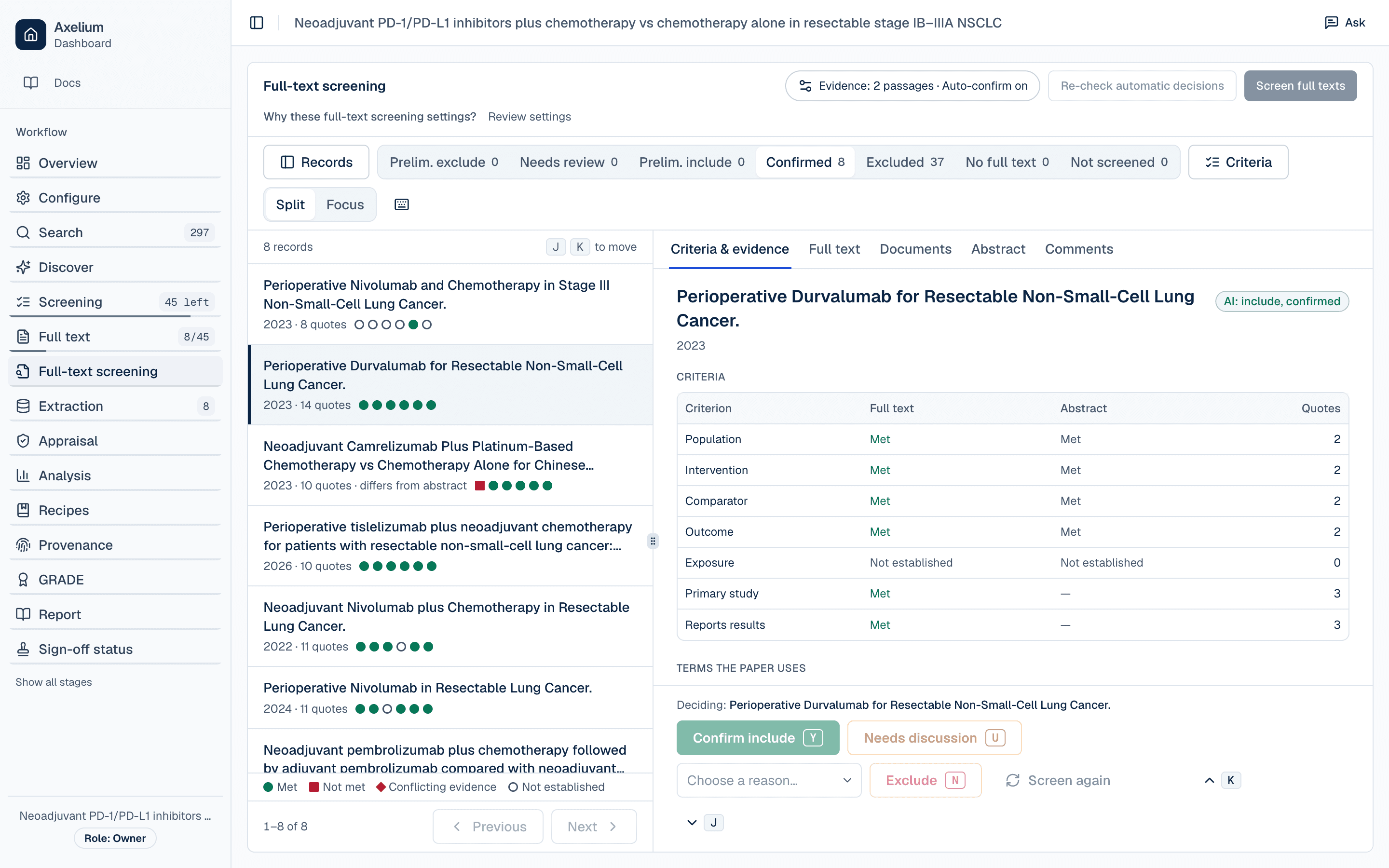
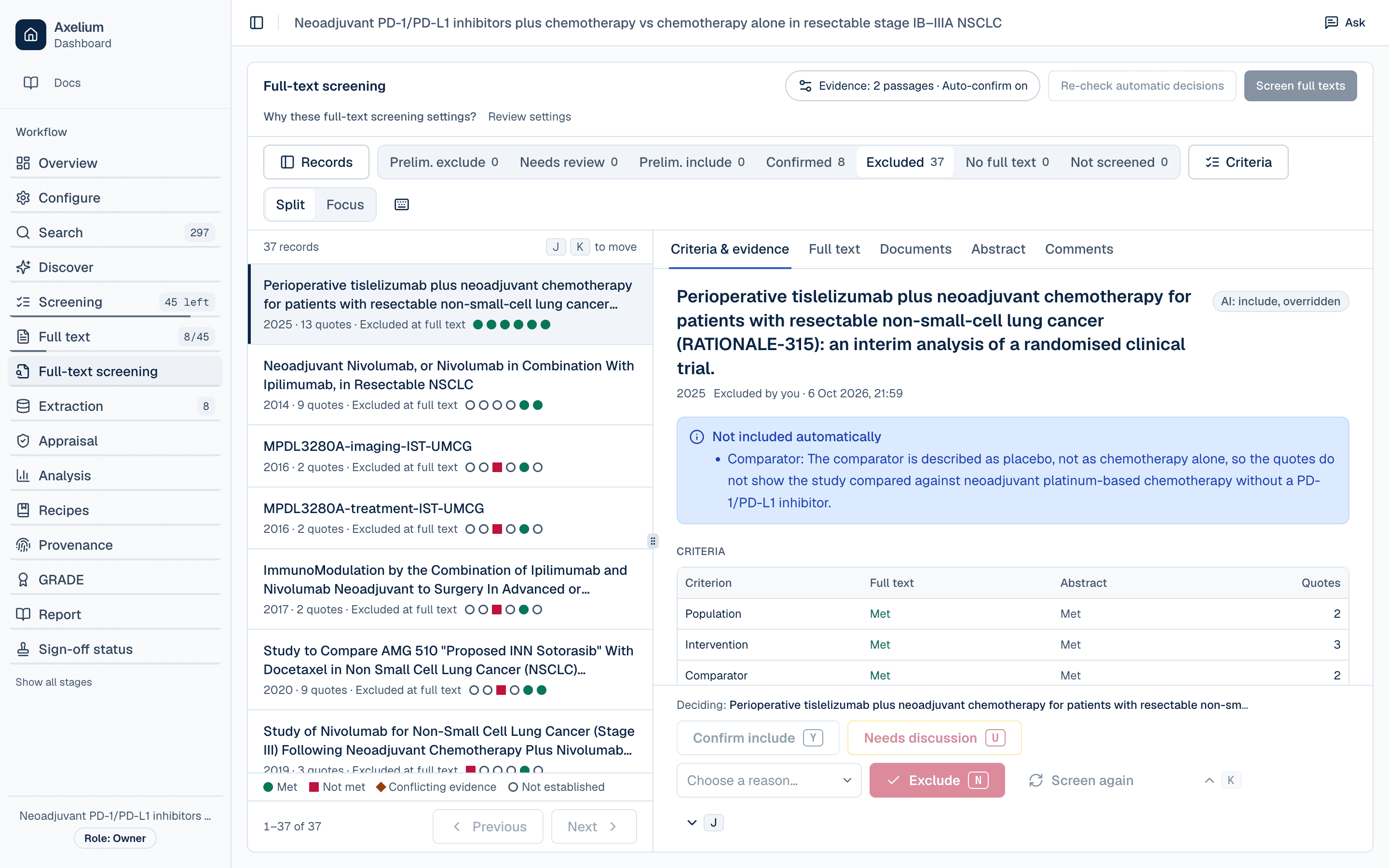
- 1. Tabs sort studies by verdict.
- 2. One mark per criterion: met, not met, conflicting or not established.
- 3. Confirm include, Exclude, Needs discussion or Screen again.
How a criterion is settled
A criterion is settled only when enough independent passages support it: two by default, or one or three if you change it in the page's settings. Evidence on both sides marks it conflicting, and a criterion the paper does not settle goes to a reviewer. A heading, a table label, or a passage that only relates to a criterion without answering it (one that shares a word with it, or only shows who was studied) is kept for you to see but never counted. Absence of evidence never excludes a study; a study's own statement that it had no comparison group is evidence, not absence. A ClinicalTrials.gov record is judged on its trial's eligibility: each entry of the record counts as its own passage, a record that registers a single group does not meet a required comparator, and whether results are posted on it is shown but does not decide.
A review can choose which of its criteria must be met at full text, including questions it keeps outside its framework, such as a comparison or a study design; a criterion newly required there never excludes a study on its own, so such a study waits for you. When the review requires the study itself to compare the groups, the comparison counts only where the paper states a result for them, and the abstract screen can pass on a study whose comparison looks incidental instead of excluding it, so that its full text decides.
What you do
Work through the list
Open it from Screening → Full-text screening; the sidebar step shows how many studies await a decision. Tabs sort studies into Preliminary exclude, Needs review, Preliminary include, Confirmed, Excluded, Full text unavailable, and Not screened yet, and each row shows one mark per criterion — met, not met, conflicting, or not established, each with its own shape. The list and the decision bar work as at title and abstract. The pipeline screens full texts automatically after retrieval, and Screen full texts starts it by hand. Press ? on any screening or extraction page for its keyboard shortcuts.
Read the criteria and their evidence
The open study's Criteria & evidence tab shows each criterion's full-text verdict beside the abstract screen's, with disagreements highlighted, and the supporting quotes. Choosing a quote opens the paper in the Full text tab at that place; from there you can move between the whole paper and each criterion's passages. The paper loads only when you open it; its buttons turn the pages, and Text shows the paper's words in place of its pages. A quote that could not be found in the paper is struck through, and a quote that was found but does not count is shown muted with the reason; neither is included in the quote counts. The Abstract tab marks the abstract screen's passages, and choosing a quote in the paper outlines its criterion there too.
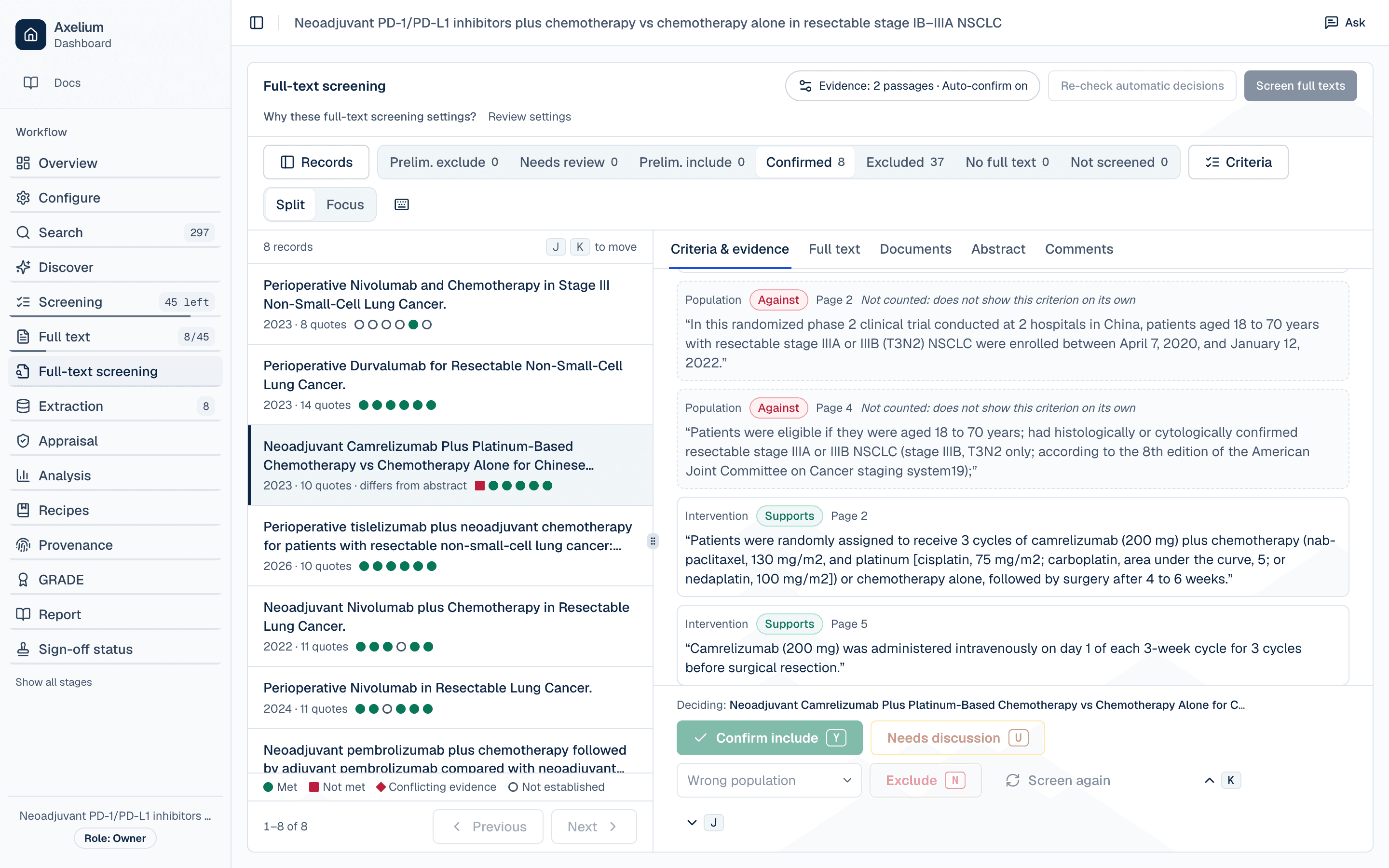
In the Full text tab every quote found in the paper is marked where it is, numbered like its criterion's chip and shaded by what it shows: met, not met, or muted when it was found but does not count. Select a criterion's chip to go to its first quote and select it again to go to the next; clicking a marked quote chooses it, and Whole paper keeps every quote marked with none chosen. On a PDF's pages the chosen quote is found and highlighted on its page, and every other quote is outlined: a dashed outline is approximate and marks the paragraph a quote is in, with the numbers of the criteria quoted there. Once a reviewer has opened a quote and it was found on its page, it is outlined where it is from then on, for everyone on the review. Click an outline to choose its quote.
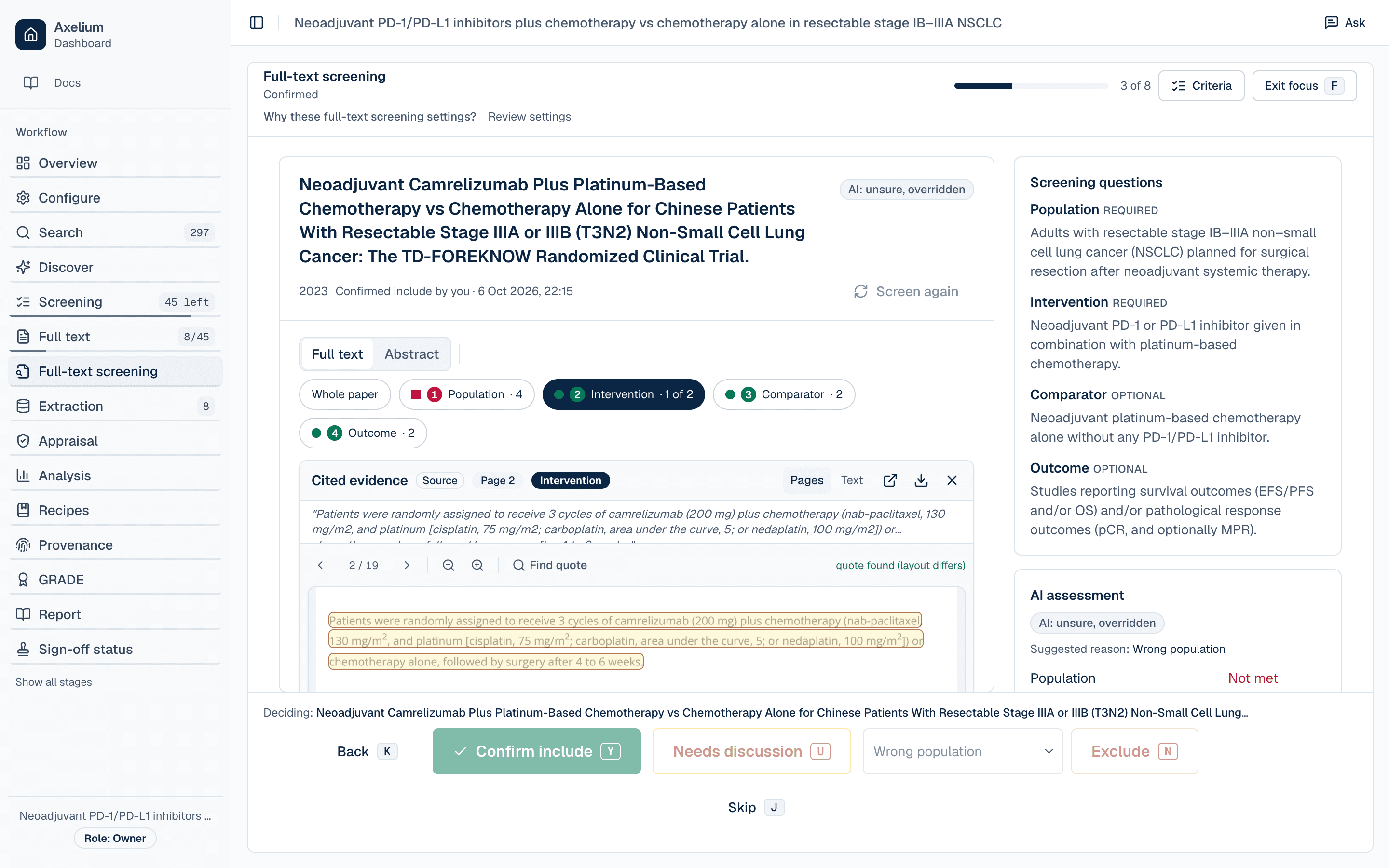
- 1. The paper, opened at the chosen quote.
- 2. Every quote marked, none chosen.
Decide
From the decision bar you can Confirm include, Exclude (with a reason, prefilled from the AI's suggestion), mark it Needs discussion, or Screen again; several studies can be confirmed or excluded at once. Excluded together, each keeps the AI's own suggested reason unless you choose one reason for all of them; a study without a suggestion needs a reason from you. Including or excluding against the AI's proposal, and Needs discussion on a study the AI proposed or that was already decided, ask why as at title and abstract; an exclusion's dialog starts with the exclusion reason you chose, which you can send as it stands or add to, and a bulk Confirm include or Exclude asks once for the selection. In single review your decision is final: it sets the study's status, moves an excluded study out of the review, and no later run screens it again. A study at preliminary exclude, needs review, or excluded is not extracted.
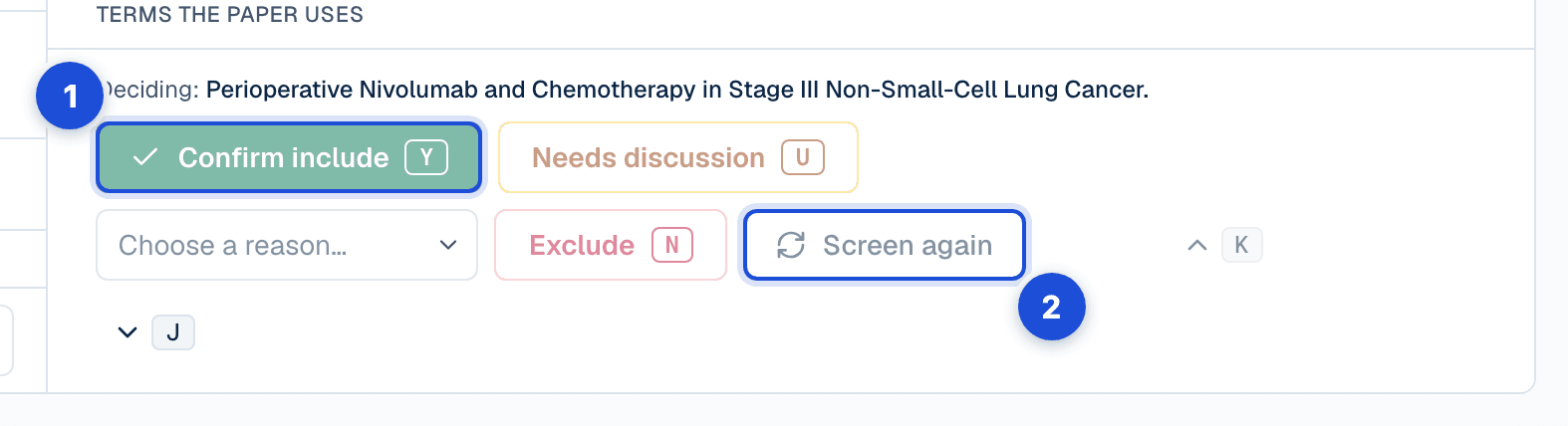
- 1. Confirm include, Exclude with a reason prefilled from the AI’s suggestion, or Needs discussion; the one that agrees with the AI confirms it.
- 2. Screen again has the AI reviewer read the paper in use once more.
What is confirmed for you
In single-reviewer review, decisions the evidence settles clearly are confirmed automatically by default, once a separate check agrees that the quotes answer each deciding criterion's question; when it does not, the decision waits for you with the reason, and everything else waits for you too. An automatic exclusion is recorded as automatic with its reason, and a reviewer can reverse it. Turn confirmation off in the full-text screening settings (on that page, or from Full-text decisions on Configure) to confirm every decision yourself. Studies whose full text could not be obtained are marked Full text unavailable and are never excluded for that reason. Exclusions at full text are counted with their reasons in the PRISMA flow and the RevMan export.
Dual review at full text
Full-text screening follows the review mode of the abstract phase. In AI + human mode the AI reviewer holds Reviewer A's slot and assesses each full text; the human reviewer decides in the other slot. With two human reviewers, the AI reviewer does not screen full texts: both people read the papers and decide themselves. In either case nothing is confirmed automatically, so every full-text decision is made by a person. Decisions stay blinded as they do at the abstract phase: a reviewer does not see the AI reviewer's full-text assessment, its criterion verdicts or its quotes, until they have recorded their own decision, unless the review is set to show the AI verdict first. The other human reviewer's decision is never shown early, and History and the approval record keep the same blind: a vote in dual review appears there once both reviewers have decided. Only the vote that agrees with the other reviewer against a proposal the AI made before the review moved to two reviewers asks why.
When the two decisions disagree, the study goes to the conflicts queue, labelled with its phase. Conflicts are adjudicated per phase, and once full text has decided a study that decision stands: a ruling on its abstract conflict closes that conflict only, and the study stays where full text put it. Reopening the study, or accepting, rejecting or importing it in the living-review inbox, is refused; change the decision on the full-text screening page. When the lead reviewer rules to exclude at full text, they choose the reason from the same list reviewers use; the study is removed from the review and counted among the reports excluded after full text, under that reason. The conflict shows the AI reviewer's assessment of each criterion, with the reason it gave, its reason for excluding the study when it did, and each reviewer's own exclusion reason. When both reviewers exclude a study without a conflict, the exclusion is recorded with its reason in the same way: the first reviewer's reason is kept when the second gives none.
Answer a criterion yourself
On a study waiting for you, Criteria & evidence also lists, under Your answers, each criterion the AI reviewer left unsettled, with its best quotes, Met and Not met, and an optional note. Your answers are yours: they settle those criteria for you alone, no other reviewer sees them, and they do not change the AI reviewer's assessment. Once a required criterion is not met, or every required criterion is met, the decision that follows is one press away: Confirm include to include, or Exclude to exclude with the reason that criterion records already chosen when there is one. A decision against the AI's proposal still asks why, and the dialog opens with your answers in your words. Once the study is included or excluded — by you, or in single review by anyone — the answers stay as they are; after Needs discussion they can still be changed. In dual review answers are offered only while the AI reviewer's assessment is shown to you, so only when the review shows the AI verdict first. Someone who can only view the review, a demo account and a locked review see them turned off, with the reason why.
Check which document was read
The Documents tab lists the study's documents: the one the AI reviewer read for the decision shown, the one in use (the one screening, extraction and risk of bias read), where each came from, and whether it is shown to be the study's own paper — Verified (it prints the study's DOI, PubMed ID or title), Not verified, May be another study's paper, or Confirmed by a person — with a note on how its text is read where that matters. Use this document makes another of them the study's paper, the one screening, extraction and risk of bias read; a supplement, or a document whose text is not ready, cannot be chosen. A different document changes no decision: when the AI reviewer read another document than the one in use, Screen again has it read the one in use, since a new screening run does not read a study it has already screened again, and a study a person has decided is not read again. In dual review, which document the AI reviewer read stays hidden until you decide, like its assessment.
Re-check automatic decisions
Changing the review's criteria or settings does not change decisions already confirmed automatically. Re-check automatic decisions, at the top of the page, applies the current rules again to every full-text decision that was confirmed automatically and that no one has decided, and, when the review sends studies whose comparison looks incidental on to full text, to the studies excluded at title and abstract for that reason alone. It reads the papers again, about as much as screening them again, so it asks before it starts, and one runs at a time. Nothing changes by itself: when it finishes you are told what it found, a banner tells everyone on the review how many studies the current rules would change, and Review changes (or Re-check report, beside the action) lists them under Would now be excluded, Would now be included, Would now need review and Would now go on to full text, each with what it is now, what it would be and why. Accept one study, or a whole group, with a reason kept in each study's history: a full-text study becomes your decision — Included, Excluded or Needs discussion — and a study excluded at title and abstract goes back to title and abstract screening, which needs permission to settle screening disagreements. Dismiss leaves studies as they are. A study someone decided since is left as it is, a newer re-check replaces the report, and the report says it may be out of date when the review's settings were saved after the re-check started. In dual review no full-text decision is confirmed automatically, so there is none to re-check, and a review switched to dual shows none of the AI's full-text findings.
Settings
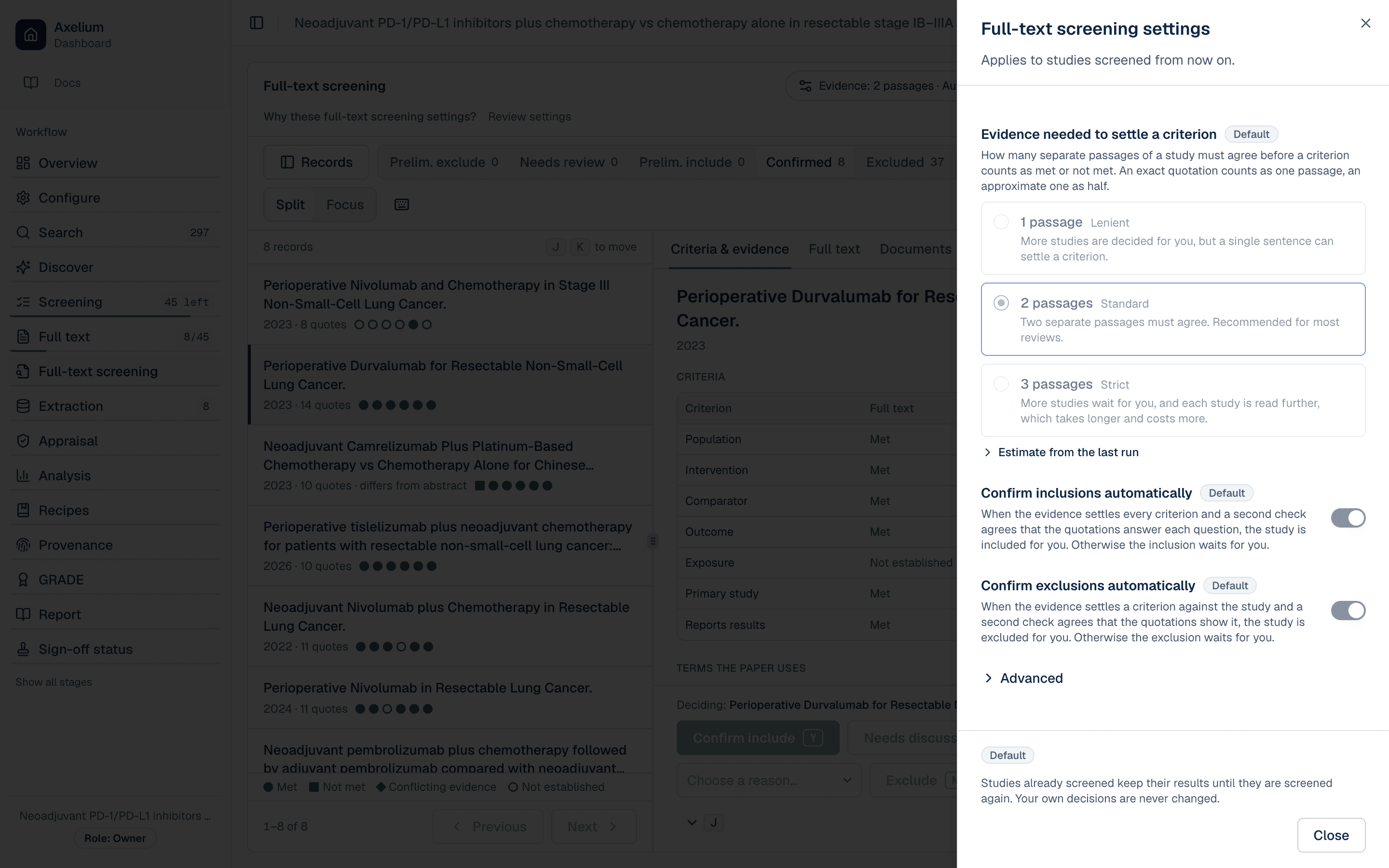
On the full-text screening page, the chip beside Screen full texts sums up how the AI reviewer screens and opens its settings; on Configure the same settings are under Full-text decisions in the Screening section.
- Evidence needed to settle a criterion: 1, 2 (the default) or 3 passages; and, under Advanced, the evidence needed to rule a study out.
- Confirm inclusions automatically and Confirm exclusions automatically: both on by default in single-reviewer review, unavailable in dual review.
- Which criteria must be met at full text, and whether the study itself must compare the groups.
A change applies to studies screened from then on; decisions already confirmed automatically stay as they are until a re-check proposes otherwise and a person accepts it. The settings in full, with their defaults and who may change them: Automatic confirmation at full text and Full-text screening settings.
What is recorded
| Record | Where you see it | Exported in |
|---|---|---|
| The AI reviewer’s proposal on each study: its verdict per criterion, each quote with where it was found in the paper and whether it counted, the suggested exclusion reason, the model and prompt version, and which document it read | Criteria & evidence; Full text; Documents; the study’s History | Approval record (CSV or NDJSON); the report’s Methods |
| An automatic confirmation: that it was automatic, with the decision and its reason | The study’s History; Sign-off status | Approval record (CSV or NDJSON); the report’s Methods (how many were confirmed automatically) |
| A study held for a person, with the reason it was held | Criteria & evidence, above the criteria | — |
| A person’s decision: who, when, whether it confirmed or went against the proposal, the exclusion reason, and the reason given | The study’s History; Sign-off status | Approval record (CSV or NDJSON); PRISMA flow and RevMan export (exclusions by reason) |
| A run that found no full text for a study | The Full text unavailable tab; the study’s History | Approval record (CSV or NDJSON) |
| In dual review, each reviewer’s vote, the agreement, a conflict and the lead’s ruling with its reason | The study’s History; Conflicts; Sign-off status | Approval record (CSV or NDJSON) |
| A re-check: what it proposed for each study and why, who accepted or dismissed it, and the reason kept with each accepted study | Re-check report; the study’s History | Approval record (CSV or NDJSON) |
| The Methods paragraph: the model and prompt version, the evidence rule, how many decisions were confirmed automatically, and the exclusions by reason | The generated report | The report |
Limits
- The evidence rule and the separate check reduce, but do not remove, decisions resting on a misreading: a passage can be found in the paper and still not answer the criterion. Check the quotes behind every exclusion you rely on.
- The AI reviewer reads the paper's text and can miss a criterion stated only in a table or figure, which then stays unsettled or is settled on the text alone. A study that reports its comparison only in a table or figure stays unsettled and waits for you.
- A decision settled without a quotation from the study never excludes it on its own; the study waits for a person.
- Papers whose text cannot be extracted, such as some scanned PDFs, are also Full text unavailable until a readable copy is added.
- A reviewer's answer to a criterion settles it for that reviewer, whatever the AI reviewer found; the AI reviewer's own assessment, and the counts generated reports give of it, are unchanged.
- Re-checking automatic decisions reads each paper again, so a study can change because the second reading differs, not only because the rules did. Read the reasons before you accept.
- A document marked Not verified has not been shown to be the study's paper, which is not the same as being shown to be another's; Confirmed by a person does not say who confirmed it.
- For PRISMA 2020 item 8, the Methods paragraph names the model and the prompt version used (a short identifier; the prompt text itself is not kept), the evidence rule, how many decisions were confirmed automatically, and the exclusions by reason. Nothing checks that the paragraph reached the final text, so check it against your protocol before submission.
Why the method is sound, and its validation: Full-text screening method and Validation and limitations.