Part 1 · The review, stage by stage
1.3Screening
Title and abstract screening applies the protocol to every candidate record. The AI screens each one against the eligibility criteria and says why; a person confirms, changes or settles what it left open. Full-text screening, the second phase, has its own chapter.
What it does
Screening reads each record's title and abstract against the review's criteria and files it as Included, Excluded with a reason, or Unsure. For every criterion it records a verdict, its confidence and the passage of the abstract it relied on. Included and unsure records go on to full text, so the paper itself can settle them; excluded records keep their reason for the PRISMA counts. In single review, the default, an AI decision stands unless a person changes it; in the other modes a person decides every record. The AI never overturns a person's decision: a re-screen that disagrees leaves the person's decision in place. It never adds or removes records, and it never settles a disagreement between two people; that goes to the conflicts queue for a lead reviewer.

- 1. The bar names the record it acts on; a decision moves you on, and on a decided record the decision made shows pressed.
- 2. The AI’s verdict for each criterion, numbered like its passage in the abstract; select a chip to outline its passages.
- 3. Split shows the list beside the record; Focus shows one record at full width.
What is set aside whatever the protocol says
Two kinds of record are set aside because neither can contribute participants of its own: study protocols and methods-only papers, which describe a study without reporting its results; and secondary literature (reviews, meta-analyses, editorials, guidelines and economic evaluations), which re-reports studies already eligible in their own right. Including the latter would count the same trial more than once. Subgroup and follow-up reports of a named trial are unaffected. A registry record whose trial started after the end of the review's date range is excluded without being read.
For comparison-based questions, screening also records whether each study analyses the comparison the review asks about (reporting outcomes separately for the compared groups, or estimating an effect of the contrast) or merely mentions it, for example as a baseline characteristic or a subgroup label. A review whose comparison vocabulary is common in off-topic abstracts can require the analysed comparison for inclusion: mention-only studies are then excluded, and studies where the text does not reveal which are held for a person. A review can instead send studies whose comparison looks incidental on to full text, so that the paper decides.
What you do
Choose the review mode
The review mode, set on Configure, controls how many decisions a record needs. In single-reviewer mode, the default, an AI title and abstract decision stands unless a person changes it; use it for rapid scoping or early exploration. AI + human mode asks a person to decide every record, with the AI's verdict as a blinded second opinion in the other reviewer slot. Two-human mode asks two people to decide each record independently and the AI screens nothing; use it when your protocol or sponsor requires independent human screening.
In AI + human mode a lead reviewer or admin can turn on Show AI verdict before I decide on Configure, with the screening policy. The reviewer then sees the AI's verdict before deciding. That gives up independent review, so inter-rater agreement no longer measures two independent judgements; use it for triage and training. It is not offered with a single reviewer or two human reviewers, and choosing a different screening policy resets it. If a review is switched from AI + human to two human reviewers part of the way through, the AI's earlier decisions no longer take a reviewer's place: each person's decision is paired with the other person's, and a disagreement between them goes to the conflicts queue.
Work through the records
Open Screening from the review's sidebar. The records sit in a list beside the one you have open, sorted into tabs by decision. The open record's own tabs show its abstract, comments and history. The bar under the record names the record it will act on, and a decision moves you on to the next. On a record you have already decided, the bar shows that decision pressed, and pressing it again changes nothing; the other two are still a press away. A record the AI decided and no one has confirmed shows nothing pressed, since the decision that agrees with the AI confirms it. Press ? on any screening or extraction page for its keyboard shortcuts.
In the abstract, the passage the AI relied on for each criterion is marked on its own. Each criterion has a number, shown on its chip and where its passage starts, and each passage is shaded by the criterion's verdict: met, not met, or not established. Select a chip to outline that criterion's passages and bring them into view; select it again to clear them. A chip that cannot be selected has no passage in the abstract. Only passages found word for word in the abstract are marked, so records screened before 10 June 2026 show their verdicts without highlights.
Focus shows one record at a time at full width, with the AI's assessment beside it, the next few records and an optional note that is saved with your decision. In dual review the AI's assessment stays hidden until you have decided, unless the review is set to show it first. Switch between Split and Focus above the list; the page remembers your choice. On a phone the list and the record take turns, and Start focus review works through the queue one record at a time.
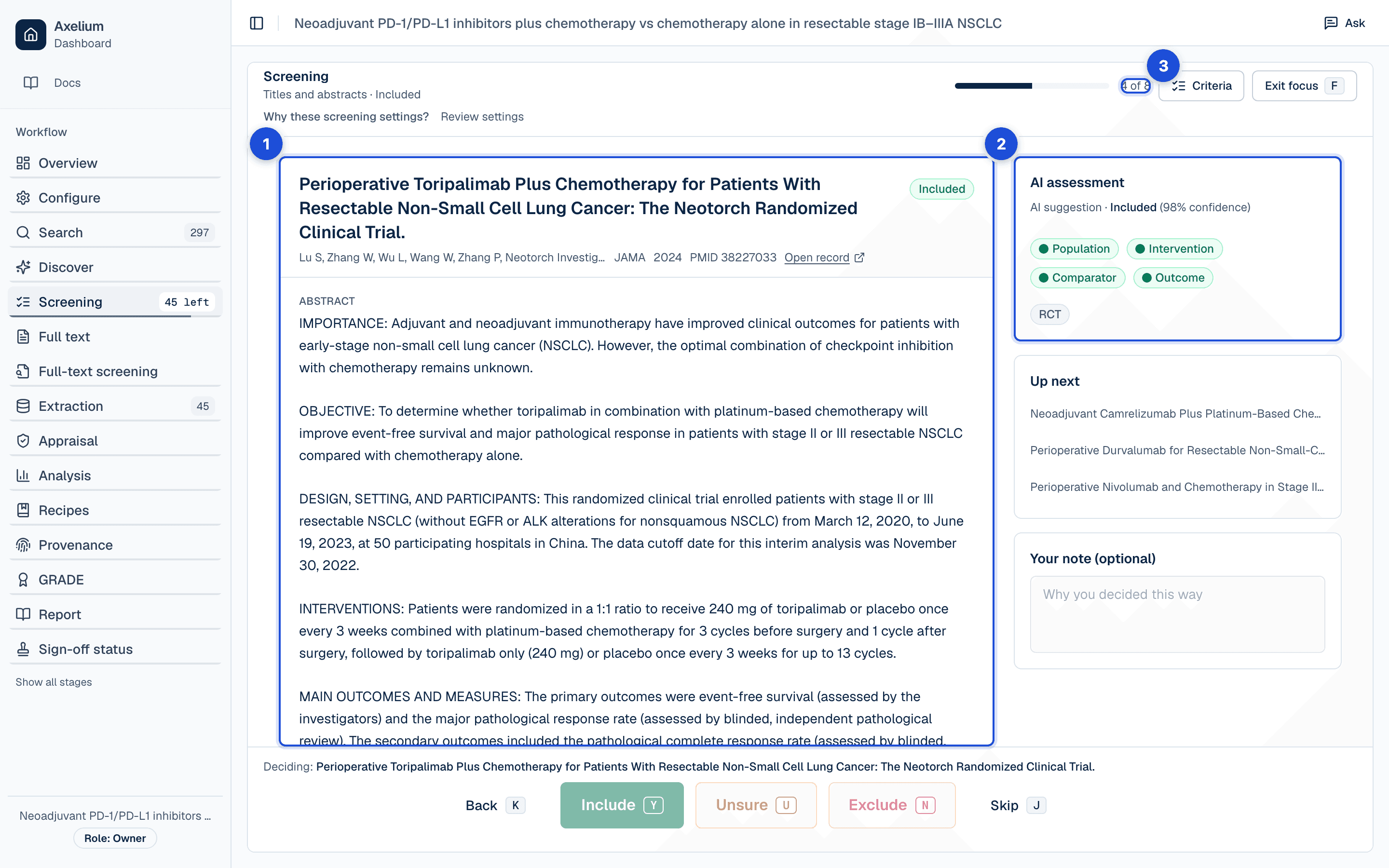
- 1. One record at full width, with an optional note kept with your decision.
- 2. The AI’s assessment beside it; in dual review it stays hidden until you have decided.
- 3. Where you are in the queue, and the next few records.
Give a reason where one is needed
Including or excluding a record against the AI's suggestion, and Unsure on a record that was already included or excluded, ask why before anything is saved; the dialog says what the AI suggested, or whose decision you are taking back, and your reason is kept in the record's history. In Focus, a note you have written starts the reason. Confirming the AI, deciding a record the AI has not screened, and Unsure on an undecided record save at once. Send to full text is not a decision against the AI and asks nothing. When a decision cannot be saved, the reason shows under the bar you used, with the next step where there is one.
Decide several records together
Tick several records, or select them with the keyboard, to decide them together. A bulk decision asks once, only when some of the selection goes against the AI or takes a decision back, and keeps the reason with each of those records; the others are saved without it in the same step. When many unsure records share one exclusion reason, refine your criteria or screening instructions rather than deciding each by hand.
Settle a disagreement
Each person's decision on a record is kept as theirs, in single review too, so when two people decide the same record differently it goes to the conflicts queue, labelled with its phase. In dual review a disagreement between the two reviewer slots, or an Unsure from either, goes there as well. Reviewers' decisions stay blinded until both have decided. A lead reviewer with permission to adjudicate compares the decisions, with each reviewer's reasoning and the AI's assessment of each criterion, and rules: include, exclude, or send the record back as Unsure. Including or excluding asks you to confirm; sending it back as Unsure asks why, and the reason is kept. A lead who was one of the two reviewers cannot rule on their own conflict. Conflicts are adjudicated per phase: a ruling on a record's abstract conflict is recorded and closes it, but once full text has decided the record, it stays where full text put it. The review assistant will not start a new analysis run while a conflict is open. Rulings, and the rest of the queue, are described in Approvals, locks and sign-off.
Assign work
For small reviews, every reviewer works from the full screening list. For larger reviews, a lead reviewer opens Assignments and splits the work by phase (title and abstract, or full text) and reviewer slot, so each person sees a focused queue; a banner on the screening page says which queue you are in. A review with no assignments shows everyone everything.
Good practice
- Phrase eligibility criteria as questions a study can fail. “Does the study itself compare X against Y?” screens far more precisely than a topic label like “Y group”, which any abstract using similar vocabulary can satisfy. Label-style criteria are flagged at setup, but a question you phrase yourself is sharper.
- Require the analysed comparison when its vocabulary is everywhere, as in timing-of-treatment and prognostic-factor questions.
- Write screening instructions for your domain, for example “exclude phase I dose-finding” or “include only RCTs with at least 50 patients”. Domain-specific guidance cuts the unsure rate.
- Aim for under 5% unsure before moving on. A large unsure set means the review is incomplete rather than merely underpowered.
- Use dual review when the protocol requires independent judgement, and resolve conflicts before finalising the included set.
Settings
All are part of the protocol: set on Configure by a lead reviewer or admin, read-only once it is locked. Changing one does not re-screen records already decided; run screening again to apply it, and a re-screen never changes a person's decision.
- Review mode: single reviewer (the default), AI + human, or two human reviewers; and in AI + human mode, Show AI verdict before I decide, off by default.
- Screening policy and confidence threshold: how confident the AI must be before an exclusion stands rather than being held as Unsure.
- Require the analysed comparison, off by default; and whether studies whose comparison looks incidental are excluded or sent on to full text.
- Screening instructions: your own guidance in plain words, added to every record's screening.
- The review's date range: a registry record whose trial started after its end is excluded unread.
Versions, what an earlier result shows after a change, and how settings are copied between reviews: Review settings.
What is recorded
Every decision at this stage is an entry in the review's approval record, with who made it, when, and in which phase.
| Record | Where you see it | Exported in |
|---|---|---|
| The AI’s verdict on each record: include, exclude with a reason, or unsure; its confidence; and the verdict and quoted passage per criterion | The record’s abstract and criteria chips; its History tab | Approval record (CSV or NDJSON): the verdict and its reason |
| The model and prompt version each AI verdict was made with, and the run it belonged to | The record’s History tab; Sign-off status | Approval record (CSV or NDJSON) |
| A person’s decision, who made it and when, whether it confirmed or went against the AI, and the reason given | The record’s History tab; Sign-off status | Approval record (CSV or NDJSON) |
| A decision taken back to Unsure, with its reason | The record’s History tab | Approval record (CSV or NDJSON) |
| A bulk decision: one entry per record, with the reason on each record that needed one | Each record’s History tab | Approval record (CSV or NDJSON) |
| In dual review, each reviewer’s vote and the agreement, shown once both have decided | The record’s History tab; Sign-off status | Approval record (CSV or NDJSON) |
| A conflict, the two decisions behind it, and the lead reviewer’s ruling with its reason | Conflicts; the record’s History tab | Approval record (CSV or NDJSON) |
| Assignments: which reviewer holds which slot for which records, per phase | Assignments | — |
| Exclusion reasons and the screening counts | Screening; Sign-off and Provenance (Ask) | PRISMA flow; RevMan export; the report |
Limits
- Screening checks its own reasoning for consistency before a record is decided automatically. If a rationale argues against its own eligibility answer (marking the population as met while explaining that the study organism falls outside it), or an exclusion's stated reason is contradicted by the screening's own assessment of the paper, the record is held as Unsure for you to settle. This catches self-contradiction, not every misreading.
- Records with no abstract are screened on what genuinely exists. A bibliographic citation is never treated as an abstract, but when no abstract exists in any source, common for older literature, screening considers the title with the publication-type labels the record is indexed under, and marks any decision made this way as title-based so you can confirm it. A record without even a usable title is held for review unscreened.
- Records excluded for their design rather than for one of your criteria (secondary research, or work screening was confident falls outside your question for another reason) are excluded rather than left in the unsure queue. Screening still holds back anything it is genuinely uncertain about, so the unsure queue reflects real ambiguity.
- Once screening is locked, neither a person nor a re-screen changes a decision, and no records can be added from any source; unlock the review on Versions first.
- The automated workflow does not wait for an open conflict; only the review assistant's analysis runs do.
The validation posture behind these statements: Validation and limitations.